
Color legend plain property method
Draw renders the gizmo at the target’s pivot with its own BasicEffect, over everything else.
It builds the handles’ triangles again each frame from the camera and the target, so there is nothing to keep in sync
and nothing to load. Names are colored by what they are: a property or a
method; values and fields keep the plain color.
Drawing the gizmo
Call Draw after the scene, with the camera and the target given to
Update:
protected override void Draw(GameTime gameTime)
{
    GraphicsDevice.Clear(Color.Black);

    DrawScene();
    gizmo.Draw(camera, selected); // over the scene
    DrawPanels();                 // the editor's 2D panels over the gizmo

    base.Draw(gameTime);
}
It draws into the device’s current viewport and render target. Nothing is drawn without a target, or for one that
offers no mode, and like Update it keeps Mode on a mode the target offers.
What it draws follows the mode: the three move arms and the three plane squares, the three rings, or the three scale
arms and the plane squares when the target offers
ScaleAxes. The pivot square comes with every mode.
TransformGizmo drawing method
| Method | Description |
|---|---|
Draw(Camera camera, ITransformGizmoTarget target) |
Draws the gizmo at the target’s pivot, over everything, and puts back the render states it changed. Draws nothing for a null target or one that offers no mode. Throws ArgumentNullException for a null camera. |
Render states
Draw sets three states for its draw call and puts the ones it found back after it:
| State | Set to | Because |
|---|---|---|
DepthStencilState |
None |
The gizmo is drawn over everything, never hidden by what is in front of it. |
BlendState |
AlphaBlend |
The see-through plane squares, and colors with alpha, blend with the scene. |
RasterizerState |
CullNone |
The handles are flat, and seen from either side. |
The effect gets the camera’s View and Projection and an identity world matrix: the
vertices are built relative to the camera’s Offset already. The gizmo touches no texture, sampler or
render target.
Size on screen
Each arm is 13% of the viewport’s height long, wherever the target is on screen and however far away. The gizmo works out the arm’s length in world units from the camera’s field of view and the target’s depth: its distance along the view’s forward rather than in a straight line, so a gizmo at the side of a wide view is no smaller than one in the middle. A target at or behind the camera gets the near plane’s depth. Every other size is a share of the arm’s length:
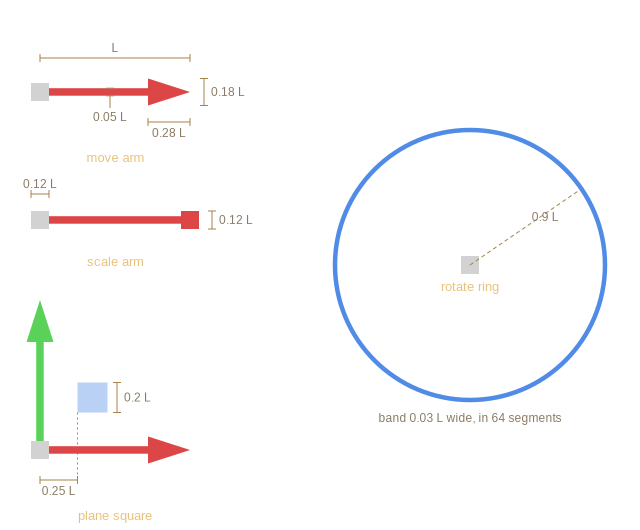
| Part | Size |
|---|---|
| Arm | L, 13% of the viewport’s height |
| Shaft | 0.05 L thick |
| Arrowhead | 0.28 L long and 0.18 L wide |
| Scale box | 0.12 L across |
| Pivot square | 0.12 L across |
| Plane square | 0.2 L a side, from 0.25 L to 0.45 L along both of its arms |
| Ring | 0.9 L in radius, with a band 0.03 L wide, in 64 segments |
The sizes are fixed: the gizmo has no setting for them. Arms, boxes and the pivot square are flat and turned to face the camera, and each ring’s band is a ribbon turned to face it all the way round, so they keep their width from any angle, a ring seen edge-on included. The plane squares lie in their planes instead, and narrow as a plane turns edge-on, which shows which way it lies.
Overlap
With depth testing off, the order the handles are painted in decides which covers which. The gizmo paints far to near:
- The plane squares first, under the arms, by the depth of their centers. They are see-through, so where two overlap both show, the nearer one on top.
- The arms by the depth of their tips, so an arm pointing toward the camera lies over the others.
- The rings segment by segment: the 192 segments of the three rings are sorted together by the depth of their middles, so where two rings cross, the nearer arc is on top from any angle. A fixed order of whole rings would get one of the crossings wrong, as a ring’s near and far arcs need opposite orders.
- The pivot square last, over everything.
Colors
The handles take the colors of their axes, a plane square that of the axis it leaves out, and the pivot square its own. Set them at any time:
gizmo.AxisXColor = new Color(255, 96, 96);
gizmo.CenterColor = Color.Gold;
The handle under the pointer, and the one being dragged, is drawn halfway from its color to white. The plane squares
are drawn at 40% of their color’s opacity, and at 75% under the pointer. For translucent handles, scale the whole color rather than only its alpha: AlphaBlend expects colors premultiplied by their alpha.
gizmo.AxisZColor = new Color(80, 140, 230) * 0.6f; // 60% opaque
The highlight goes halfway to an opaque white, so a translucent handle also grows more opaque under the pointer.
TransformGizmo color properties
| Property | Type | Description |
|---|---|---|
AxisXColor |
Color |
The X arm, ring or scale box, and the YZ plane square. (220, 70, 70), a red, by default. |
AxisYColor |
Color |
The Y arm, ring or scale box, and the XZ plane square. (90, 210, 90), a green, by default. |
AxisZColor |
Color |
The Z arm, ring or scale box, and the XY plane square. (80, 140, 230), a blue, by default. |
CenterColor |
Color |
The pivot square. (210, 210, 210), a light gray, by default. |
Painter’s order for overlays of your own
FarToNear is the sort the gizmo paints with, public for overlays of your own drawn with
depth testing off: light and camera icons, selection outlines, labels. Give it one depth per item, larger farther,
such as the distance along the camera’s forward, and a span to fill; it fills the span with the items’ indices,
farthest first.
// icons drawn over the scene, nearer ones on top
Span<float> depths = stackalloc float[icons.Count];
Span<int> order = stackalloc int[icons.Count];

for (var i = 0; i < icons.Count; i++)
    depths[i] = Vector3.Dot(camera.Forward, icons[i].Position - camera.Position);

PainterOrderDepthSort.FarToNear(depths, order);

foreach (var i in order) DrawIcon(icons[i]);
It is an insertion sort: it allocates nothing, is quick for the tens to hundreds of items an overlay has, and is
stable, so items at the same depth keep their order. It sorts as many items as order is long, and leaves depths as
they are.
PainterOrderDepthSort methods
| Method | Description |
|---|---|
FarToNear(ReadOnlySpan<float> depths, Span<int> order) |
Static. Fills order with the indices from 0 to its length − 1, farthest first: by depth, from the largest to the smallest. Stable; depths must be at least as long as order. |