
Color legend plain property
Every tunable of a sheet is a property of its FabricSettings, a plain object you change in place: no
method to call, nothing to apply by hand. Their defaults make a light cloth that hangs, folds, piles and settles. This page has the solver’s own settings; the air’s are on the wind page, and the
colliders’, self-collision’s and rest’s on the collisions page. Names are
colored by what they are: a property; values and fields keep the plain color.
Two lifetimes
Most settings are read every frame. Fabric.Update uploads them all before it steps, so a setting changed while the
cloth runs is in force from the next step: a gust, a stiffer weave, a sphere that moves. A few describe the sheet itself,
and are read only when it is built:
| Read | Settings |
|---|---|
| At a build | The settings’ WidthInParticles, HeightInParticles, RestLength and SeedRipple; the Fabric’s Origin, Orientation, Rotation, PinMode and PinnedIndices |
| Every frame | Everything else |
A setting read at a build waits for the next Rebuild, or for AutoRebuild; until then the live sheet
keeps the one it was built with. The spacing most of all: the threads, the pins’ reach, the folds and the cuts are all
measured in it, and the solver keeps the spacing of the sheet as built, whatever RestLength says since. The settings’
figures worked out from RestLength, ParticleMass and SelfCollisionThickness, follow the settings, not the
sheet, until it is built again.
A Fabric can be handed another FabricSettings at any time, through Settings: its settings read every frame
are in force from the next step, and the rest wait for a build, as above. Every setting is checked as it is uploaded,
and a value that isn’t a finite number throws ArgumentException, naming the setting, before anything reaches the
GPU: one NaN would spread through the whole sheet within a few steps, and stay. Values outside a setting’s range are
held to it, as each one’s entry says.
Rates per 1/120 s
Four settings are fractions taken away per step: Damping, ColliderFriction, SelfCollisionFriction and
BendingPlasticRate. Each is stated per 1/120 s, a step at the default rate, and the solver rescales it to the
step it takes, so that the same share goes per second: a rate r becomes 1 − (1 − r)^(120 × step) a step. The motion
each point carries from one step to the next is rescaled the same way when the rate changes.
So SolverFrequencyHz changes the cost and the stability, not how the cloth moves. Raise it, even while the
cloth runs, and every step is shorter, every round has less to correct, and fast motion is caught that a longer step
would let one layer through another, at the price of more steps a second. The two frictions also set, unscaled, the
static friction that holds resting cloth on a slope, see holding settled cloth still.
The solver
A step moves every point by what it carries and what pushes it, then relaxes the threads in rounds: in each, every
thread asks its two points to move towards its length, and every point moves by the average of what its threads ask.
More rounds leave the cloth less stretched, in proportion to the work. Each thread corrects Stiffness of its
stretch a round: 1 is crisp, and lower is springy.
A thread folded shorter than its length is free down to CompressionSlack of it, and only then pushes back. That
is how cloth crumples: easily, without buckling like a stiff sheet. Lower crumples tighter, but keep it at least
MinimumCompressionSlackForContacts while self-collision is on, see thickness and slack.
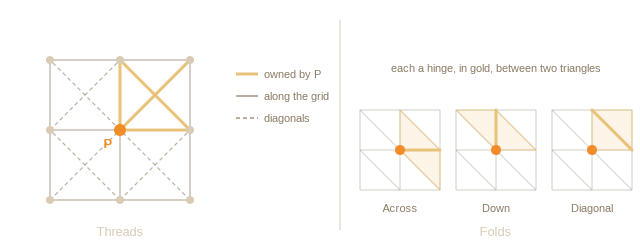
The weave has threads along the grid, between neighbors across and up, and, with UseShearingConstraints,
across both diagonals of every square, so the weave can’t shear out of square. A sheet without them folds and drapes
like a net.
FabricSettings solver properties
| Property | Description |
|---|---|
SolverFrequencyHz |
float. Steps a second, whatever the frame rate. 120 by default; 120 to 240 is typical. Held to 4 to 10,000 by TimeStep. |
TimeStep |
float, read-only. Seconds a step, 1 / SolverFrequencyHz, held to 0.0001 to 0.25. |
RelaxationIterations |
int. Rounds a step: more is less stretch, for proportionally more work. 10 by default; 8 to 14 is typical. 0 solves no threads, though one round still runs for the colliders and the pins’ reach. |
MaxStepsPerFrame |
int. Steps a frame may run to catch up; the backlog past that is dropped. 4 by default, at least 1. |
Stiffness |
float. The share of a thread’s stretch taken away a round, 0 to 1. 0.9 by default; 0.8 to 1 for cloth. |
CompressionSlack |
float. How short a thread folds, as a share of its length, before it pushes back, 0 to 1. 0.375 by default. |
Damping |
float. The share of the motion taken away per 1/120 s, 0 to 1. 0.02 by default; 0.01 to 0.05 for cloth. |
UseShearingConstraints |
bool. Threads across both diagonals of every square, so the weave can’t shear. true by default. |
ShearingRestLength |
float, read-only. A diagonal’s length, RestLength × √2. |
Bending and creases
Threads keep the cloth from stretching; folds keep it from folding up like paper. Every pair of triangles that share an
edge is a fold, a hinge with a rest angle, and with UseBendingConstraints each one is pulled back towards that
angle, BendingStiffness of the way a round. Keep it well under Stiffness: real cloth folds far more easily than
it stretches, and stiff folds make cardboard of it. Each point owns three folds, across, down and diagonal, and sits
in twelve; a round that solves bending first solves every fold once, in a pass of its own, and every point then
gathers its share of the twelve.
A fold’s rest angle starts as the sheet was built, flat but for the starting ripple. With BendingPlasticRate above
0, a fold bent further than BendingPlasticYieldDegrees from its rest angle yields: its rest angle follows the
fold at that rate, and it sets as a crease. So creases stay: cloth that lay crumpled under a weight keeps its creases
once the weight is gone, and cloth folded and hung up hangs folded. The default rate of 0 always springs back.
CreaseCheck measures how creased a sheet has become, see creases.
// linen that remembers how it was folded
_settings.BendingPlasticRate = 0.05f;
_settings.BendingPlasticYieldDegrees = 20.0f;
FabricSettings bending properties
| Property | Description |
|---|---|
UseBendingConstraints |
bool. Resistance to folding, not only to stretching. true by default. |
BendingStiffness |
float. How hard folds are pulled back to their rest angles, 0 to 1. 0.5 by default. |
BendingPlasticYieldDegrees |
float. Degrees a fold must pass its rest angle before it starts to set as a crease, 0 to 180. 30 by default. |
BendingPlasticRate |
float. How fast a yielding fold sets, per 1/120 s, 0 to 1. 0 by default, which always springs back; 0.01 to 0.1 for cloth that remembers its folds. |
BendingIterations |
int. How many of the rounds also solve bending, spread evenly. EveryRound by default. |
EveryRound |
Constant, 0: as BendingIterations or ContactIterations, every round. |
Mass and gravity
The cloth’s weight is given per area, ArealDensity, not per point: each point carries the patch of cloth around
it, ParticleMass, ArealDensity × RestLength². So a sheet weighs the same, and catches the wind the same, at
any resolution: refine the grid and every point gets lighter. Weight matters against the air: a light sheet billows,
a heavy one hangs. Gravity is the same for any weight.
Gravity is an acceleration in world space. It can point any way, but the ground stays level whichever way it
points: it is a plane at a height of Y, see colliders.
FabricSettings mass properties
| Property | Description |
|---|---|
Gravity |
Vector3. Meters per second squared, in world space. (0, −9.81, 0) by default. |
ArealDensity |
float. Kilograms per square meter. 0.2 by default; light cotton 0.15, canvas 0.5, upholstery 1. |
ParticleMass |
float, read-only. The mass a point carries, ArealDensity × RestLength², in kilograms. |
The sheet’s own settings
The grid and its spacing have no defaults worth having: WidthInParticles, HeightInParticles and
RestLength all start at 0, which a build refuses, so every setup gives its own. The spacing is the cloth’s
finest detail, since a fold bends at the points: a sheet that must crease finely wants a small spacing, and pays for it
in points. Typical spacings are 3 to 6 cm.
FabricSettings sheet properties
| Property | Description |
|---|---|
WidthInParticles |
int. Points across, at least 2. 0 by default: always set it. |
HeightInParticles |
int. Points up, or deep lying flat, at least 2. 0 by default: always set it. |
RestLength |
float. The spacing between neighbors, in meters. 0 by default: always set it; 0.03 to 0.06 is typical. |
SeedRipple |
float. The starting wave’s height, as a share of the spacing. 0.05 by default, held to 0 to MaxSeedRipple. See the starting ripple. |
AutoRebuild |
bool. Rebuilds the sheet at the next Update or Step whenever something a build reads has changed. false by default. |
MaxSeedRipple |
Constant, 0.5: the highest starting wave. |
Cost
A step’s cost is its passes, each over the whole sheet: one integration, a pass per round, and the extra passes of bending and self-collision. On a small sheet none of it matters. On a large one, two settings decide the frame time:
ContactIterationscaps how many of the rounds also solve self-collision, 4 of the 10 by default. Each point’s partners are found once a step, and every round that solves contacts tests them again. It is the first knob to turn down: large grids want 1 or 2.BendingIterationscaps how many of the rounds also solve bending, every round by default, each adding a pass. Large sheets want 1 or 2.
Both spread the rounds they get evenly across the step, and both mean every round at EveryRound, 0, or at any
count from RelaxationIterations up. RelaxationIterations is unlike them: 0 there means no threads.
DispatchesPerStep counts the passes a step takes, and SolverFrequencyHz how many steps a second
run them: halving it halves the cost, and a frame rate higher than the step rate costs nothing more, since most
frames then run no step. UseAerodynamicPressure adds a few passes, which together cost about one and a third
passes over the sheet.
// a large sheet: fewer contact and fold rounds, the rest as they were
_settings.ContactIterations = 2;
_settings.BendingIterations = 2;
Back to the defaults
To put every setting back to its default, give the Fabric a fresh FabricSettings and build again. That is the way
between presets, since a setting one preset changes and the next doesn’t would otherwise carry over. Set the grid on
the new instance too: it starts at 0, like any other.
_fabric.Settings = new FabricSettings
{
    WidthInParticles = 96,
    HeightInParticles = 64,
    RestLength = 0.06f
};

_fabric.Rebuild();