
Color legend plain property method event
GamePadManager reads four player slots at every update, one GamePadStatus each: whether a pad is connected,
its fifteen buttons, two sticks and two triggers, each with how far it moved since the update before. Names are
colored by what they are: a plain property, a method or an event.
Four players
GamePadsStatus holds the four slots, indexed by MonoGame’s PlayerIndex, from One to Four.
Every slot has its status, connected or not, and each status is the same object for the whole run:
var pad = GamePadManager.GamePadsStatus[(int)PlayerIndex.One];

// or all four
foreach (var p in GamePadManager.GamePadsStatus)
    if (p.IsConnected) DrawPlayerIcon(p.PlayerIndex);
Which pad lands in which slot is up to MonoGame and Windows, usually in the order they were connected. A game that lets anyone join picks the slot from the pad that pressed a button:
// the title screen: whoever presses a button is player one
foreach (var p in GamePadManager.GamePadsStatus)
{
    if (!p.IsAnyButtonPressed) continue;

    _playerOne = p.PlayerIndex;
    StartGame();
    break;
}
GamePadManager properties
| Property | Type | Description |
|---|---|---|
GamePadsStatus |
ImmutableArray<GamePadStatus> |
Static, read-only. The four player slots, indexed by (int)PlayerIndex. The array can’t be changed, and each status is the same object for the whole run. |
GamePadStatus properties
| Property | Type | Description |
|---|---|---|
PlayerIndex |
PlayerIndex |
Read-only. The slot, from One to Four. |
IsConnected |
bool |
Read-only. A pad is connected in the slot. |
IsAnyButtonPressed |
bool |
Read-only. Any of the fifteen buttons went down at the last update. |
IsAnyButtonDown |
bool |
Read-only. Any of the fifteen buttons is held: Pressed or Down. |
IsAnyButtonUp |
bool |
Read-only. Any of the fifteen buttons was let go at the last update. |
IsAnyButtonActive |
bool |
Read-only. Any of the fifteen buttons is pressed, held or just let go. The triggers aren’t buttons and don’t count. |
Connecting and disconnecting
IsConnected says whether a pad is in the slot. A slot without one reads idle and at zero, so game
code can read a slot without checking first: the player just doesn’t move.
When a pad disconnects in the middle of a game, its slot is updated as if everything had been let go: at that update
its held buttons go Up and its sticks and triggers back to zero, with deltas to match, and at the next its buttons
are Idle. A button held at the time never stays stuck down, and a walking player stops.
There is no event of its own for a connection. OnStatusChanged is raised when it changes, among other
things, so a game that pauses when its player’s pad goes away remembers the last value:
GamePadManager.OnStatusChanged += player =>
{
    if (player != _playerOne) return;

    var connected = GamePadManager.GamePadsStatus[(int)player].IsConnected;
    if (_wasConnected && !connected) Pause();
    _wasConnected = connected;
};
Buttons
Each status has fifteen buttons, each a GamePadButtonInfo with the state and the
five checks of every button. They are named after the Xbox layout:
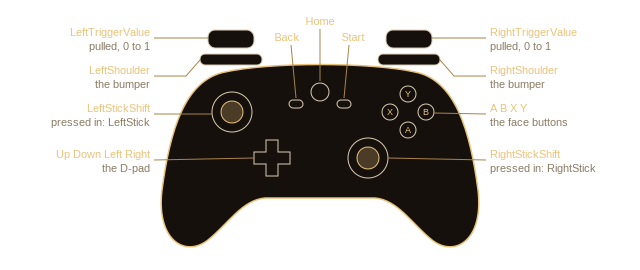
Home is the guide button in the middle, MonoGame’s BigButton. Not every platform reports it, so
don’t make it the only way to do something. LeftStick and RightStick are presses on
the sticks, and LeftShoulder and RightShoulder the bumpers.
var pad = GamePadManager.GamePadsStatus[(int)PlayerIndex.One];

if (pad.A.Pressed) _player.Jump();
if (pad.LeftStick.Pressed) _player.ToggleSprint();
if (pad.Up.Pressed) _menu.SelectPrevious();
if (pad.Down.Pressed) _menu.SelectNext();
A button object is the same for the whole run, so pad.A can be kept and read later, see
buttons that are always there.
GamePadStatus button properties
| Property | Type | Description |
|---|---|---|
A |
GamePadButtonInfo |
Read-only. The bottom face button. |
B |
GamePadButtonInfo |
Read-only. The right face button. |
X |
GamePadButtonInfo |
Read-only. The left face button. |
Y |
GamePadButtonInfo |
Read-only. The top face button. |
Back |
GamePadButtonInfo |
Read-only. The Back or View button, left of the middle. |
Start |
GamePadButtonInfo |
Read-only. The Start or Menu button, right of the middle. |
Home |
GamePadButtonInfo |
Read-only. The guide button in the middle, MonoGame’s BigButton. Not every platform reports it. |
LeftStick |
GamePadButtonInfo |
Read-only. A press on the left stick. |
RightStick |
GamePadButtonInfo |
Read-only. A press on the right stick. |
LeftShoulder |
GamePadButtonInfo |
Read-only. The left bumper. |
RightShoulder |
GamePadButtonInfo |
Read-only. The right bumper. |
Up |
GamePadButtonInfo |
Read-only. Up on the D-pad. |
Down |
GamePadButtonInfo |
Read-only. Down on the D-pad. |
Left |
GamePadButtonInfo |
Read-only. Left on the D-pad. |
Right |
GamePadButtonInfo |
Read-only. Right on the D-pad. |
GamePadButtonInfo members
GamePadButtonInfo derives from ButtonInfo, whose properties are
the state and the checks. It adds:
| Member | Description |
|---|---|
Type |
Read-only GamePadButtonTypes. Which button it is. |
ToString() |
The type and the state, such as A | Down. |
GamePadButtonInfo(GamePadButtonTypes type) |
A button of the type, Idle. A pad status makes its own fifteen; one you create is never updated. |
GamePadButtonTypes
| Value | Meaning |
|---|---|
A, B, X, Y |
The face buttons: bottom, right, left and top. |
Back, Start |
The Back or View button and the Start or Menu button. |
Home |
The guide button, MonoGame’s Buttons.BigButton. |
LeftStick, RightStick |
Presses on the sticks. |
LeftShoulder, RightShoulder |
The bumpers. |
Up, Down, Left, Right |
The D-pad. |
Sticks
LeftStickShift and RightStickShift are where the sticks are, each axis from −1
to 1: X to the right and Y up. The screen’s Y goes down, so flip Y to move something on screen:
var stick = pad.LeftStickShift;
_player.Position += new Vector2(stick.X, -stick.Y) * PlayerSpeed * dt;
The manager reads the sticks with MonoGame’s circular dead zone. A stick at rest never sits exactly in the middle, so
small readings around it come out as zero: a stick that isn’t touched reads Vector2.Zero, and code can compare with
zero safely. The library always asks for the circular dead zone, and has no setting for another.
LeftStickShiftDelta and RightStickShiftDelta are how far each stick moved since the
update before, as for a quick flick:
// a dodge on a fast flick of the right stick
if (pad.RightStickShiftDelta.Length() > 0.6f) _player.Dodge(pad.RightStickShift);
GamePadStatus stick properties
| Property | Type | Description |
|---|---|---|
LeftStickShift |
Vector2 |
Read-only. Where the left stick is, each axis from −1 to 1: X to the right, Y up. Exactly zero at rest. |
RightStickShift |
Vector2 |
Read-only. Where the right stick is, each axis from −1 to 1: X to the right, Y up. Exactly zero at rest. |
LeftStickShiftDelta |
Vector2 |
Read-only. How far the left stick moved since the update before. |
RightStickShiftDelta |
Vector2 |
Read-only. How far the right stick moved since the update before. |
Triggers
The triggers are analog, so they have values, not states: LeftTriggerValue and
RightTriggerValue, from 0, let go, to 1, pulled all the way. Their deltas are how far they moved
since the update before, positive when pulled further.
To use a trigger as a button, choose a point along its travel. The value before this update is the value minus the delta, so a press is the update the value crosses the point:
const float Threshold = 0.5f;
var now = pad.RightTriggerValue;
var before = now - pad.RightTriggerValueDelta;

if (now >= Threshold && before < Threshold) _player.Fire();      // pressed
if (now < Threshold && before >= Threshold) _player.StopFire();  // let go
GamePadStatus trigger properties
| Property | Type | Description |
|---|---|---|
LeftTriggerValue |
float |
Read-only. How far the left trigger is pulled, from 0 to 1. |
RightTriggerValue |
float |
Read-only. How far the right trigger is pulled, from 0 to 1. |
LeftTriggerValueDelta |
float |
Read-only. How far the left trigger moved since the update before: positive when pulled further. |
RightTriggerValueDelta |
float |
Read-only. How far the right trigger moved since the update before: positive when pulled further. |
Vibration
SetVibration sets the speed of a pad’s two motors, each from 0, stopped, to 1, full speed. The
low-frequency motor, the left one on most pads, gives a heavy rumble; the high-frequency one, on the right, a light
buzz. The motors keep the speed they were given until the next call, so a rumble that lasts a while is stopped by the
game:
// a hit: a quarter of a second of rumble
GamePadManager.SetVibration(PlayerIndex.One, 0.8f, 0.3f);
_rumbleLeft = 0.25f;

// every frame
if (_rumbleLeft > 0)
{
    _rumbleLeft -= dt;
    if (_rumbleLeft <= 0) GamePadManager.SetVibration(PlayerIndex.One, 0, 0);
}
It does nothing for a pad that isn’t connected or can’t vibrate. Stop the motors when the game pauses too: nothing stops them for you.
GamePadManager methods
| Method | Description |
|---|---|
Update() |
Static. Reads the four slots with a circular dead zone, moves their buttons one step, and raises OnStatusChanged for each pad that changed. Call it once per frame. |
SetVibration(PlayerIndex index, float lowFreqMotor, float highFreqMotor) |
Static. Sets the speed of a pad’s two motors, from 0 to 1. They keep it until the next call. |
Status events
OnStatusChanged is raised from Update, at most once per pad per update, slot One
first, with the slot of the pad that changed. Anything counts: the pad connected or disconnected, a button changed
state at any step, Pressed to Down and Up to Idle included, or a stick or a trigger moved. So it is raised at
every update a stick is being moved, and is best for telling when to look, such as redrawing a controller test screen:
GamePadManager.OnStatusChanged += player => _testScreen.Redraw(GamePadManager.GamePadsStatus[(int)player]);
The event is static: a handler stays subscribed, and keeps its object alive, until it is removed.
GamePadManager events
| Event | Handler | Raised when |
|---|---|---|
OnStatusChanged |
(PlayerIndex playerIndex) |
Static. Something about the pad changed at an update: its connection, a button’s state, a stick or a trigger. |
The handler type is the delegate StatusChanged, nested in the manager.