
Color legend plain property method
Two things connect the camera to the world around it: a ray through a point of the screen, for picking what the player clicks, and the floating origin, which keeps the view steady however far from the origin the camera flies. Names are colored by what they are: a property or a method.
Picking
ScreenPointToRay returns a world-space ray from the camera through a pixel. Test it against what can be picked:
var mouse = Mouse.GetState();
var ray = camera.ScreenPointToRay(new Vector2(mouse.X, mouse.Y), GraphicsDevice.Viewport);

// the ground, the plane y = 0
var ground = new Plane(Vector3.Up, 0);

if (ray.Intersects(ground) is float distance)
{
    var point = ray.Position + ray.Direction * distance;
    // put a marker at point
}

// an object, by its bounding sphere
if (ray.Intersects(new BoundingSphere(cratePosition, 1.5f)) is float hit)
{
    // the crate is under the mouse, hit units along the ray
}
- The pixel is in window coordinates, the same as the mouse’s: from the top left corner, x to the right and y down.
- The viewport is the one the camera draws into, usually
GraphicsDevice.Viewport. For a split screen, pass that camera’s own viewport: its position in the window is taken into account. - The ray is in world coordinates, like
Position, so test it against world positions, not rebased ones. It starts on the near plane rather than at the camera, so nothing closer than the near plane, which isn’t drawn either, is hit. Its direction is a unit vector.
The ray is worked out from the camera’s current pose and projection, not from its matrices, so it is right even
before the next Update, and it doesn’t lose precision far from the origin: its direction is accurate to
about 10−7 radians anywhere.
To pick among many objects, test each one and keep the nearest hit:
Thing picked = null;
var nearest = float.MaxValue;

foreach (var thing in things)
{
    if (ray.Intersects(thing.Bounds) is float d && d < nearest)
    {
        nearest = d;
        picked = thing;
    }
}
Camera picking methods
| Method | Description |
|---|---|
ScreenPointToRay(Vector2 pixel, Viewport viewport) |
A ray in world coordinates through the pixel, starting on the near plane, with a unit direction. Uses the current pose and projection, so it needs no Update after they change. |
The floating origin
A float has 24 bits of precision, so the farther a number is from 0, the coarser its steps: about 0.0001 near
1 000, 0.008 near 100 000 and 0.06 near 1 000 000. A GPU multiplies each vertex by the world, view and projection
matrices in floats. With an object 100 000 units from the origin, the world matrix holds a translation of 100 000 and
the view matrix one of about −100 000. They cancel, but only after both have been rounded, and what is left jumps in
steps of 0.008 units from frame to frame: up close, vertices shake and surfaces swim.
The camera avoids this with a floating origin. It keeps an Offset, a point near it on a grid of 1000-unit
cells, and builds its view matrix from RebasedPosition, its position minus the offset. Draw the world
relative to the same offset and, near the camera, every translation the GPU sees stays below a cell or two, wherever
the camera is.
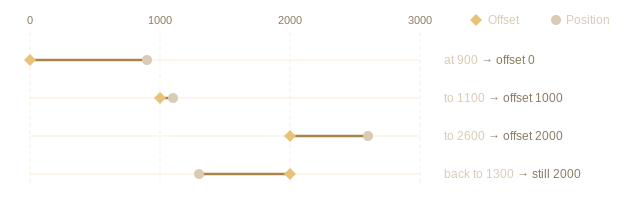
On each axis, once the camera is more than 1000 units from the offset, Update moves the offset by
as many whole cells as fit in between. So the offset is always a whole number of thousands on each axis, and after an
update the rebased position is never more than 1000 units from 0 on any axis. The offset moves in the same update as
the view, so the view and the offset always agree.
Everything else stays in world coordinates: Position, LookAt targets, the rays of
ScreenPointToRay, camera paths and their waypoints. Only drawing needs the offset.
Drawing relative to the offset
Subtract the camera’s Offset from each position before it goes into a world matrix:
// an object's world matrix: scale, then rotation, then the rebased translation
var world = Matrix.CreateScale(scale)
            * Matrix.CreateFromQuaternion(rotation)
            * Matrix.CreateTranslation(position - camera.Offset);
Do it every frame, in Draw: the offset moves as the camera does, and a world matrix built once at load would be off
by the cells the camera has crossed since. Geometry you build yourself in world coordinates, such as
the lines of a path, gets the offset subtracted from each vertex on the CPU,
where the subtraction is precise.
The offset can’t add precision that the positions don’t have: an object 1 000 000 units out is placed to 0.06 units
by its float coordinates alone. What it removes is the rounding the matrices add on top, which is what makes a
far-away view shake. For a world larger than that, keep positions in finer units of your own, such as a chunk and a
position within it, and turn them into positions near the camera before drawing.
Culling
A frustum built from the camera’s matrices is in rebased coordinates, like the view. Test bounds shifted by the offset:
var frustum = new BoundingFrustum(camera.View * camera.Projection);

foreach (var thing in things)
{
    var bounds = new BoundingSphere(thing.Bounds.Center - camera.Offset, thing.Bounds.Radius);
    if (frustum.Intersects(bounds)) Draw(thing);
}
Camera floating origin properties
| Property | Type | Description |
|---|---|---|
Offset |
Vector3 |
Read-only. The floating origin: a whole number of 1000-unit cells on each axis, moved by Update when the camera is more than a cell from it. Subtract it from positions before drawing. |
RebasedPosition |
Vector3 |
Read-only. Position minus Offset: where the camera is in the coordinates the view matrix is built in. |