
Color legend plain property method
AnimatedCameraController moves its camera along a camera path: fly-throughs, cutscenes,
attract modes and the tours of an editor. It keeps a steady cruise speed, and slows, stops and speeds up again where
the path’s waypoints ease and hold. It plays, pauses and seeks like a media
player, and eases the camera onto the path from wherever it was. Names are colored by what they are: a
property or a method; values and fields keep the
plain color.
Playing a path
A new controller has an empty path of its own. Add waypoints to it, attach the controller and play:
var tour = new AnimatedCameraController { DurationSec = 12 };

tour.Path.AddWaypoint(CameraWaypoint.CreateLookAtTarget(new Vector3(-30, 8, 30), castle));
tour.Path.AddWaypoint(CameraWaypoint.CreateLookAtTarget(new Vector3(30, 14, 30), castle));
tour.Path.AddWaypoint(CameraWaypoint.CreateTangentFollow(new Vector3(35, 5, -20)));

camera.Controller = tour;
tour.Play();
Path can also be assigned a path you built elsewhere, which one controller or several can share. It is never
null: assigning null throws ArgumentNullException.
A new controller is paused. Play starts it and Pause holds it, and IsPlaying says which it
is doing. Paused, the controller still keeps the camera at its point of the path. With no waypoints, it leaves the
camera where it is; with a duration or a speed of 0 or less, or a path of length 0, it doesn’t move along the path.
Duration or speed
Timing decides what sets the length of a run, as a CameraPathTiming:
Duration, the default, plays one run inDurationSec, 8 seconds by default, easing and holds included. The controller picks the cruise speed that fits the run into it, from the path’sCruiseSpeed. Without easing or holds, that speed is the path’sLengthover the duration: the same duration makes a longer path faster.Speedcruises atSpeedUnitsPerSec, 5 units a second by default, wherever no waypoint eases. A run takes as long as the path needs at that speed, itsTravelTime: a longer path takes longer.
tour.Timing = CameraPathTiming.Speed;
tour.SpeedUnitsPerSec = 6; // cruising at 6 units a second, however long the path
The setting not in force is kept for when you switch back. Timed by speed, the camera keeps its speed while the path is edited under it, as a designer moves waypoints during playback; timed by duration, it keeps the length of the run and changes speed instead.
CameraPathTiming values
| Value | Description |
|---|---|
Duration |
A run takes DurationSec; the cruise speed follows from it. |
Speed |
The camera cruises at SpeedUnitsPerSec; a run takes as long as that comes to. |
AnimatedCameraController properties
| Property | Type | Description |
|---|---|---|
Path |
CameraPath |
The path to follow. An empty path of its own by default. Throws ArgumentNullException for null. |
Timing |
CameraPathTiming |
What sets the length of a run: Duration or Speed. Duration by default. |
DurationSec |
float |
The seconds of one run from end to end, easing and holds included, while Timing is Duration. 8 by default. |
SpeedUnitsPerSec |
float |
The cruise speed, in units a second, while Timing is Speed. 5 by default. |
OpenPathAnimationMode |
CameraAnimationMode |
What an open path does at its ends: Stop, Loop or PingPong. Stop by default. A closed path always goes round. |
EntryBlendDurationSec |
float |
The seconds the camera takes to ease onto the path when the controller is attached; 0 or less jumps. 2 by default. |
SnapToNearestOnEntry |
bool |
Whether attaching starts from the point of the path nearest the camera, rather than from PathDistance. On by default. |
IsPlaying |
bool |
Read-only. Whether the camera is moving along the path. |
PathDistance |
float |
Read-only. Where the camera is, as a distance along the path in world units. Set it with Seek. |
Easing and holds
The waypoints’ easing and holds play out in every run: the controller moves through the run’s time, and the path says where that puts the camera. A cutscene that settles to a halt in front of the castle, takes it in, and moves on:
var castleShot = CameraWaypoint.CreateLookAtTarget(new Vector3(30, 14, 30), castle) with
{
    EaseOut = new QuadraticEaseOut(), // settles to a halt
    HoldSec = 3,                      // looks for three seconds
    EaseIn = new QuadraticEaseIn()    // and gathers speed again
};

_cutscene.Path.SetWaypoint(1, castleShot);
_cutscene.Timing = CameraPathTiming.Speed;
_cutscene.SpeedUnitsPerSec = 8; // cruising at 8 units a second
Timed by speed, easing and holds make the run longer: each eased half takes
a few times its cruise time, three times for these quadratic
curves, and each hold adds its seconds. Timed by duration, the run keeps its length: within
DurationSec, the holds take their seconds and the travel takes the rest, so a longer hold or a slower ease makes
the rest of the run faster. Travel always gets at least a tenth of the duration: holds that alone would fill it make
the run that much longer.
The controller keeps its place as a share of the run’s time. Changing the duration, the speed or the timing, or editing the path, while it plays carries on from the same share of the new run.
The ends of a path
OpenPathAnimationMode decides what the camera does when it reaches the end of an open path, as a
CameraAnimationMode:
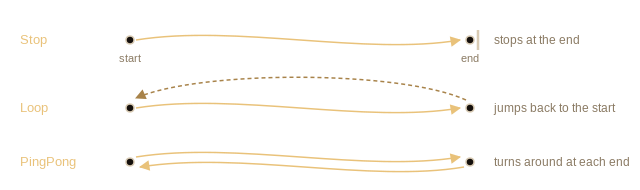
Stop, the default, runs once and stops at the end, after the last waypoint’s hold if it has one:IsPlayingturnsfalse.Playat the end starts over from the beginning.Loopjumps from the end back to the start and goes on. On an open path that is a cut from the last waypoint to the first; for a smooth loop, close the path instead. The camera holds at the last waypoint before the cut and at the first after it.PingPongturns around at each end and travels back, forever. The way back plays the run backwards: the camera slows into a waypoint where it sped away from it, and passes an end’s hold on the way in and again on the way out, so it waits there twice as long.
A closed path has no ends: the camera goes round it whatever the mode, holding at its first waypoint at the start of each lap.
The controller raises no event at the end. Watch IsPlaying to tell when a Stop cutscene is over, its last hold
included:
if (_inCutscene && !_cutscene.IsPlaying)
{
    _inCutscene = false;
    camera.Controller = _free; // hand the camera back to the player
}
CameraAnimationMode values
| Value | Description |
|---|---|
Stop |
Runs once and stops at the end; playing again starts over. |
Loop |
Jumps from the end back to the start and goes on. |
PingPong |
Turns around at each end. |
Seeking
PathDistance is where the camera is on the path, in world units from its start. Seek moves it to a
distance and SeekNormalized to a fraction of the length, both clamped to the path. Seeking works playing or
paused, and the camera gets there at its next update. A timeline scrubber in an editor:
// scrub is 0 to 1, from a slider under the view
tour.Pause();
tour.SeekNormalized(scrub);
A seek starts the run at the matching point of its timing, so the easing and holds still ahead play out as they would have. Seeking onto a waypoint that holds starts at the moment the camera arrives there: it holds first. On the way back of a ping-pong, the camera keeps going back after a seek.
To jump to a waypoint, seek to the path’s WaypointDistance for it, which is exact. The point nearest
the waypoint’s position comes out a hair off it, and where the camera eases into the waypoint a hair of distance is a
long while of the run.
tour.Seek(tour.Path.WaypointDistance(2)); // at the third waypoint, as the camera arrives
Easing onto the path
Attaching the controller takes the camera over from wherever it is, in two steps:
- Where to start. With
SnapToNearestOnEntry, on by default, the controller starts from the point of the path nearest the camera, at the matching point of the run as a seek does. Off, it starts from itsPathDistance: 0 for a new controller, or where it was paused, or where a seek put it. - How to get there. Over
EntryBlendDurationSec, 2 seconds by default, the camera eases from its pose to the path’s, starting and ending gently. A playing path keeps moving meanwhile, so the camera merges into it rather than catching up with a point left behind. A blend of 0 jumps onto the path at once.
Build the path before attaching the controller: the nearest point is found at attachment. To cut into a cutscene on its first frame, with no easing:
_cutscene.SnapToNearestOnEntry = false;
_cutscene.EntryBlendDurationSec = 0;
_cutscene.Seek(0);

camera.Controller = _cutscene;
_cutscene.Play();
_inCutscene = true;
AnimatedCameraController methods
| Method | Description |
|---|---|
AnimatedCameraController() |
A paused controller with an empty path, timed by an 8-second duration, a speed of 5 units a second for timing by speed, the Stop mode, a 2-second entry blend and snapping to the nearest point on. |
Play() |
Starts moving along the path. At the end of a stopped open path, starts over from the beginning. |
Pause() |
Holds the camera where it is on the path. |
Seek(float pathDistance) |
Moves to a distance along the path, clamped to 0 to its Length, and to the matching point of the run. At a waypoint that holds, the camera holds first. |
SeekNormalized(float value) |
Moves to a fraction of the path’s length, clamped to 0 to 1. |
AddWaypoint(Camera camera, CameraWaypointOrientationMode mode = Fixed, Vector3? lookAt = null) |
Adds a waypoint at the end of the path, at the camera’s position. Throws ArgumentNullException for null. |
Update(float elapsedSeconds) |
Moves along the path and sets the camera’s pose. The camera calls it. |
Recording waypoints
AddWaypoint builds a path from a camera: it adds a waypoint at the camera’s position, usually one the player
or a designer is flying with a free camera. The controller doesn’t need to be attached to that camera.
tour.AddWaypoint(camera);                                                    // facing where the camera faces
tour.AddWaypoint(camera, CameraWaypointOrientationMode.LookAtTarget, castle); // facing the castle
tour.AddWaypoint(camera, CameraWaypointOrientationMode.TangentFollow);       // facing along the path
A LookAtTarget waypoint with no lookAt faces the origin.
Saving a path
Waypoints are plain data, all but their easing curves. Save each one’s fields, and the path’s Closed and
WorldUp, to build the same path again. A curve is an object, which System.Text.Json writes out but can’t
create again: loading a waypoint that eases throws NotSupportedException. Save each curve as its ID and parameters
instead, with the CurveSettings record from saving a curve. This
record holds a waypoint as it is saved:
using BorrowedTorch.Cameras.Animation;
using Microsoft.Xna.Framework;

// a waypoint as saved: its plain fields as they are, its eases as their curve settings
public sealed record SavedWaypoint(Vector3 Position, Quaternion Orientation, Vector3 LookAtTarget,
    CameraWaypointOrientationMode OrientationMode, float HoldSec, CurveSettings? EaseIn, CurveSettings? EaseOut)
{
    public static SavedWaypoint From(CameraWaypoint waypoint)
    {
        return new SavedWaypoint(waypoint.Position, waypoint.Orientation, waypoint.LookAtTarget,
            waypoint.OrientationMode, waypoint.HoldSec,
            waypoint.EaseIn == null ? null : CurveSettings.From(waypoint.EaseIn),
            waypoint.EaseOut == null ? null : CurveSettings.From(waypoint.EaseOut));
    }

    public CameraWaypoint ToWaypoint()
    {
        return new CameraWaypoint
        {
            Position = Position,
            Orientation = Orientation,
            LookAtTarget = LookAtTarget,
            OrientationMode = OrientationMode,
            HoldSec = HoldSec,
            EaseIn = EaseIn?.Create(),
            EaseOut = EaseOut?.Create()
        };
    }
}
MonoGame’s vectors and quaternions keep their numbers in fields, so tell System.Text.Json to include fields:
using System.Text.Json;

var options = new JsonSerializerOptions { IncludeFields = true, WriteIndented = true };

// save
File.WriteAllText("tour.json", JsonSerializer.Serialize(tour.Path.Waypoints.Select(SavedWaypoint.From), options));

// load
var path = new CameraPath();
foreach (var saved in JsonSerializer.Deserialize<SavedWaypoint[]>(File.ReadAllText("tour.json"), options))
    path.AddWaypoint(saved.ToWaypoint());

tour.Path = path;
A custom function has no ID of its own to save; the custom functions page saves them under names of their own.