
Color legend plain property method
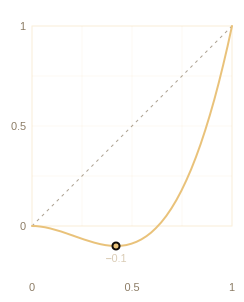
Pulls back below the start by 10%, then speeds up to the end.
A class in the category ShapingFunctionCategory.Back. It derives from BaseShapingFunction and has its members too: CalculateOutput gives the curve. The curves page shows it in context, with the rest of its family.
Names are colored by what they are: a property or a method; values and fields keep the plain color.
The curve
| Property | Value |
|---|---|
Id |
ShapingFunctionId.BackEaseIn, number 0 |
Category |
ShapingFunctionCategory.Back |
Name |
"Back EaseIn" |
Order |
3 |
ParameterCount |
0 |
HasVariableOrder |
false |
For an input x from 0 to 1, the output is c₃x³ − c₁x², with c₁ = 1.70158 and c₃ = c₁ + 1.
It dips to −0.1 at x = 0.42, is back at 0 at x = 0.63 and ends at full speed. It is BackEaseOut played backwards.
Methods
BackEaseIn() →
BackEaseIn() · Creates the curve. ShapingFunctionFactory.Create creates the same from ShapingFunctionId.BackEaseIn.