
Color legend method
BorrowedTorch.RayTracing is the ray caster of Kindling. It answers two questions about a scene of triangle meshes: “where does this ray hit”, on the CPU, for picking and placing things, and “is anything in the way”, on the CPU and in a shader, for shadows, ambient occlusion and other effects built on occlusion. It keeps a bounding volume hierarchy over each mesh and one over the scene, keeps them up to date as objects move with as little work as each frame allows, copies them to the GPU, and gives shaders the walk and the depth / normal G-buffer that traced passes start from. Shading the hits is left to you.
These pages cover the library from setup to every public type:
| Page | What it covers |
|---|---|
| Quick start guide (this page) | Installing, the parts, the conventions, a first trace, what the library leaves to you, picking crates in MonoGame |
| Meshes | Your meshes as the library reads them, meshes from a model, building a BLAS and what it keeps, deforming meshes, units |
| The scene | Declaring the scene every frame, instance ids, flags, what an update does, a stable order, odd transforms, versions |
| CPU queries | The closest hit and what it holds, the any hit, masks, starting off a surface, attributes at a hit, tracing one mesh |
| Tracing on the GPU | The GPU copy and what an upload sends, the HLSL headers, a shadow kernel and its dispatch, pixel shaders, counting steps |
| The G-buffer | Its two targets, filling them with a prepass, what to draw, current or not, reading positions and normals back |
| The BVH and performance | The builder, the node layout, walking with and without a stack, refits and rebuilds, the GPU layouts, costs and limits |
| Glossary | Every public type and HLSL header with its members in alphabetical order, one page each |
Installing
Add the package to your project:
dotnet add package BorrowedTorch.RayTracing
| Requirement | Version |
|---|---|
| .NET | 8 or later (net8.0-windows) |
| Operating system | Windows |
| MonoGame | The compute fork, MonoGame.Framework.Compute.WindowsDX.NoMemoryLeak 3.8.3.1, installed with the package: DirectX 11, the HiDef profile, compute shaders and structured buffers |
| Shaders | Compiled for DirectX_11, compute kernels as cs_5_0 |
The package also brings two HLSL headers, RayTraversal.fxh and GBuffer.fxh, copied to your build
output at Content/Effects/Lib/. Only the shaders need them; the CPU queries work without. The
GPU page has how an effect includes them.
The parts
Five parts make up the library, each built on the one before:
- Meshes. An
ITriangleMeshis your mesh as the library reads it: a triangle count and three positions per triangle. AMeshBlas, a bottom-level acceleration structure, is a tree over one mesh’s triangles in the mesh’s own space, built once and shared by every object that uses the mesh. See meshes. - The scene. A
Tlas, the top-level acceleration structure, is a tree over the scene’s instances: aMeshBlasplaced by a world matrix, under an id of yours. You declare the scene every frame, and it works out on its own what changed. See the scene. - CPU queries. The
Tlastraces a ray to the nearest hit, aRayHitwith the instance, the triangle and where on it, or tells whether anything blocks it at all. See CPU queries. - The GPU copy. A
GpuAccelerationStructuremirrors theTlasand its meshes in four structured buffers, whichRtTraceAnyinRayTraversal.fxhwalks from a compute or a pixel shader. See tracing on the GPU. - The G-buffer. A
GBufferholds the depth and the normal of the nearest surface at every pixel, which your prepass draws and a traced pass reads back as the points to trace from. See the G-buffer.
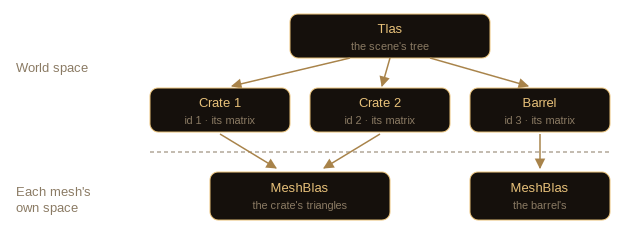
Tlas over three instances. The two crates share one MeshBlas: each is the same triangles, placed by its own matrix.Every type is in one namespace, BorrowedTorch.RayTracing:
| Group | Types |
|---|---|
| Meshes and the scene | ITriangleMesh, MeshBlas, Tlas, TlasInstance, TlasUpdateResult, RayTracingFlags, RayHit |
| The GPU and the G-buffer | GpuAccelerationStructure, GBuffer, GpuInstance, GpuTriangle |
| The BVH | Bvh, BvhNode |
Conventions
- MonoGame’s types and maths. Positions, rays and matrices are MonoGame’s
Vector3,Ray,BoundingBoxandMatrix, in its row-vector convention: a point is transformed asp * M, so a world matrix isscale * rotation * translation, read left to right. - Spaces. A mesh’s triangles are in the mesh’s own space; an instance’s world matrix places them in the scene. Rays are traced in the space the world matrices put the instances in, so a ray has to be in that space too, on the CPU and in a shader. Usually that is world space.
- Distances are ray parameters. A hit at distance
tis atray.Position + ray.Direction * t. For a direction of length 1 that is a distance in world units; the direction need not be of length 1, and a maximum distance is then in the same parameter. See distances and long rays. - Triangles are double-sided. A ray hits a triangle from either side: a shadow ray must not slip through the far wall of a closed object.
- Ids are yours. An instance’s id is a
ulongthe library never reads beyond comparing it, and hands back in every hit. See instance ids.
A first trace
One mesh, two objects that use it, and a ray dropped onto the first:
using BorrowedTorch.RayTracing;
using Microsoft.Xna.Framework;

// the mesh, as the library reads it: a triangle count and three positions per triangle
public sealed class IndexedTriangles : ITriangleMesh
{
    private readonly Vector3[] _positions;
    private readonly int[] _indices;

    public IndexedTriangles(Vector3[] positions, int[] indices)
    {
        _positions = positions;
        _indices = indices;
    }

    public int TriangleCount => _indices.Length / 3;

    public void GetTriangle(int triangle, out Vector3 v0, out Vector3 v1, out Vector3 v2)
    {
        v0 = _positions[_indices[triangle * 3]];
        v1 = _positions[_indices[triangle * 3 + 1]];
        v2 = _positions[_indices[triangle * 3 + 2]];
    }
}
Then the tree over the mesh, built once, and the scene, declared every frame:
// once per mesh: a unit cube centred on its origin
var crate = MeshBlas.Build(new IndexedTriangles(cubePositions, cubeIndices));

var tlas = new Tlas();

// every frame: every object, in the same order, under an id of yours
tlas.BeginUpdate();
tlas.Add(1, crate, Matrix.CreateTranslation(0, 0.5f, 0));                         // on the ground, its top at y = 1
tlas.Add(2, crate, Matrix.CreateScale(2) * Matrix.CreateTranslation(4, 1, 0));    // twice the size, to the side
tlas.EndUpdate();

// a ray straight down from y = 5
var ray = new Ray(new Vector3(0, 5, 0), Vector3.Down);

if (tlas.Intersect(ray, float.MaxValue, out var hit))
{
    // hit.InstanceId is 1, and hit.Distance is 4: the ray met the first crate's top at y = 1
    var point = ray.Position + ray.Direction * hit.Distance;
}

// is anything between the two points? Stops at the first thing in the way
var blocked = tlas.IntersectAny(new Ray(new Vector3(-3, 0.5f, 0), Vector3.Right), 6f);    // true: crate 1
Both crates are the same triangles: MeshBlas.Build reads the mesh once, and every instance of it
carries only a matrix. EndUpdate compares the instances with the last update’s: here the first update
builds the tree, and from then on an update in which nothing moved costs a few comparisons. The
scene page has the rest.
Tlas constructor
Names are colored by what they are: a method.
| Method | Description |
|---|---|
Tlas() |
An empty scene: no instances and an empty tree. Its first EndUpdate builds the tree, even with nothing declared. |
The other members of the Tlas are on the pages of what they do: declaring instances on the
scene page, and the queries on the
CPU queries page.
What it leaves to you
The library finds hits. The rest is the game’s:
- Shading. A hit is an instance, a triangle and a point on it. Its material, its normal and its texture coordinate are yours to look up, see attributes at a hit.
- The nearest hit on the GPU. Shaders get the any-hit walk only: “is anything in the way”, the question shadows and occlusion ask. Reflections and bounced light need a closest-hit walk, which isn’t there.
- The prepass. The
GBufferowns its targets, but the effect that fills them is yours; the G-buffer page has one to start from. - Filtering. A traced shadow or occlusion pass gives a hard answer per ray. Softening it, accumulating it over frames, or tracing at a reduced resolution and upsampling is up to the pass.
- Threads. The structures aren’t thread-safe: don’t query a
Tlaswhile it is being updated, and upload from the thread that owns the graphics device.
Picking crates
A complete MonoGame game: a grid of 25 crates turning on their spots, and a click picks the one under the cursor, which turns gold. Every crate is an instance of one mesh, and the scene is declared anew every frame.
using BorrowedTorch.RayTracing;
using Microsoft.Xna.Framework;
using Microsoft.Xna.Framework.Graphics;
using Microsoft.Xna.Framework.Input;

public class PickingGame : Game
{
    private const int Size = 5;                    // a grid of 5 × 5 crates
    private const ulong Nothing = ulong.MaxValue;  // the id of no crate

    private readonly GraphicsDeviceManager _graphics;
    private readonly Tlas _tlas = new();
    private BasicEffect _effect;
    private VertexPositionNormalTexture[] _vertices;
    private short[] _indices;
    private MeshBlas _crate;
    private Matrix _view;
    private Matrix _projection;
    private float _time;
    private ulong _picked = Nothing;
    private MouseState _previousMouse;

    public PickingGame()
    {
        _graphics = new GraphicsDeviceManager(this);
        IsMouseVisible = true;
    }

    protected override void LoadContent()
    {
        _effect = new BasicEffect(GraphicsDevice);
        _effect.EnableDefaultLighting();

        (_vertices, _indices) = Cube();

        // traced with the very triangles it is drawn with
        var positions = Array.ConvertAll(_vertices, vertex => vertex.Position);
        _crate = MeshBlas.Build(new IndexedTriangles(positions, Array.ConvertAll(_indices, index => (int)index)));

        _view = Matrix.CreateLookAt(new Vector3(0, 9, 9), Vector3.Zero, Vector3.Up);
        _projection = Matrix.CreatePerspectiveFieldOfView(MathHelper.PiOver4, GraphicsDevice.Viewport.AspectRatio, 0.1f, 100f);
    }

    protected override void Update(GameTime gameTime)
    {
        _time += (float)gameTime.ElapsedGameTime.TotalSeconds;

        // the scene, every frame, in the same order: crate i under the id i
        _tlas.BeginUpdate();
        for (var i = 0; i < Size * Size; i++) _tlas.Add((ulong)i, _crate, World(i));
        _tlas.EndUpdate();

        var mouse = Mouse.GetState();

        if (mouse.LeftButton == ButtonState.Pressed && _previousMouse.LeftButton == ButtonState.Released)
        {
            var ray = CursorRay(mouse.Position.ToVector2());
            _picked = _tlas.Intersect(ray, float.MaxValue, out var hit, RayTracingFlags.Pickable) ? hit.InstanceId : Nothing;
        }

        _previousMouse = mouse;

        base.Update(gameTime);
    }

    protected override void Draw(GameTime gameTime)
    {
        GraphicsDevice.Clear(new Color(21, 16, 12));

        _effect.View = _view;
        _effect.Projection = _projection;

        for (var i = 0; i < Size * Size; i++)
        {
            _effect.World = World(i);
            _effect.DiffuseColor = (ulong)i == _picked ? Color.Gold.ToVector3() : Color.SaddleBrown.ToVector3();

            foreach (var pass in _effect.CurrentTechnique.Passes)
            {
                pass.Apply();
                GraphicsDevice.DrawUserIndexedPrimitives(PrimitiveType.TriangleList, _vertices, 0, _vertices.Length, _indices, 0, _indices.Length / 3);
            }
        }

        base.Draw(gameTime);
    }

    // crate i of the grid, turning on its spot: the same matrix draws it and traces it
    private Matrix World(int i)
    {
        var x = (i % Size - (Size - 1) / 2f) * 2f;
        var z = (i / Size - (Size - 1) / 2f) * 2f;

        return Matrix.CreateRotationY(_time + i) * Matrix.CreateTranslation(x, 0.5f, z);
    }

    // the cursor as a ray into the world
    private Ray CursorRay(Vector2 cursor)
    {
        var viewport = GraphicsDevice.Viewport;
        var near = viewport.Unproject(new Vector3(cursor, 0f), _projection, _view, Matrix.Identity);
        var far = viewport.Unproject(new Vector3(cursor, 1f), _projection, _view, Matrix.Identity);

        return new Ray(near, Vector3.Normalize(far - near));
    }

    // a unit cube centred on its origin, four vertices a face so each face has its own normal
    private static (VertexPositionNormalTexture[], short[]) Cube()
    {
        var vertices = new List<VertexPositionNormalTexture>();
        var indices = new List<short>();

        foreach (var normal in new[] { Vector3.Up, Vector3.Down, Vector3.Left, Vector3.Right, Vector3.Forward, Vector3.Backward })
        {
            // two axes across the face
            var side = new Vector3(normal.Y, normal.Z, normal.X);
            var up = Vector3.Cross(normal, side);
            var first = (short)vertices.Count;

            vertices.Add(new(0.5f * (normal - side - up), normal, Vector2.Zero));
            vertices.Add(new(0.5f * (normal - side + up), normal, Vector2.UnitY));
            vertices.Add(new(0.5f * (normal + side + up), normal, Vector2.One));
            vertices.Add(new(0.5f * (normal + side - up), normal, Vector2.UnitX));

            indices.AddRange(new[] { first, (short)(first + 1), (short)(first + 2), first, (short)(first + 2), (short)(first + 3) });
        }

        return (vertices.ToArray(), indices.ToArray());
    }
}
IndexedTriangles is the one from a first trace. The crates turn, so their boxes change every frame
and every update refits the tree, which for a scene this size is next to nothing. A scene that stands still costs a few
comparisons an update, and the scene page has when an update rebuilds
instead.
The click asks for Pickable instances only. Every crate has it, since an instance gets every flag unless it is
declared with fewer: declare the ground with RayTracingFlags.CastsShadow alone, and clicks go through it. Shadows
for the same scene, traced on the GPU from a G-buffer, are the GPU page’s
example.