
Color legend plain property method
A Tlas answers two questions about a ray: what it hits first, for picking and placing things, and whether
anything is in its way at all, for visibility. Both run on the calling thread, against the scene as of the last
EndUpdate, and neither allocates. Names are colored by what they are: a
property or a method; values and fields keep the plain
color.
Closest hit
Intersect finds the nearest thing a ray hits. Picking with the mouse is the usual case: turn the cursor
into a ray in the world, and ask for the nearest pickable instance along it.
// the cursor as a ray in the world: MonoGame does the maths
Vector3 near = viewport.Unproject(new Vector3(mouse.X, mouse.Y, 0f), projection, view, Matrix.Identity);
Vector3 far = viewport.Unproject(new Vector3(mouse.X, mouse.Y, 1f), projection, view, Matrix.Identity);
var ray = new Ray(near, Vector3.Normalize(far - near));

if (tlas.Intersect(ray, float.MaxValue, out RayHit hit, RayTracingFlags.Pickable))
{
    ulong picked = hit.InstanceId;
    Vector3 point = ray.Position + ray.Direction * hit.Distance;
}
It returns whether anything was hit, and fills a RayHit either way, see what a hit holds.
Only the instances with every flag in the mask are seen, and the default mask, None, sees them all: see
flags. Hits at or beyond the maximum distance are left out, so a shorter one is
cheaper: the walk skips every box that starts past the nearest hit so far, and past the maximum before that.
Tlas closest hit
| Method | Description |
|---|---|
Intersect(in Ray ray, float maxDistance, out RayHit hit, RayTracingFlags mask = None) |
Whether the ray hits an instance with every flag in mask closer than maxDistance, and the nearest such hit. The ray is in world space, and its direction need not be of length 1. |
What a hit holds
A RayHit says where along the ray, which instance, which triangle, and where on it:
- Where along the ray.
Distanceis the ray parameter of the hit: the point isray.Position + ray.Direction * hit.Distance. For a direction of length 1 it is the distance in world units, see distances and long rays. - Which instance.
InstanceIdis the id you declared it with, andInstanceIndexits place inTlas.Instances, which has its mesh and its matrix. - Which triangle, and where on it.
TriangleIndexis the triangle of the instance’s mesh, asGetTrianglenumbers it, andUandVwhere inside it, see attributes at a hit.
With no hit, HasHit is false, the distance is the maximum asked for, the two indexes are −1 and the id
means nothing.
RayHit members
| Member | Description |
|---|---|
Distance |
float field. The ray parameter of the hit; the maximum distance when there is none. |
InstanceId |
ulong field. The id of the instance hit. Means nothing without a hit. |
InstanceIndex |
int field. The instance’s place in Tlas.Instances; −1 for none. |
TriangleIndex |
int field. The triangle hit, in the instance’s mesh; −1 for none. |
U, V |
float fields. Where in the triangle: the weights of its second and third corners. |
HasHit |
Read-only bool. Something was hit. |
None(float maxDistance = float.MaxValue) |
Static. A hit of nothing, at the distance given. |
Any hit
IntersectAny asks only whether anything blocks a ray. It stops at the first thing it finds, in no particular
order, and reports nothing about it, which makes it cheaper than asking for the nearest hit: the question a shadow, a
line of sight or a free path asks.
// is the point in the sun? Anything that casts a shadow between it and the sun says no
var shadowRay = new Ray(point + normal * 0.02f, -sunDirection);
bool inShadow = tlas.IntersectAny(shadowRay, 10_000f, RayTracingFlags.CastsShadow);

// and in the light of a lamp? Only what is between the point and the lamp counts
var toLamp = lampPosition - point;
var distance = toLamp.Length();
bool lit = !tlas.IntersectAny(new Ray(point + normal * 0.02f, toLamp / distance), distance, RayTracingFlags.CastsShadow);
The ray starts a little off the surface, along its normal, see starting off a surface. The maximum distance matters here: for a lamp it is the distance to the lamp, or what is behind it would shadow the point. A line of sight between two characters is the same, from just outside one to just outside the other: each one’s own triangles would block a ray that starts or ends inside it.
The shaders have this query too, RtTraceAny, and walk the tree the same way: see
tracing on the GPU.
Tlas any hit
| Method | Description |
|---|---|
IntersectAny(in Ray ray, float maxDistance, RayTracingFlags mask = None) |
Whether anything with every flag in mask blocks the ray closer than maxDistance. Stops at the first hit. |
Starting off a surface
A ray traced from a point on a surface finds the surface it starts on. The point, worked out from a hit or read back from the G-buffer, lies on the triangle only to within float’s precision, on one side or the other, and the ray meets the triangle again right at its start. The result is shadow acne: a surface speckled with its own shadow.
So start the ray off the surface, along its normal, on the side the ray leaves from:
var origin = point + normal * 0.02f; // a normal bias: a couple of centimetres in a scene in metres
- Along the normal, not along the ray. A ray that leaves at a grazing angle and is moved along itself stays as close to the surface as it was.
- How far. Too little and the acne stays where the surface is far from the camera or at a grazing angle. Too much and shadows come loose from what casts them, where an object stands on the ground. Something like 0.02 suits a scene in metres.
- A backstop. Hits closer than 10−4 along a ray are ignored, on the CPU and the GPU alike
(
RT_MIN_DISTANCE). That catches the worst of it, but on its own is too small for most scenes.
Attributes at a hit
A hit knows only positions. U and V are the hit’s barycentric coordinates in its triangle,
not texture coordinates: the weights that blend the triangle’s three corners into the point hit. The first corner’s
weight is 1 - U - V, the second’s U and the third’s V.
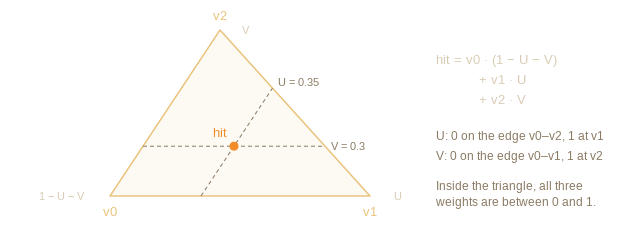
The same weights blend anything else your mesh keeps per vertex. The position, in the mesh’s space and in the world:
TlasInstance instance = tlas.Instances[hit.InstanceIndex];
instance.Blas.Geometry.GetTriangle(hit.TriangleIndex, out var a, out var b, out var c);

var w = 1 - hit.U - hit.V;
Vector3 local = a * w + b * hit.U + c * hit.V;
Vector3 world = Vector3.Transform(local, instance.World);
The surface’s normal, as its triangle faces, turned toward where the ray came from, since triangles are hit from either side. A normal goes through the transpose of the inverse matrix, which keeps it at right angles to a surface a non-uniform scale has stretched:
Vector3 faceNormal = Vector3.Cross(b - a, c - a);
Vector3 normal = Vector3.Normalize(Vector3.TransformNormal(faceNormal, Matrix.Transpose(instance.WorldInverse)));

if (Vector3.Dot(normal, ray.Direction) > 0) normal = -normal;
And anything else your mesh keeps per vertex, through its own indices: here a texture coordinate, from the arrays
the IndexedTriangles of the quick start guide was made from:
var t = hit.TriangleIndex * 3;
Vector2 uv = texCoords[indices[t]] * w + texCoords[indices[t + 1]] * hit.U + texCoords[indices[t + 2]] * hit.V;
That is everything an editor needs to place an object where the cursor points, standing on the surface: the point, and the normal to stand it along.
Tracing one mesh
A MeshBlas answers the same two questions on its own, in the mesh’s own space, with no scene around it:
a tool that paints on one selected mesh, or a check against a single collider. Take the ray into the mesh’s space with
the inverse of its world matrix, and keep its direction as that makes it:
var inverse = Matrix.Invert(world);
var local = new Ray(Vector3.Transform(ray.Position, inverse), Vector3.TransformNormal(ray.Direction, inverse));

if (blas.Intersect(local, float.MaxValue, out var distance, out var triangle, out var u, out var v))
{
    // the same distance along the world ray: its direction was taken across, not normalized
    Vector3 point = ray.Position + ray.Direction * distance;
}
A direction taken through the inverse is shortened or stretched by the object’s scale, and a distance along it is
the same ray parameter as along the world ray. Normalizing it would change the parameter, and the distance with it.
That is also how a Tlas compares hits on instances of different sizes.
MeshBlas queries
| Method | Description |
|---|---|
Intersect(in Ray ray, float maxDistance, out float distance, out int triangleIndex, out float u, out float v) |
Whether the ray, in the mesh’s space, hits a triangle closer than maxDistance, and the nearest: its distance, its index and the barycentric u and v of the hit. With no hit, distance is maxDistance and triangleIndex −1. |
IntersectAny(in Ray ray, float maxDistance) |
Whether any triangle blocks the ray, in the mesh’s space, closer than maxDistance. Stops at the first hit. |
Distances and long rays
- A ray parameter. Distances, given and returned, are along the ray’s direction as it is:
tis the pointray.Position + ray.Direction * t. For a direction of length 1 that is a distance in world units. - A segment. A direction from one point to another, not normalized, with a maximum distance of 1, tests exactly
the segment between them:
tlas.IntersectAny(new Ray(a, b - a), 1f). The backstop is then 10−4 of the segment’s length. - No end. Pass
float.MaxValue. The closest hit also takesfloat.PositiveInfinityas it is, and the any hit, on the CPU and the GPU alike, takes it asfloat.MaxValue. A directional light is far away, not infinitely far: a long, finite ray says as much. - No direction. A ray whose direction is zero hits nothing.