
Color legend plain property method
A camera is a pose and a projection. The pose is where it is and which way it faces: Position and
Orientation. The projection is how much of the world it sees: a field of view, an aspect ratio and two clip
planes. Update turns them into the View and Projection matrices. Names are colored by what
they are: a property or a method.
Position
Position is where the camera is, in world coordinates. Set it whenever you like:
camera.Position = new Vector3(120, 40, -300);
camera.Position += camera.Forward * 2; // two units ahead
It stays in world coordinates however far the camera goes. Only the view matrix is built relative to the floating origin, and you never have to rebase a position yourself.
While a controller is attached, it moves the camera in its own update: a free camera moves on from a position you set, while an animated camera puts the camera back on its path. See who owns the pose.
Orientation
Orientation is a quaternion: the rotation from the camera’s own axes to the world’s. The camera keeps no
angles, so it can face any way, upside down and rolled included, with no gimbal lock. Build an orientation with
MonoGame’s quaternion helpers:
// 30° to the left and 10° down, no roll
camera.Orientation = Quaternion.CreateFromYawPitchRoll(
    MathHelper.ToRadians(30), MathHelper.ToRadians(-10), 0);

// a quarter turn to the left, about the camera's own up axis
camera.Orientation *= Quaternion.CreateFromAxisAngle(Vector3.Up, MathHelper.PiOver2);
The order of a product decides the frame of the turn: Orientation * turn turns about the camera’s own axes, and
turn * Orientation about the world’s.
The camera stores a normalized copy of what you give it, so a quaternion that has drifted from unit length after many
products is fine. It throws ArgumentException for a quaternion that can’t be a rotation: one of length zero, or with
a NaN or an infinite component.
The basis vectors
Forward, Right and Up are the camera’s axes in world space, as unit vectors. They are
worked out when the orientation changes, not when you read them, so they cost nothing to read and are up to date at
once, before the next update. Use them to move relative to the view, to place things in front of the camera, or for
the audio listener.
// a light a little ahead of the camera and to its right
light.Position = camera.Position + camera.Forward * 3 + camera.Right;
Looking at a point
LookAt turns the camera to face a point in the world, with no roll against the up direction you give:
camera.LookAt(tower.Position, Vector3.Up);
The target and the camera’s Position are both in world coordinates. Two cases still give a valid orientation:
- A target at the camera’s own position has no direction, and leaves the orientation as it was.
- A target along the up direction gives no roll reference, and world +Y takes its place. A target straight above or below the camera gets the default view tipped up or down by 90°: looking down, the top of the view points toward −Z.
The Camera(position, target, up) constructor calls LookAt for you. A free camera keeps its own
orientation and writes it back every frame, so a LookAt made while one is attached lasts until its next
update; attach it again to make it start from the new orientation.
Camera pose properties
| Property | Type | Description |
|---|---|---|
Position |
Vector3 |
Where the camera is, in world coordinates. The origin for Camera(). |
Orientation |
Quaternion |
The rotation from the camera’s axes to the world’s, stored normalized. Throws ArgumentException for a quaternion of length zero, or with a NaN or an infinite component. |
Forward |
Vector3 |
Read-only. The direction the camera faces, its local −Z, as a unit vector in world space. |
Right |
Vector3 |
Read-only. The camera’s right, its local +X, as a unit vector in world space. |
Up |
Vector3 |
Read-only. The camera’s up, its local +Y, as a unit vector in world space. |
Camera pose methods
| Method | Description |
|---|---|
LookAt(Vector3 worldTarget, Vector3 worldUp) |
Turns the camera to face the target, with no roll against worldUp. A target at the camera’s position changes nothing; a target along worldUp still gives a valid orientation. |
Projection
Four numbers decide what the camera sees:
FieldOfViewDegrees, the vertical angle of the view, strictly between 0 and 180. 45 by default; 60 to 90 suit most games. The horizontal angle follows from the aspect ratio.AspectRatio, the width of the view over its height. 4:3 by default; set it from the viewport.NearPlaneandFarPlane, the distances in front of the camera between which things are drawn. 0.1 and 1000 by default.
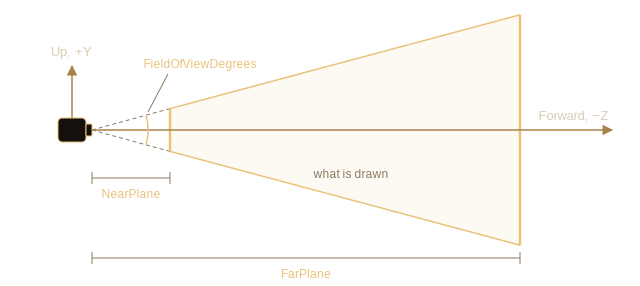
Each setter checks its value and throws ArgumentOutOfRangeException for one out of range: a field of view of 0 or
less, or of 180 or more, and an aspect ratio or a clip distance that isn’t a positive, finite number. That the near
plane is closer than the far plane is checked later, by Update, so you can set the two in any order:
camera.NearPlane = 2000; // fine for now, though FarPlane is still 1000
camera.FarPlane = 50000;
camera.Update(0);        // checks them: 2000 is less than 50000
The ratio of the two planes spreads the precision of the depth buffer. Far things fight over the same depth values when the near plane is tiny, so keep it as far out as the scene allows: moving it from 0.1 to 1 helps far more than pulling the far plane in.
A window that changes size
The aspect ratio has to follow the window. Set it again when the window’s size changes:
Window.AllowUserResizing = true;
Window.ClientSizeChanged += (_, _) =>
{
    var size = Window.ClientBounds;

    // a minimized window has no size, and an aspect ratio of 0 would throw
    if (size.Width > 0 && size.Height > 0)
        _camera.AspectRatio = (float)size.Width / size.Height;
};
For a split screen, give each camera the aspect ratio of its own viewport.
Camera projection properties
| Property | Type | Description |
|---|---|---|
FieldOfViewDegrees |
float |
The vertical field of view, in degrees, strictly between 0 and 180. 45 by default. Throws ArgumentOutOfRangeException outside that range. |
AspectRatio |
float |
The width of the view over its height. 4/3 by default. Throws ArgumentOutOfRangeException for a value that isn’t positive and finite. |
NearPlane |
float |
The distance of the near clip plane. 0.1 by default. Throws ArgumentOutOfRangeException for a value that isn’t positive and finite. |
FarPlane |
float |
The distance of the far clip plane. 1000 by default. Throws ArgumentOutOfRangeException for a value that isn’t positive and finite. |
The matrices
View and Projection are what your effects need. They change only in Update, which does
three things in order:
- Runs the controller, if one is attached, with the seconds it was given. The controller moves and turns the camera.
- Moves the floating origin if the camera has gone more than a cell from it, see the floating origin.
- Rebuilds the matrices that changed: the view when the position or the orientation changed, the projection when one of its four numbers did. A frame where nothing changed costs next to nothing.
So the matrices always describe the camera as it was at its last update. A pose set after the update shows in the
matrices of the next one, though Forward, Right and Up follow the orientation at once. Update the
camera once per frame, after the game has moved what the camera follows and before anything draws.
The constructor runs a first update, so a new camera’s matrices are ready before its first frame. Setting a value to the one it already has changes nothing and rebuilds nothing.
Projection is a standard perspective matrix, Matrix.CreatePerspectiveFieldOfView of the four numbers.
View is built from the camera’s RebasedPosition, not from its Position: draw every object
relative to the same offset, as the picking and large worlds page
shows.
Camera matrix properties
| Property | Type | Description |
|---|---|---|
View |
Matrix |
Read-only. The view matrix, from the camera’s RebasedPosition and Orientation at the last Update. |
Projection |
Matrix |
Read-only. The perspective projection of the field of view, the aspect ratio and the clip planes at the last Update. |