
Color legend method
BorrowedTorch.FabricSimulator is the cloth solver of Kindling. A sheet of cloth is a grid of points joined by threads, and a compute shader moves the points: it integrates them under gravity and wind, pulls the threads back to their length, keeps the folds from closing up and the layers from passing through each other, and works out the normals. The points stay on the GPU the whole time and never come back to the CPU unless you ask. Your own shader reads them from the same buffer and draws the sheet: the library has no lights, no materials and no draw calls.
These pages cover the library from setup to every public type:
| Page | What it covers |
|---|---|
| Quick start guide (this page) | Installing, the shaders in your content, the parts, the conventions, a first sheet, what the library leaves to you |
| The sheet and the step | Building the sheet, settings read live and at a build, rebuilding by itself, the sheet as built, the fixed step, several sheets, driving the solver yourself |
| Drawing the cloth | The vertex shader, what to bind every frame, the triangles, three rules, drawing between steps, the particle, the headers’ version |
| Placement and pins | Where the sheet hangs and at what angle, the starting ripple, pin presets and custom pins, pins on the live sheet, long-range attachments, moving pins |
| Settings | Two lifetimes, rates per 1/120 s, the solver, bending and creases, mass and gravity, the sheet’s own settings, cost, back to the defaults |
| Wind and air | Wind as the air’s velocity, gusts, wind that varies across the sheet, drag, aerodynamic pressure |
| Collisions and rest | The sphere and the ground, friction, self-collision, thickness and slack, the spatial hash, rest, holding settled cloth still |
| Cuts and tears | Cutting the flat sheet, what a cut does, single threads and mending, clean lips, drawing a cut mesh, the awkward cases, the damage |
| Cutting what you see | A pose to pick against, a knife’s drag, how a stroke joins, layers, scissors, surfaces and rebuilds |
| Diagnostics | Reading the sheet back, rest and hold, outrunning the contacts, what self-collision lost, penetration, creases |
| Tour of the solver | An illustrated walk through the solver’s source, layer by layer, on a page of its own |
| Glossary | Every public type and HLSL file with its members in alphabetical order, one page each |
Installing
Add the package to your project:
dotnet add package BorrowedTorch.FabricSimulator
| Requirement | Version |
|---|---|
| .NET | 10 (net10.0-windows) |
| Operating system | Windows |
| MonoGame | The compute fork, MonoGame.Framework.Compute.WindowsDX.NoMemoryLeak 3.8.3.1, installed with the package: DirectX 11, compute shaders and structured buffers. The GraphicsDeviceManager must use GraphicsProfile.HiDef |
| Content builder | The fork’s, MonoGame.Content.Builder.Task.Compute and the dotnet-mgcb-compute tool: the solver ships as HLSL, compiled by your content build |
Stock MonoGame has no compute shaders and no structured buffers, so it can’t run the solver. The content builder is yours to add, along with a tool manifest that holds its tool:
dotnet add package MonoGame.Content.Builder.Task.Compute
dotnet new tool-manifest
dotnet tool install dotnet-mgcb-compute
You need the builder for your own shader anyway: it reads a StructuredBuffer, which stock MGCB can’t compile and
stock MonoGame can’t bind. Without it, the build stops with BTFS0001 rather than failing later at Content.Load.
The shaders in your content
The package ships the solver as HLSL source, not as a compiled effect: a compiled effect carries an MGFX version the runtime checks and rejects outright, so it would be tied to one build of one fork, and the error wouldn’t mention the package. Instead, on every build, it copies the source into your content folder, where your content build compiles it along with everything else:
| File | What it is |
|---|---|
Content/BorrowedTorch.FabricSimulator.mgcb |
The package’s own response file, beside your Content.mgcb |
Content/Effects/Fabric/FabricCompute.fx |
The solver, see FabricCompute.fx |
Content/Effects/Fabric/FabricSimulation.fxh |
The solver’s body, which FabricCompute.fx includes |
Content/Effects/Fabric/FabricParticle.fxh |
The particle record, the grid sizes and the texture coordinates, shared by the solver and your shader, see FabricParticle.fxh |
Content/Effects/Fabric/FabricParticleBuffer.fxh |
What your shader includes: the record, the buffer to read it from, and the functions that draw a vertex, see FabricParticleBuffer.fxh |
The build turns FabricCompute.fx into Content/Effects/Fabric/FabricCompute.xnb in your output, which is
FabricEffect.DefaultEffectPath, "Effects/Fabric/FabricCompute", for a ContentManager rooted at Content.
The two response files don’t collide: the builder names its output folders after each .mgcb.
The files land in your tree, not the package cache, because the builder writes its output next to the .mgcb that
names it, and a package folder is shared by every project on the machine. They are worth a .gitignore line, as
Content/bin/ and Content/obj/ are. The copy stays the package’s: every build refreshes it, so an edit made to it
in place is lost at the next one. To change the solver, turn the copying off first, as below.
Build properties
| Property | Default | What it does |
|---|---|---|
BorrowedTorchFabricContentDir |
Content\ in the project’s folder |
Your content root, with or without the trailing separator: set it if your ContentManager.RootDirectory isn’t Content. Set it in the project file or Directory.Build.props, so the package’s targets see it when they are imported. |
BorrowedTorchFabricProvideShaderSource |
true for an executable, false for a library |
Whether the package takes part in your content build at all: the copy and both build messages below. false means you compile FabricCompute.fx yourself. |
BorrowedTorchFabricShaderSourceDir |
The package’s folder | Not a setting: where the package keeps its own copy of the sources, for a Copy target of your own. |
The package’s targets flow to the projects that reference yours, so a game that gets the package through a library of its own still gets the shaders, while the library in between compiles none.
Build messages
| Code | Kind | When |
|---|---|---|
BTFS0001 |
Error | The copying is on and the project has no compute content builder: add MonoGame.Content.Builder.Task.Compute and the tool, as in installing, or turn the copying off. |
BTFS0002 |
Warning | The copying is off, but the response file an earlier build copied is still in your content folder. The builder finds .mgcb files by scanning the folder, so the solver is still compiled from it, and once you compile FabricCompute.fx from a .mgcb of your own, two content builds race for one output path. |
Turning the copying off deletes nothing: by then the copy in your tree may be one you have edited, and a build that removed it as a side effect would lose that silently. Deleting it is a step of its own:
dotnet build -t:BorrowedTorchFabricRemoveShaderSource
That deletes the files the package copied, by name, and the Effects/Fabric folder only once nothing else is left in
it, so files of your own there are kept. It is safe to run again, and does nothing when there is nothing to remove.
The parts
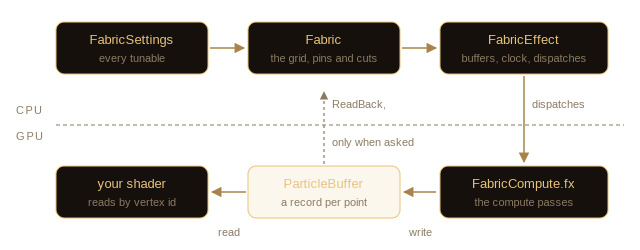
Four parts make up the library, with a shader of yours at the end:
- The settings. A
FabricSettingsholds every tunable: the grid, the solver, the bending, the air, the colliders, the rest. It is a plain object you change in place, and the solver takes it up every frame. See settings. - The sheet. A
Fabricbuilds the grid, with where it hangs and what holds it, and drives the solver: you call itsUpdateevery frame. Pins, cuts and tears change the live sheet through it. See the sheet and the step. - The solver. A
FabricEffectowns the particle buffers on the GPU, the compute passes and the fixed-step clock, one per sheet. ItsParticleBufferholds aFabricParticleper point, the sheet as of the latest step. - Cuts and picking. A cut sheet draws from a
FabricCutMesh, whose lips follow the cuts at any angle, and aFabricSurfaceturns a ray from the cursor into a point of the weave, so the player can cut crumpled cloth where they see it. See cuts and tears and cutting what you see. - Your shader. It includes
FabricParticleBuffer.fxhand reads the particles by vertex id: no vertex stream and no readback. See drawing the cloth.
The types are in two namespaces, and the shaders in your content:
| Where | Types |
|---|---|
BorrowedTorch.FabricSimulator.Simulation |
Fabric, FabricSettings, FabricOrientation, FabricPinMode, FabricEffect, FabricParticle, FabricTearFlags, FabricCutMesh, FabricSeamVertex, FabricSurface, FabricSurfaceHit, FabricStroke |
BorrowedTorch.FabricSimulator.Diagnostics |
PenetrationCheck, CreaseCheck, NumericChecks |
Content/Effects/Fabric/ |
FabricParticle.fxh, FabricParticleBuffer.fxh, FabricCompute.fx |
Conventions
- World space, in meters and seconds. The particles are simulated in world space, and gravity, the wind and the
colliders are world vectors: draw the sheet with no world matrix. Lengths are in meters, speeds in meters per second,
the cloth’s weight in kilograms per square meter. Positions, rotations and rays are MonoGame’s
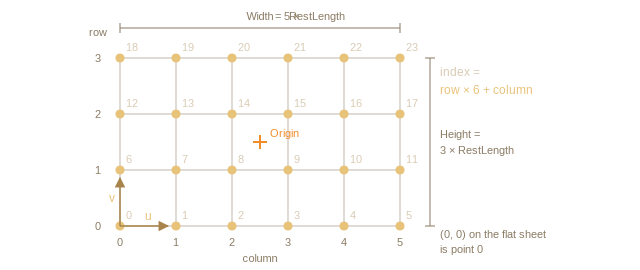
Vector3,QuaternionandRay. - The grid. A sheet is
WidthInParticlespoints across andHeightInParticlesup,RestLengthapart. A point’s index isrow * WidthInParticles + column, row by row up from the bottom edge of an upright sheet, which is the free edge of one hanging from its top.ParticleIndexworks it out and checks it. - Flat-sheet coordinates. Cuts are drawn on the unfolded sheet, in meters:
(0, 0)is the point of index 0,uruns along the width andvalong the height. So a cut lands on the same threads whatever the cloth is doing, and at any resolution. - Built, then live. The grid, its spacing, where the sheet hangs and what holds it are read when the sheet is built; everything else in the settings is read every frame. See two lifetimes.
- A fixed step. The solver steps 120 times a second by default, whatever the frame rate, so the cloth behaves the same at 30 frames a second and at 240.
Origin is the middle.A first sheet
Four files, on top of the packages above: a sheet 96 points across and 64 up, pinned along its top edge, falling under
gravity and blowing away from the camera, lit by the solver’s own normals. Program.cs:
using var game = new ClothGame();
game.Run();
ClothGame.cs:
using BorrowedTorch.FabricSimulator.Simulation;
using Microsoft.Xna.Framework;
using Microsoft.Xna.Framework.Graphics;

public class ClothGame : Game
{
    private FabricSettings _settings;
    private FabricEffect _solver;
    private Fabric _fabric;

    private Effect _cloth;
    private IndexBuffer _indices;
    private VertexBuffer _vertices;
    private Matrix _viewProjection;
    private Vector3 _cameraPosition;

    public ClothGame()
    {
        // compute needs HiDef: Reach has no compute stage to compile the solver into
        _ = new GraphicsDeviceManager(this) { GraphicsProfile = GraphicsProfile.HiDef };
        Content.RootDirectory = "Content";
    }

    protected override void LoadContent()
    {
        _settings = new FabricSettings
        {
            WidthInParticles = 96,
            HeightInParticles = 64,
            RestLength = 0.06f,                       // 6 cm between points: a sheet 5.7 m wide and 3.78 m high
            Wind = new Vector3(0.0f, 0.0f, -6.0f)     // the air's velocity, away from the camera
        };

        _solver = new FabricEffect(GraphicsDevice, Content);   // Effects/Fabric/FabricCompute
        _fabric = new Fabric(_solver, _settings);

        // nothing is built until Rebuild, or the first Update, so the layout comes first
        _fabric.Origin = new Vector3(0.0f, 3.0f, 0.0f);         // the middle of the sheet
        _fabric.PinMode = FabricPinMode.TopEdge;
        _fabric.Rebuild();

        // two triangles per grid square, indexing the particles directly: 32-bit indices,
        // since 16-bit ones overflow silently past 65,536 particles
        var indices = _fabric.CreateTriangleIndices();

        _indices = new IndexBuffer(GraphicsDevice, IndexElementSize.ThirtyTwoBits, indices.Length, BufferUsage.WriteOnly);
        _indices.SetData(indices);

        // a draw needs a vertex buffer bound, but nothing reads it: the shader takes everything
        // from the particle buffer, by vertex id. One float per vertex will do
        var placeholder = new VertexDeclaration(new VertexElement(0, VertexElementFormat.Single, VertexElementUsage.Position, 0));

        _vertices = new VertexBuffer(GraphicsDevice, placeholder, _fabric.ParticleCount, BufferUsage.WriteOnly);

        _cloth = Content.Load<Effect>("Effects/Cloth");

        _cameraPosition = new Vector3(0.0f, 3.0f, 7.0f);
        _viewProjection =
            Matrix.CreateLookAt(_cameraPosition, new Vector3(0.0f, 2.6f, 0.0f), Vector3.Up) *
            Matrix.CreatePerspectiveFieldOfView(MathHelper.PiOver4, GraphicsDevice.Viewport.AspectRatio, 0.1f, 100.0f);
    }

    protected override void Update(GameTime gameTime)
    {
        _fabric.Update((float)gameTime.ElapsedGameTime.TotalSeconds);

        base.Update(gameTime);
    }

    protected override void Draw(GameTime gameTime)
    {
        GraphicsDevice.Clear(Color.CornflowerBlue);

        // both sides of the sheet show as soon as it folds
        GraphicsDevice.RasterizerState = RasterizerState.CullNone;
        GraphicsDevice.DepthStencilState = DepthStencilState.Default;

        // every frame: which of the solver's two buffers holds the latest step changes as it steps
        _cloth.Parameters["FabricParticles"].SetValue(_solver.ParticleBuffer);
        _cloth.Parameters["FabricWidthInParticles"].SetValue(_fabric.WidthInParticles);
        _cloth.Parameters["FabricHeightInParticles"].SetValue(_fabric.HeightInParticles);

        // no world matrix: the particles are in world space already
        _cloth.Parameters["WorldViewProjection"].SetValue(_viewProjection);
        _cloth.Parameters["CameraPosition"].SetValue(_cameraPosition);

        GraphicsDevice.SetVertexBuffer(_vertices);
        GraphicsDevice.Indices = _indices;

        foreach (var pass in _cloth.CurrentTechnique.Passes)
        {
            pass.Apply();
            GraphicsDevice.DrawIndexedPrimitives(PrimitiveType.TriangleList, 0, 0, _fabric.TriangleCount);
        }

        base.Draw(gameTime);
    }

    protected override void UnloadContent() => _solver.Dispose();
}
Content/Effects/Cloth.fx, yours, not the package’s. The #include finds the header because the package put it next
door, in Content/Effects/Fabric:
#include "Fabric/FabricParticleBuffer.fxh"

float4x4 WorldViewProjection;
float3 CameraPosition;

struct VSOutput
{
    float4 Position      : SV_POSITION;
    float3 WorldPosition : TEXCOORD1;
    float3 Normal        : NORMAL0;
    float2 TexCoord      : TEXCOORD0;
};

VSOutput VS(float unused : POSITION0, uint vertexId : SV_VertexID)
{
    FabricParticle p = FabricParticles[vertexId];

    VSOutput output;

    output.Position = mul(float4(p.Position, 1.0), WorldViewProjection);
    output.WorldPosition = p.Position;                      // already in world space
    output.Normal = p.Normal;                               // the solver's, not the triangle's
    output.TexCoord = FabricTextureCoordinates(vertexId);

    return output;
}

float4 PS(VSOutput input) : SV_TARGET
{
    float3 normal = normalize(input.Normal);
    float3 toCamera = normalize(CameraPosition - input.WorldPosition);

    // culling is off, so half the sheet shows its back while the solver's normal points one way:
    // turn it towards the camera, or the far side of every fold is lit as if from behind
    if (dot(normal, toCamera) < 0.0)
        normal = -normal;

    float lambert = saturate(dot(normal, normalize(float3(0.3, 0.8, 0.6))));

    return float4(float3(0.85, 0.25, 0.30) * (0.25 + 0.75 * lambert), 1.0);
}

technique ClothTechnique
{
    pass MainPass
    {
        VertexShader = compile vs_5_0 VS();
        PixelShader = compile ps_5_0 PS();
    }
}
And Content/Content.mgcb, your own content build, with Cloth.fx in it like any effect. The solver’s response file
sits beside it, written by the package.
Every frame, Update takes the settings up and runs as many 1/120 s steps as the frame’s time affords,
two at MonoGame’s default 60 frames a second. The sheet hangs from its top row; everything below it falls, swings and
blows in the wind, which is the air’s velocity, not a force: see wind and air. The
drawing page has the rules the shader follows and why, and the
pins page other ways to hang a sheet.
Fabric constructor
Names are colored by what they are: a method.
| Method | Description |
|---|---|
Fabric(FabricEffect effect, FabricSettings settings) |
A sheet driven by that solver, with those settings. Builds nothing: the sheet is built by Rebuild, or by the first Update that finds it unbuilt, so where it hangs and what holds it can be set in between, or in an object initializer. Throws ArgumentNullException for either one null. |
FabricEffect constructor
| Method | Description |
|---|---|
FabricEffect(GraphicsDevice graphicsDevice, ContentManager contentManager, string effectPath = DefaultEffectPath) |
Loads the solver through the content manager and takes a copy of it for this sheet, so several sheets can share one ContentManager. Throws when the effect isn’t the solver, and when the headers in your content come from another release than the assembly, see the headers’ version. |
The other members of both are on the pages of what they do: building and stepping on the sheet and step page, and what a renderer binds on the drawing page.
What it leaves to you
The library moves the cloth. The rest is the game’s:
- Drawing. No lights, no materials, no draw calls. Your shader reads the particles; the drawing page has what it must respect.
- Colliders. The cloth meets a sphere, a level ground and itself, and nothing else: your scene’s meshes aren’t colliders. See collisions and rest.
- The air. The wind is a velocity you set, every frame if you like; gusts are yours to compute, and air that varies from place to place is an HLSL function of yours. See wind and air.
- Moving pins. Pins can be set and released on the live sheet, but moving one means reading the whole sheet back and uploading it again, a stall each time. See moving pins.
- Saving. The sheet’s state lives on the GPU.
ReadBackandCopyTearStatehand it to you; what you keep of it is up to you. - Threads. A
Fabricand itsFabricEffectdrive the graphics device: call them from the thread that owns it. A capturedFabricSurfacenever changes, so any number of threads may pick against it at once.