
Color legend plain property method
A CameraPath is a smooth curve through waypoints, with an orientation at every point of it. Give it a distance
along the curve and it tells you where that is, which way the curve heads there and which way to face. Equal
distances are equal lengths of curve, so a distance that grows at a steady rate moves at a steady speed. A waypoint
can also slow the travel to a halt, hold it there a while and speed it up again, and the path works out where that
puts a camera at any time of a run. The animated camera plays a path; the path itself is
plain data, which you can also sample for a rail camera, a cutscene of your own or anything else that should glide
along a curve. Names are colored by what they are: a property or a
method; values and fields keep the plain color.
Waypoints
A CameraWaypoint is a position and a way to face, one of three
CameraWaypointOrientationModes:
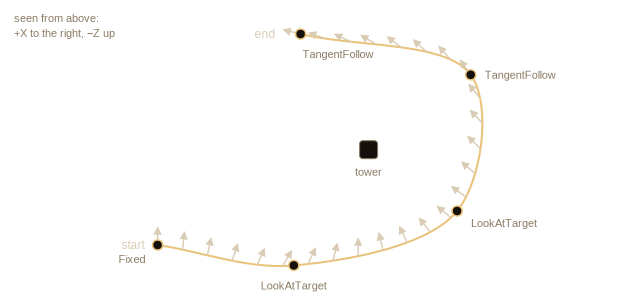
Fixedfaces the way itsOrientationsays: a shot framed by hand.LookAtTargetfaces the pointLookAtTarget, with no roll against the path’sWorldUp.TangentFollowfaces the way the path heads at the waypoint, with no roll againstWorldUp: it looks down the track.
A factory makes each kind:
var opening = CameraWaypoint.CreateFixed(new Vector3(0, 12, 45), Quaternion.Identity); // facing -Z
var circle = CameraWaypoint.CreateLookAtTarget(new Vector3(35, 10, 0), towerPosition);  // facing the tower
var descent = CameraWaypoint.CreateTangentFollow(new Vector3(0, 4, -35));               // facing along the path
var here = CameraWaypoint.CreateFixedFromCamera(camera); // where the camera is, facing where it faces
A waypoint is a small struct with public fields; the factories fill the ones its mode doesn’t use with defaults. A
Fixed waypoint whose orientation is a zero quaternion, such as default(CameraWaypoint), faces −Z. Three more
fields, EaseIn, EaseOut and HoldSec, decide how the camera travels through the waypoint
rather than where it faces, see easing and holds. The factories leave them off: no easing and no
hold.
Between two waypoints, the orientation turns from one waypoint’s to the next, in proportion to the distance traveled
along the segment. So the modes mix freely: a fixed opening shot can turn smoothly toward a target at the next
waypoint. One consequence for TangentFollow: the camera faces along the curve exactly at the waypoints, and turns
evenly between them, so on a long bend it doesn’t follow the curve point by point. Add waypoints along the bend for a
closer follow.
CameraWaypoint fields
| Field | Type | Description |
|---|---|---|
Position |
Vector3 |
Where the waypoint is, in world coordinates. The curve passes through it. |
Orientation |
Quaternion |
The facing of a Fixed waypoint. Normalized when used; a zero quaternion faces −Z. |
LookAtTarget |
Vector3 |
The point a LookAtTarget waypoint faces, in world coordinates. |
OrientationMode |
CameraWaypointOrientationMode |
How the waypoint’s facing is decided: Fixed, LookAtTarget or TangentFollow. |
EaseIn |
BaseShapingFunction? |
How the camera leaves the waypoint: its speed over the first half of the next segment, as a share of cruise speed, rising from rest with the curve. null, the default, travels it at cruise speed. |
EaseOut |
BaseShapingFunction? |
How the camera arrives at the waypoint: its speed over the second half of the segment before, falling from cruise to rest along 1 minus the curve. null, the default, travels it at cruise speed. |
HoldSec |
float |
The seconds the camera waits at the waypoint before it leaves. 0, the default, passes straight through. |
CameraWaypoint factory methods
| Method | Description |
|---|---|
CreateFixed(Vector3 position, Quaternion orientation) |
Static. A Fixed waypoint facing the way of the orientation. |
CreateLookAtTarget(Vector3 position, Vector3 lookAtTarget) |
Static. A waypoint facing the target. |
CreateTangentFollow(Vector3 position) |
Static. A waypoint facing the way the path heads there. |
CreateFixedFromCamera(Camera camera) |
Static. A Fixed waypoint at the camera’s position, with its orientation. Throws ArgumentNullException for null. |
CameraWaypointOrientationMode values
| Value | Description |
|---|---|
Fixed |
Faces the way of the waypoint’s Orientation. |
LookAtTarget |
Faces the waypoint’s LookAtTarget, leveled against the path’s WorldUp. |
TangentFollow |
Faces the way the path heads at the waypoint, leveled against WorldUp. |
Building a path
Add the waypoints in the order the path visits them, and edit them through the path’s methods:
var path = new CameraPath();
path.AddWaypoint(opening);
path.AddWaypoint(circle);
path.AddWaypoint(descent);

// one more between the first two
path.InsertWaypoint(1, CameraWaypoint.CreateTangentFollow(new Vector3(25, 11, 30)));

// move the opening shot up a little; waypoints are structs, so change a copy
path.SetWaypoint(0, path.Waypoints[0] with { Position = new Vector3(0, 15, 45) });

path.RemoveWaypointAt(2);
path.ClearWaypoints();
Waypoints is a read-only view of them in order: read it, count it, loop over it, but change waypoints with the
methods, which also mark the path for rebuilding. An index out of range throws
ArgumentOutOfRangeException.
Open and closed paths
An open path starts at its first waypoint and ends at its last. Set Closed and it also runs from the last
waypoint back to the first, as smoothly across that seam as anywhere else: a loop around a building, a patrol, an
attract mode.
var orbit = new CameraPath { Closed = true };

for (var i = 0; i < 8; i++)
{
    var angle = MathHelper.TwoPi * i / 8;
    var position = new Vector3(MathF.Sin(angle) * 40, 15, MathF.Cos(angle) * 40);
    orbit.AddWaypoint(CameraWaypoint.CreateLookAtTarget(position, Vector3.Zero));
}
A loop needs at least three waypoints: with fewer, a closed path stays open. IsClosed says whether it really
loops, and SegmentCount how many segments it has: one per waypoint for a loop, one fewer for an open path.
WorldUp is the up that LookAtTarget and TangentFollow waypoints level their roll against: Vector3.Up by
default. Change it for a world whose up is another axis.
CameraPath properties
| Property | Type | Description |
|---|---|---|
Waypoints |
IReadOnlyList<CameraWaypoint> |
Read-only. The waypoints in path order. Edit them with the methods below. |
Closed |
bool |
Whether the path loops back to its first waypoint. Takes effect with three waypoints or more. Off by default. |
IsClosed |
bool |
Read-only. Whether the path really loops: Closed is set and it has at least three waypoints. |
WorldUp |
Vector3 |
The up that LookAtTarget and TangentFollow waypoints level their roll against. Vector3.Up by default. |
SegmentCount |
int |
Read-only. The number of segments between waypoints: one fewer than the waypoints for an open path, as many for a loop, 0 for fewer than two waypoints. |
Length |
float |
Read-only. The length of the whole curve, in world units. |
CameraPath editing methods
| Method | Description |
|---|---|
CameraPath(int samplesPerSegment = 32) |
An empty path. samplesPerSegment sets how finely each segment is measured, see accuracy. Throws ArgumentOutOfRangeException when it is less than 1. |
AddWaypoint(CameraWaypoint waypoint) |
Adds a waypoint at the end. |
InsertWaypoint(int index, CameraWaypoint waypoint) |
Inserts a waypoint at the index; the ones from there on move up by one. |
SetWaypoint(int index, CameraWaypoint waypoint) |
Replaces the waypoint at the index. |
RemoveWaypointAt(int index) |
Removes the waypoint at the index. |
ClearWaypoints() |
Removes every waypoint. |
The shape of the curve
The curve is a centripetal Catmull-Rom spline: it passes through every waypoint in order, and its direction changes smoothly through each of them. The centripetal kind spaces its segments by the distances between the waypoints, so waypoints placed unevenly, some close together and some far apart, still give a curve with no loops, kinks or overshoots within a segment.
At the ends of an open path, the curve leaves the first waypoint heading roughly toward the second, and arrives at the last coming from the one before it. Two waypoints give a straight line between them.
A curve through few waypoints can bulge more than you would like between two that are far apart. Add a waypoint where the curve should pass rather than moving its neighbors: each waypoint shapes only four segments, the two that meet at it and the next one beyond each of those.
Sampling
A point of the path is a distance along it, in world units from its first waypoint, from 0 to Length.
SampleByPathDistance returns everything about it as a CameraPathPoint:
// something that travels the path at 5 units a second, and starts over at the end
if (path.Length > 0)
{
    _distance = (_distance + 5 * seconds) % path.Length;

    var point = path.SampleByPathDistance(_distance);
    marker.Position = point.Position;
    marker.Rotation = point.Orientation;
}
| What | Where |
|---|---|
| The position on the curve | point.Position |
| The direction the curve heads, a unit vector | point.Tangent |
| The orientation, between the two waypoints’ | point.Orientation |
| The distance that was sampled, after clamping | point.DistanceUnits |
PositionByPathDistance returns the position alone and skips the rest, for when that is all you need. Both have a
normalized form, which takes a fraction of the path from 0 to 1 instead of a distance:
path.SampleByPathDistanceNormalized(0.5f) is the middle of the path, halfway along its length.
Distances are clamped to the path: below 0 is the start, beyond Length the end, on a closed path too. Wrap them
yourself, as with % above, to go round a loop. A path with one waypoint has no curve: every distance gives that
waypoint’s position and orientation. An empty path gives the origin, facing −Z.
GetWaypointOrientation returns the orientation a waypoint resolves to, for a LookAtTarget or a TangentFollow
waypoint the one worked out from its target or the curve. It is the orientation the path has at that waypoint.
CameraPath sampling methods
| Method | Description |
|---|---|
SampleByPathDistance(float pathDistance) |
The position, direction and orientation at the distance along the path, clamped to 0 to Length. |
SampleByPathDistanceNormalized(float value) |
The same at a fraction of the length, clamped to 0 to 1. |
PositionByPathDistance(float pathDistance) |
The position alone at the distance, clamped to 0 to Length. |
PositionByPathDistanceNormalized(float value) |
The position alone at a fraction of the length, clamped to 0 to 1. |
ClosestDistance(Vector3 worldPosition) |
The distance along the path of its point nearest the position. 0 for a path with fewer than two waypoints. |
GetWaypointOrientation(int index) |
The orientation the waypoint resolves to. Throws ArgumentOutOfRangeException for an index out of range. |
CameraPathPoint fields
| Field | Type | Description |
|---|---|---|
Position |
Vector3 |
Read-only. The point on the curve, in world coordinates. |
Tangent |
Vector3 |
Read-only. The direction the curve heads there, a unit vector. Vector3.Forward where it has none, as on a path of one waypoint. |
Orientation |
Quaternion |
Read-only. The orientation there, turned between the orientations of the waypoints on either side. |
DistanceUnits |
float |
Read-only. The distance along the path that was sampled, after clamping. |
The nearest point
ClosestDistance finds the point of the path nearest a position and returns its distance along the path. The
animated camera uses it to join a path where the camera is. A rail camera is another use: a path laid along a
corridor, the camera kept at the point of it nearest the player, looking at them.
var d = rail.ClosestDistance(player.Position);

camera.Position = rail.PositionByPathDistance(d);
camera.LookAt(player.Position, Vector3.Up);
It scans every point the path measured itself at, then narrows the best one down between its neighbors. The scan makes it reliable on a path that folds back on itself, where a search that only went downhill could settle on the wrong side of a hairpin. It costs a pass over all those points, so call it when you need it, not many times a frame. Where two parts of the path are equally near, either may be returned.
Easing and holds
Where no waypoint says otherwise, a run along the path keeps one speed from end to end: the cruise speed. A waypoint can change that around itself. Each segment is split at its middle, and each half belongs to the waypoint at its end of the segment:
EaseInshapes the departure: the half of the segment going out. The camera sets off from rest, and its speed follows the curve up to the cruise speed:QuadraticEaseInpicks up speed gently at first.EaseOutshapes the arrival: the half of the segment coming in. The camera’s speed falls from cruise to rest at the waypoint, along 1 minus the curve:QuadraticEaseOutsettles gently at the end.HoldSeckeeps the camera at the waypoint for that many seconds before it leaves.
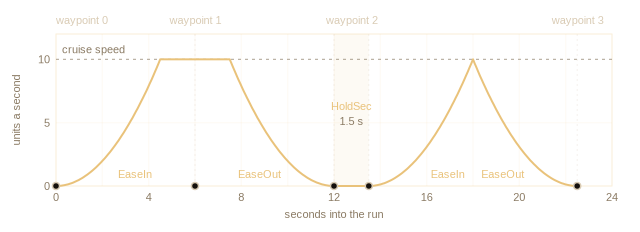
QuadraticEaseIn, out with QuadraticEaseOut. Each eased half takes three times as long as at cruise speed.The curves are shaping functions from BorrowedTorch.ShapingFunctions, read as speed
over time: the input is the share of the half’s time gone by, the output the camera’s speed as a share of the cruise
speed. Leaving a waypoint, the speed is the output, rising from rest at 0 to cruise at 1; arriving at one, it is 1
minus the output, falling from cruise to rest. An easing curve runs from 0 to 1, so the camera meets the rest of the
run at exactly the cruise speed and its speed never jumps between halves. At the waypoint itself it is whatever the
curves on either side make it: rest on an eased side, cruise on the other. Any function of that library will do, and
so will a custom one. One instance can serve several waypoints.
using BorrowedTorch.ShapingFunctions;

// settle at the waypoint facing the tower, look at it for two seconds, then move on
path.SetWaypoint(1, path.Waypoints[1] with
{
    EaseOut = new QuadraticEaseOut(),
    HoldSec = 2,
    EaseIn = new QuadraticEaseIn()
});

// set off gently from rest, and settle gently at the end
var last = path.Waypoints.Count - 1;
path.SetWaypoint(0, path.Waypoints[0] with { EaseIn = new CubicEaseIn() });
path.SetWaypoint(last, path.Waypoints[last] with { EaseOut = new CubicEaseOut() });
The shape of the speed
Which way a curve bends decides how the camera gets going and how it comes to rest:
| Curve | Leaving, as EaseIn |
Arriving, as EaseOut |
|---|---|---|
Linear |
Picks up speed steadily | Slows steadily |
An ease in, such as QuadraticEaseIn |
Sets off gently, and picks up speed late | Slows late, and comes to a firm stop |
An ease out, such as QuadraticEaseOut |
Picks up speed quickly at first, and eases into cruise | Slows quickly at first, and settles gently |
An ease in-out, such as SineEaseInOut |
Sets off gently, and eases into cruise | Eases out of cruise, and settles gently |
An ease in leaving and an ease out arriving, as in the picture, are gentle at the waypoint. An ease in-out is gentle at both ends of its half, at the waypoint and where it meets cruise, so the camera never jolts.
A curve that dips below 0 or rises past 1 on the way, such as a back or an elastic ease, takes the speed below zero or past cruise for a while. Leaving, a dip backs the camera up before it sets off, and a rise runs it faster than cruise; arriving, a rise carries it a little past the waypoint and back, and a dip runs it faster. Sampling clamps distances to the path, so at the ends of an open path the camera stays put for that moment instead.
How long an eased half takes
An eased half covers its length at its curve’s average speed, so against the time it would take at cruise speed it
takes the inverse of that average. Linear and every ease in-out average half the cruise speed and take twice
the cruise time. An ease in leaving or an ease out arriving keeps the camera slow for longer and takes more; the
other way round, less:
| Curves | An ease in leaving, or an ease out arriving | An ease out leaving, or an ease in arriving |
|---|---|---|
Linear, and every ease in-out |
2 times the cruise time | 2 times |
| Sine | 2.75 times | 1.57 times |
| Quadratic | 3 times | 1.5 times |
| Bounce | 3.2 times | 1.45 times |
| Cubic | 4 times | 1.33 times |
| Circular | 4.7 times | 1.27 times |
| Quartic | 5 times | 1.25 times |
| Quintic | 6 times | 1.2 times |
| Exponential | 6.9 times | 1.17 times |
| Back | 9.2 times | 1.12 times |
| Elastic | 70 times | 1.01 times |
An elastic ease in spends most of its half wobbling about at rest before it sets off, which is why it takes so long.
EaseStretch gives the number for any curve, the library’s or your own:
CameraPath.EaseStretch(new CubicEaseIn(), arriving: false) is 4.
A half takes at most a hundred times its cruise time, well past every curve of the library. A curve that all but stays at rest is held to that, and meets cruise with a jump; one that on the whole goes nowhere, or backwards, travels its half at cruise speed.
The path times the halves when it rebuilds, so setting a waypoint retimes it. Changing the parameters of a function a waypoint already holds doesn’t: set the waypoint again after.
Holds
A hold comes just before the camera leaves its waypoint: at the first waypoint, before the camera sets off, and at the last waypoint of an open path, where there is nothing more to travel, before the run ends. A closed path holds at its first waypoint once per lap, at the start of the lap.
Holds are plain seconds, which the cruise speed doesn’t change. A negative or non-finite
HoldSec counts as 0.
Timing a run
TravelTime gives the seconds of one run at a cruise speed, easing and holds included, and
DistanceAtTime where along the path a camera is some seconds into the run. Together they turn the
sampling example into a run with the waypoints’ easing and holds:
// something that cruises the path at 5 units a second, eases and holds where its waypoints say,
// and starts over at the end
var run = path.TravelTime(5);

if (run > 0)
{
    _seconds = (_seconds + seconds) % run;

    var point = path.SampleByPathDistance(path.DistanceAtTime(_seconds, 5));
    marker.Position = point.Position;
    marker.Rotation = point.Orientation;
}
CruiseSpeed works the other way, from the length of a run to its cruise speed. The holds take their
seconds and the travel takes the rest, but never less than a tenth of the run: holds that alone would fill it make
the run that much longer. TimeAtDistance turns a distance back into a time, to start a run partway
along. The animated camera uses all four, see its easing and holds.
The rest read a run for whatever shows it, such as a timeline or a speedometer in an editor.
SpeedAtTime gives the camera’s speed at a moment, read off the speed curve itself: 0 while it holds, below
0 while an overshooting curve backs it up. WaypointArrivalTime and WaypointDepartureTime say when a run
reaches a waypoint and when it leaves, its hold in between, and WaypointDistance where along the path the
waypoint lies:
// a timeline under the view: a mark for each waypoint, as long as its hold
var run = path.TravelTime(5);

for (var i = 0; i < path.Waypoints.Count; i++)
    timeline.AddMark(path.WaypointArrivalTime(i, 5) / run, path.WaypointDepartureTime(i, 5) / run);

// and the speed at the playhead
speedLabel.Text = $"{path.SpeedAtTime(_seconds, 5):0.0} units a second";
The three waypoint methods are exact, read off the path’s own tables. Finding a waypoint by its position with
ClosestDistance and timing that distance comes out a little off, most where an ease out creeps into the
waypoint and a hair of distance takes a long while. The first waypoint is at 0 and reached at 0; on a closed path it
is also at Length, where the loop comes back to it. The last waypoint of an open path is left at the end of
the run.
CameraPath timing methods
| Method | Description |
|---|---|
TravelTime(float cruiseSpeed) |
The seconds of one run at the cruise speed, in units a second, easing and holds included; without either, Length over the speed. 0 for a path with no segment, infinity for a speed of 0 or less. |
CruiseSpeed(float durationSec) |
The cruise speed at which one run takes the duration, the inverse of TravelTime. Travel gets at least a tenth of the duration, whatever the holds. 0 for a duration of 0 or less, or a path of length 0. |
DistanceAtTime(float seconds, float cruiseSpeed) |
The distance along the path the seconds into a run at the cruise speed; without easing or holds, the speed times the seconds. 0 before the run and Length after it. |
TimeAtDistance(float pathDistance, float cruiseSpeed) |
The seconds into a run at the cruise speed when the camera reaches the distance, clamped to the path: the inverse of DistanceAtTime. At a waypoint that holds, the time the camera arrives. |
SpeedAtTime(float seconds, float cruiseSpeed) |
The camera’s speed, in units a second, the seconds into a run at the cruise speed: the cruise speed where no waypoint eases, 0 while one holds and outside the run, below 0 while an overshooting curve backs the camera up. |
WaypointDistance(int index) |
The distance along the path of the waypoint, exactly. Throws ArgumentOutOfRangeException for an index out of range. |
WaypointArrivalTime(int index, float cruiseSpeed) |
The seconds into a run at the cruise speed when the camera reaches the waypoint, before its hold. Throws ArgumentOutOfRangeException for an index out of range. |
WaypointDepartureTime(int index, float cruiseSpeed) |
The seconds into a run at the cruise speed when the camera leaves the waypoint: its arrival plus its hold. Throws ArgumentOutOfRangeException for an index out of range. |
EaseStretch(BaseShapingFunction? curve, bool arriving) |
Static. How many times its cruise time a half eased by the curve takes, leaving a waypoint or arriving at one: the inverse of its average speed. 1 for null. |
Rebuilding and accuracy
A path measures itself before it can be sampled: the length of each segment, a table from distance to the curve’s
own parameter, the orientation of each waypoint and the timing of each half segment. Any edit marks it for measuring
again: a waypoint added,
inserted, set or removed, or a change to Closed or WorldUp. The next query does it, so the tables never
disagree with the waypoints and there is nothing to remember. Many edits in a row cost one rebuild, at the next query.
Rebuild does it at once, to pay the cost at a moment of your choosing, such as while a level loads, rather than
on the first frame of a cutscene. It is quick: about 11 µs for a path of eight waypoints at the default accuracy.
Travel along a path is constant-speed. With the default 32 samples per segment, a camera’s speed stays within 0.15 %
of constant from frame to frame, even through a tight turn between two long segments; positions are within
2·10−4 units of where exact arc length would put them, and Length is right to one part in 100 000.
The constructor’s samplesPerSegment sets that accuracy: each doubling cuts the placement error more than tenfold,
until float rounding takes over at around 64. Higher values mostly cost rebuild time and memory.
CameraPath rebuild method
| Method | Description |
|---|---|
Rebuild() |
Measures the path now: its length, its distance table, its waypoint orientations, its timing and, when it is drawn, its geometry. Edits schedule it for the next query on their own. |