
Color legend plain property method
A binding puts an input into one of an action’s slots, and from the next update that input runs the action. The game
binds its defaults at startup, and the player rebinds in a settings menu, all through the action’s
RegisteredActionHandle. Names are colored by what they are: a plain property or a method.
Slots
Every action has the same number of slots, set when the binder is made: two by default, the “primary” and “secondary” columns of a settings menu. Each slot holds one input or none, and every slot of an action runs it: Space and W can both jump.
var binder = new InputBinder(inputBindingsPerAction: 3); // three columns: keyboard, mouse, pad
One rule holds throughout: an input drives one action at most. Binding never leaves an input in two places, and binding over a full slot releases the input that was in it:
InputBinder slot members
| Member | Description |
|---|---|
InputBinder(int inputBindingsPerAction = 2) |
A binder with that many slots per action. Throws ArgumentOutOfRangeException below 1. |
InputBindingsPerAction |
Read-only int. The number of slots of every action. |
Default bindings
WithDefaultBinding binds an input and returns the handle, so the defaults chain onto the registration:
binder.RegisterButtonAction("Jump", OnJump)
      .WithDefaultBinding(0, InputFactory.Key((int)Keys.Space))
      .WithDefaultBinding(1, InputFactory.GamePadButton((int)GamePadButtonTypes.A));
It never takes an input from another action. When the binding can’t be made, because the input is already another
action’s, the slot doesn’t exist or the shapes differ, it throws ArgumentException naming the action, the slot, the
reason and the action that has the input. Two actions given the same default is a mistake in the game’s setup, and it
shows at startup instead of leaving one action without its input.
Binding
Bind binds an input into a slot and says how it went, without throwing:
var result = jump.Bind(0, InputFactory.Key((int)Keys.J));

if (!result.Success) ShowError(result.Result);
It returns a BindResult, whose Result is Success or the first reason, in the order of the table,
that the input can’t go there. Anything but Success changes nothing.
InputBinderResult
| Value | Meaning |
|---|---|
None |
No result: the value of a BindResult that no bind returned. Bind never returns it. |
Success |
Bound. The input runs the action from the next update. |
InputNull |
The input was null. To empty a slot, use Unbind. |
ActionNull |
There was no action. A handle always has one, so binding through it never returns this. |
IndexOutsideOfRange |
The slot is below 0, or not below InputBindingsPerAction. |
TypesMismatch |
The input’s shape isn’t the action’s: a key for a stick’s action, say. |
InputBoundToOtherAction |
Another action has the input. ConflictingActionHandle says which; see conflicts. |
ActionNotRegistered |
The handle’s action was unregistered. |
BindResult properties
| Property | Type | Description |
|---|---|---|
Result |
InputBinderResult |
Read-only. Success, or why the input wasn’t bound. |
Success |
bool |
Read-only. Result is Success. |
ConflictingActionHandle |
RegisteredActionHandle |
Read-only. The action that has the input, for InputBoundToOtherAction; null otherwise. |
Conflicts
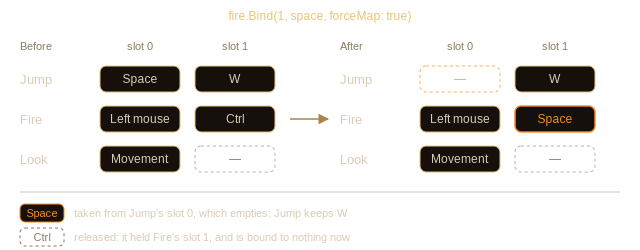
When the input is another action’s, Bind doesn’t take it: it returns InputBoundToOtherAction with that action’s
handle, and the game asks the player. Binding again with forceMap: true takes the input, and empties the other
action’s slot:
var result = fire.Bind(1, space);

if (result.Result == InputBinderResult.InputBoundToOtherAction)
{
    var owner = result.ConflictingActionHandle;
    _dialog.Ask($"Space is used by {owner.Name}. Use it for {fire.Name} instead?",
                onYes: () => fire.Bind(1, space, forceMap: true));
}
_dialog stands for your own code. The other action keeps its other slots: in the picture above, Jump still has W.
An input moved between the slots of its own action isn’t a conflict: binding Space into Jump’s slot 1 moves it there.
Slot 0 empties, and W, which held slot 1, is released.
Unbinding
Unbind empties a slot, and the input it held runs nothing from the next update. It returns false when the
slot was already empty, doesn’t exist, or the action was unregistered. A settings menu usually binds it to Delete or
Backspace, as “clear this binding”.
jump.Unbind(1);
Reading the bindings
A handle’s Inputs lists its slots in order, null for an empty one, for drawing the settings menu:
foreach (var action in binder.Actions)
{
    var row = $"{action.Description ?? action.Name,-24}";

    foreach (var input in action.Inputs)
        row += $"{(input == null ? "-" : InputNames[input]),-20}";

    Console.WriteLine(row);
}
InputNames stands for the game’s own names of inputs, see
showing an input to the player. Inputs is a live view: it
shows a rebind without being read again, and can’t be changed through a cast. Once the action is unregistered it is
empty. The inputs in it are the objects that were bound, with the representation they were made with.
RegisteredActionHandle binding members
| Member | Description |
|---|---|
Inputs |
Read-only IReadOnlyList<BaseInput>. The slots, in order, null for an empty one. A live view; empty once the action is unregistered. |
Bind(int index, BaseInput input, bool forceMap = false) |
Binds the input into the slot, releasing what was there, and returns a BindResult. With forceMap, takes the input from the action that has it. |
WithDefaultBinding(int index, BaseInput input) |
Binds the input into the slot, never taking it from another action, and returns the handle. Throws ArgumentException when it can’t. |
Unbind(int index) |
Empties the slot. false when there was nothing to empty. |
GetInput(int index) |
The input in the slot, or null: for an empty slot, one that doesn’t exist, or an unregistered action. |
A rebinding screen
The player picks an action’s slot, and the screen waits for the next key pressed. With MonoInput updated before it:
private RegisteredActionHandle _waiting; // the action whose slot is being rebound, or null
private int _slot;

private void UpdateRebinding()
{
    if (_waiting == null) return;

    foreach (var status in KeyboardManager.ActiveKeys)
    {
        if (status.State != ButtonStates.Pressed) continue;

        if (status.Key == Keys.Delete) _waiting.Unbind(_slot);                        // clears the slot
        else if (status.Key != Keys.Escape) Rebind(_waiting, _slot, InputFactory.Key((int)status.Key)); // Escape cancels

        _waiting = null;
        return;
    }
}

private void Rebind(RegisteredActionHandle action, int slot, BaseInput input)
{
    var result = action.Bind(slot, input);

    if (result.Result == InputBinderResult.InputBoundToOtherAction)
        _dialog.Ask($"{InputNames[input]} is used by {result.ConflictingActionHandle.Name}. Use it for {action.Name}?",
                    onYes: () => action.Bind(slot, input, forceMap: true));
}
Start waiting at the frame after the one that opened the wait, or the key that opened it, such as Enter, is taken as the answer. Mouse and pad buttons are listened for the same way, and a stick by waiting for its value to pass, say, 0.5. A screen that rebinds the actions of the game also stops the game’s own update from passing input to the binder meanwhile, so the key pressed doesn’t jump as well.
Saving bindings
The binder has no file format: the game saves what each slot holds, under the action’s name, and binds it back after the next start has registered the actions. An input is made again from its source, shape, id and modifier:
// what a slot holds, enough to make its input again
public record SavedInput(InputSource Source, InputType Shape, int Id, ButtonModifier Modifier = ButtonModifier.None);

public static Dictionary<string, SavedInput[]> SaveBindings(InputBinder binder)
{
    var saved = new Dictionary<string, SavedInput[]>();

    foreach (var action in binder.Actions)
        saved[action.Name] = action.Inputs.Select(input => input switch
        {
            ButtonInput b => new SavedInput(b.Source, InputType.Button, b.ButtonId, b.Modifier),
            OneAxisInput a => new SavedInput(a.Source, InputType.OneAxis, a.AxisId),
            TwoAxesInput t => new SavedInput(t.Source, InputType.TwoAxes, t.AxesId),
            _ => null // an empty slot
        }).ToArray();

    return saved;
}

public static void LoadBindings(InputBinder binder, Dictionary<string, SavedInput[]> saved)
{
    foreach (var (name, slots) in saved)
    {
        var action = binder.GetAction(name);
        if (action == null) continue; // an action this version no longer has

        for (var slot = 0; slot < slots.Length && slot < binder.InputBindingsPerAction; slot++)
        {
            var s = slots[slot];

            if (s == null)
            {
                action.Unbind(slot); // the player cleared it
                continue;
            }

            BaseInput input = s.Shape switch
            {
                InputType.Button => InputFactory.Button(s.Source, s.Id, modifier: s.Modifier),
                InputType.OneAxis => InputFactory.Axis(s.Source, s.Id),
                _ => InputFactory.Axes(s.Source, s.Id)
            };

            action.Bind(slot, input, forceMap: true);
        }
    }
}
The dictionary goes to JSON as it is, with System.Text.Json. Loading binds over the defaults, forced, so the player’s
bindings win wherever they differ: a key the player moved from Jump to Fire leaves Jump when Fire is loaded, whichever
of the two comes first. An action added since the save keeps its defaults, unless the player’s bindings use one of its
inputs.