
Color legend plain property method
A traced pass over the screen starts from the surface seen at each pixel: where it is, and which way it faces. A
GBuffer holds both, in two screen-sized targets your prepass draws into, and GBuffer.fxh turns them back
into a position and a normal in a shader. Names are colored by what they are: a property
or a method; values and fields keep the plain color.
What it holds
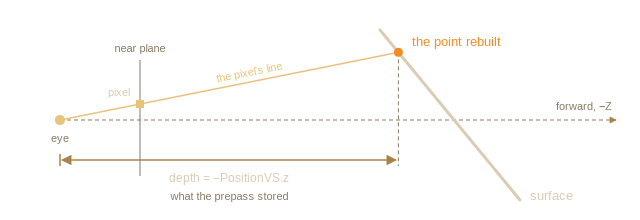
Depth, a 32-bit float a pixel: the nearest surface’s distance in front of the camera along its view direction,-PositionVS.zin view space. 0 where nothing was drawn, a distance no surface can be at. It has a depth buffer of its own, for the prepass’s depth test.Normal, 8 bits a channel: that surface’s normal in view space, packed from −1..1 into 0..1 asnormal * 0.5 + 0.5.
A linear distance rather than the depth buffer’s own value, which bunches its precision up near the camera, so a
point rebuilt from it is as precise far away as near. Both targets are null until the first
Resize, which makes them.
GBuffer targets
| Member | Description |
|---|---|
GBuffer(GraphicsDevice graphicsDevice) |
A G-buffer on the device, with no targets until the first Resize. |
Depth |
Read-only RenderTarget2D?. The linear view-space distance, SurfaceFormat.Single, 0 where nothing was drawn, with a 24-bit depth buffer. |
Normal |
Read-only RenderTarget2D?. The view-space normal packed into 0..1, SurfaceFormat.Color. |
Width, Height |
Read-only ints. The size of the targets. |
IsReady |
Read-only bool. The targets exist. Says nothing of what is in them. |
Filling it
Every frame, before anything traces: size the targets, bind them, draw the opaque meshes with your prepass effect, and unbind them.
var gBuffer = new GBuffer(GraphicsDevice);

// every frame, before the traced passes
gBuffer.Resize(width, height);   // nothing to do unless the size changed
gBuffer.BindAndClear();          // both targets, the distance cleared to 0: "nothing here"

GraphicsDevice.BlendState = BlendState.Opaque;
GraphicsDevice.DepthStencilState = DepthStencilState.Default;
// ... draw the opaque meshes with the prepass effect below ...

gBuffer.Unbind();                // back to the back buffer: this frame's surfaces are in
Resizemakes the targets, or new ones at a new size, and does nothing when the size is the one they have: hand it the viewport’s size every frame. New targets hold nothing, so the G-buffer isn’t current until the next prepass.BindAndClearbinds both targets and clears them. It throwsInvalidOperationExceptionbefore the firstResize: with no targets bound, the clear would wipe the back buffer.Unbindbinds the back buffer again. If your game draws into a render target of its own, set it again after.
GBuffer prepass methods
| Method | Description |
|---|---|
Resize(int width, int height) |
Makes the targets at this size, at least 1 × 1, unless they already are. New targets aren’t current. |
BindAndClear() |
Binds both targets and clears them: the distance and the normal to 0, the depth buffer to 1. Throws InvalidOperationException before the first Resize. |
Unbind() |
Binds the back buffer. What was drawn since BindAndClear is this frame’s G-buffer: it is current, and ContentVersion moves. |
The prepass effect
The prepass is yours: it draws your meshes, with your vertex formats and your skinning. Its pixel shader writes the
two values in the encoding GBuffer.fxh undoes. A prepass for meshes with a position and a normal:
float4x4 World;
float4x4 View;
float4x4 Projection;

struct VSInput
{
    float4 Position : POSITION0;
    float3 Normal   : NORMAL0;
};

struct VSOutput
{
    float4 Position   : SV_Position;
    float3 PositionVS : TEXCOORD0;
    float3 NormalVS   : TEXCOORD1;
};

struct PSOutput
{
    float  Depth  : SV_Target0;   // GBuffer.Depth: -PositionVS.z
    float4 Normal : SV_Target1;   // GBuffer.Normal: the view-space normal * 0.5 + 0.5
};

VSOutput VS(VSInput input)
{
    float4x4 worldView = mul(World, View);
    float4 positionVS = mul(input.Position, worldView);

    VSOutput output;
    output.Position   = mul(positionVS, Projection);
    output.PositionVS = positionVS.xyz;
    output.NormalVS   = mul(input.Normal, (float3x3) worldView); // a non-uniform scale needs the inverse transpose
    return output;
}

PSOutput PS(VSOutput input)
{
    PSOutput output;
    output.Depth  = -input.PositionVS.z;
    output.Normal = float4(normalize(input.NormalVS) * 0.5 + 0.5, 1.0);
    return output;
}

technique Prepass
{
    pass P0
    {
        VertexShader = compile vs_5_0 VS();
        PixelShader  = compile ps_5_0 PS();
    }
}
Draw with it between BindAndClear and Unbind, with the camera the frame is drawn with:
prepass.Parameters["View"].SetValue(view);
prepass.Parameters["Projection"].SetValue(projection);

foreach (var obj in opaqueObjects)
{
    prepass.Parameters["World"].SetValue(obj.World);
    prepass.CurrentTechnique.Passes[0].Apply();
    obj.Draw(GraphicsDevice);
}
A surface drawn from both sides, with CullMode.None, shows its back face from behind, with a normal pointing away
from the camera. Turn it toward the camera in the pixel shader, with a bool isFrontFace : SV_IsFrontFace input:
normal = isFrontFace ? normal : -normal.
What to draw
The G-buffer has to be what the frame shows: the nearest surface at every pixel once shading is done. So:
- Opaque, depth-writing surfaces only. A pane of glass in the G-buffer would have the wall seen through it shaded with the shadow traced from the glass. Leave blended surfaces out.
- The cull mode each is shaded with. A face culled in the forward pass but drawn in the prepass is in the G-buffer, but not on screen.
- Cut-outs cut the same way. A leaf whose texture’s alpha cuts it out, with
clipin the forward pass, needs the sameclipin the prepass, or the traced results have a square leaf. - The same camera. The same view and projection the frame is drawn with, or the points rebuilt from it are not the ones on screen.
Current or not
IsCurrent says the targets hold this frame’s surfaces. Gate every traced pass on it, not on
IsReady: a G-buffer left from an earlier frame, read through this frame’s camera, puts every shadow where the
geometry used to be.
- Drawn.
Unbindafter the prepass makes it current. - Unchanged. When nothing on screen has moved since the last prepass, neither the camera nor anything drawn, skip
the prepass and call
ConfirmCurrent: what the targets hold is this frame’s. - Not drawn. When the prepass can’t run, its effect missing or failed to load, call
Invalidate: the traced passes skip the frame rather than read old surfaces. - Resized. A new size isn’t current until the next prepass.
ContentVersion moves at every real redraw, and not at a ConfirmCurrent. With the GPU copy’s
Version, it tells a pass whether anything it reads has changed:
if (prepass == null)
    gBuffer.Invalidate();
else if (cameraMoved || sceneMoved)
    DrawPrepass();                  // BindAndClear, the meshes, Unbind
else
    gBuffer.ConfirmCurrent();

// trace the shadows again only when the surfaces, the scene or the light have changed
var stale = gBuffer.ContentVersion != _tracedContent || acceleration.Version != _tracedScene || lightMoved;

if (gBuffer.IsCurrent && acceleration.IsReady && stale)
{
    TraceShadows();

    _tracedContent = gBuffer.ContentVersion;
    _tracedScene = acceleration.Version;
}
GBuffer state
| Member | Description |
|---|---|
IsCurrent |
Read-only bool. The targets hold this frame’s surfaces. |
ContentVersion |
Read-only int. Moves at every Unbind that ends a prepass. |
ConfirmCurrent() |
The targets already hold this frame’s surfaces, and weren’t redrawn: current again, if there are targets. |
Invalidate() |
This frame’s surfaces couldn’t be drawn: not current. |
Reading it back
GBuffer.fxh undoes the encoding, in one place for every pass that reads it, so a shadow pass, an
occlusion pass and a temporal resolve can’t drift apart on where a surface is:
#include "Lib/GBuffer.fxh"

float  depth    = DepthMap[pixel];      // 0: nothing drawn here
float3 position = GBufferWorldPosition(pixel, ScreenSize, depth, InverseProjection, InverseView);
float3 normal   = GBufferWorldNormal(NormalMap[pixel], InverseView);
The position is rebuilt along the line from the eye through the pixel’s centre: the point on it whose distance in front of the camera is the one stored.
- Read a pixel, don’t sample.
DepthMap[pixel]reads the pixel as it is. A filtered depth, the average of a near and a far surface at an edge, is a point on neither. - Matrices.
InverseProjectionandInverseVieware the inverses of the ones the prepass drew with, andScreenSizeis the G-buffer’s own size:(width, height, 1 / width, 1 / height). - Normals come back normalized. Eight bits a channel doesn’t keep a vector’s length exactly.
GBuffer.fxh functions
| Function | Description |
|---|---|
float3 GBufferViewPosition(int2 pixel, float4 gBufferSize, float depth, float4x4 inverseProjection) |
The view-space point at a pixel, from its stored depth. Perspective projections only. |
float3 GBufferWorldPosition(int2 pixel, float4 gBufferSize, float depth, float4x4 inverseProjection, float4x4 inverseView) |
The same point, taken through inverseView. |
float3 GBufferViewNormal(float4 packed) |
The view-space normal, unpacked and normalized. |
float3 GBufferWorldNormal(float4 packed, float4x4 inverseView) |
The same normal, taken through inverseView. |
int2 GBufferPixelOf(uint2 pixel, int pixelScale) |
The G-buffer pixel a pass at a reduced resolution reads for a pixel of its own. |
float2 ReducedGridPosition(float2 fullResolution, int pixelScale) |
Where a full-resolution position falls on the reduced grid, in its texels. |
Reduced resolution
A pass traced at half or a quarter of the resolution, pixelScale 2 or 4, costs a quarter or a sixteenth of the rays.
Each of its pixels reads one pixel of the G-buffer, the top-left of the block it covers, never an average of the
block: an average across an edge is a surface that isn’t there. GBufferPixelOf says which:
int PixelScale = 2; // the pass at half the G-buffer's resolution

// in the kernel, one thread per pixel of the pass
int2   source   = GBufferPixelOf(id.xy, PixelScale);
float  depth    = DepthMap[source];
float3 position = GBufferWorldPosition(source, ScreenSize, depth, InverseProjection, InverseView);
ScreenSize stays the G-buffer’s size: the point is rebuilt at the G-buffer pixel it was read from. To read the result
back at full resolution, ReducedGridPosition maps a full-resolution position onto the reduced grid, with
the whole numbers on the pixels the pass traced, so everything agrees on which pixel that was:
// in the forward pass: SV_Position.xy is the pixel's centre, which is what the function takes
float2 grid    = ReducedGridPosition(input.Position.xy, PixelScale);
int2   nearest = int2(floor(grid + 0.5));
float  shadow  = ShadowMask[nearest].r; // or a bilinear blend of four, weighted by frac(grid)
Perspective only
GBufferViewPosition finds the surface along the line from the eye through the pixel, which is how a
perspective camera sees. An orthographic camera looks along parallel lines, and its point is rebuilt otherwise, in a
function of your own:
// an orthographic camera: the pixel's view-space x and y don't depend on the depth
float3 OrthographicViewPosition(int2 pixel, float4 gBufferSize, float depth, float4x4 inverseProjection)
{
    float2 uv  = (pixel + 0.5) * gBufferSize.zw;
    float2 ndc = float2(uv.x * 2.0 - 1.0, 1.0 - uv.y * 2.0);

    float3 onNearPlane = mul(float4(ndc, 0.0, 1.0), inverseProjection).xyz;

    return float3(onNearPlane.xy, -depth);
}
Lifetime
The G-buffer owns its targets: Dispose it with the device’s other resources. After it, there are no
targets, and it isn’t current.
GBuffer lifetime
| Member | Description |
|---|---|
Dispose() |
Frees both targets. A second call does nothing. |
IsDisposed |
Read-only bool. Dispose has been called. |