
Color legend plain property method
Once a frame, the game polls its devices into inputs and hands them to
Update, which runs the action bound to each. The binder keeps no input state of its own between
frames, beyond which binding each held key was pressed into: what an action’s callback gets is what the game polled.
Names are colored by what they are: a plain property or a method.
What an update does
Update takes three lists, one per shape, and the modifier keys held:
binder.Update(buttonInputs, oneAxisInputs, twoAxesInputs,
              withShift: shiftHeld, withCtrl: ctrlHeld, withAlt: altHeld);
It goes through the buttons, then the one-axis inputs, then the two-axes inputs, each list in its order. For each input it finds the binding with the same identity, its source, shape, id and modifier, and calls that action’s callback with the input’s state or value and its player number:
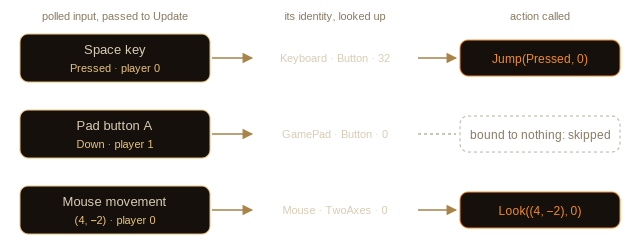
- An input bound to nothing is skipped.
- A list may be
null, when the game has nothing of that shape to pass. - The callbacks run inside
Update, on the thread that calls it, one after the other in the order of the lists. - The modifier flags only change which binding a plain key reaches, see modifier keys.
InputBinder update method
| Method | Description |
|---|---|
Update(IReadOnlyList<ButtonInput> buttonInputs, IReadOnlyList<OneAxisInput> oneAxisInputs, IReadOnlyList<TwoAxesInput> twoAxesInputs, bool withShift, bool withCtrl, bool withAlt) |
Runs the action bound to each input of the three lists, any of which may be null. The flags say whether Shift, Ctrl and Alt are held. |
Which inputs to pass
Every input passed calls its action, whatever it is doing: an idle button calls its action with ButtonState.None, a
stick at rest with zero. So the game chooses between two ways:
- Pass only what is happening. For buttons, the ones pressed, held or just let go, such as the keys in
MonoInput’s
ActiveKeys. The callbacks then never seeNone, and the update does little work on a quiet frame. - Pass everything, and let the callbacks ignore what doesn’t concern them. Simpler to poll, since every input is in
the list every frame, and a button callback that acts on
Pressedalone ignores the rest anyway.
Axes are best passed every frame, even at rest. An action that keeps its last value, such as a throttle, would otherwise keep the last value it was given before the stick was let go, rather than zero.
Reusing inputs
State, Value and PlayerNumber can be set so that the game makes each polled input once and
refills it every frame. Together with lists kept from frame to frame, that makes polling and updating allocate nothing:
// once, at startup
var space = InputFactory.Key((int)Keys.Space);
var buttons = new List<ButtonInput>(32);

// each frame
buttons.Clear();
space.State = ButtonState.Pressed;
buttons.Add(space);
binder.Update(buttons, null, null, false, false, false);
The lists are IReadOnlyList<T>: an array, a List<T>, or any list of the game’s own. An input can be both bound and
polled, the binding being the same object: the binder never reads a binding’s state or value.
Players
PlayerNumber is live data, not part of the identity, so one binding serves every player: pad button A
bound to Jump jumps for whichever pad it is pressed on, and the callback is told which. For four pads, poll each pad’s
buttons into inputs of their own, each with its slot’s player number:
binder.RegisterButtonAction("Jump", (state, player) => { if (state == ButtonState.Pressed) _heroes[player].Jump(); })
      .WithDefaultBinding(0, InputFactory.GamePadButton((int)GamePadButtonTypes.A));

// pad A of all four slots, made once, numbered 0 to 3
var padA = new ButtonInput[4];
for (var i = 0; i < 4; i++) padA[i] = new ButtonInput(InputSource.GamePad, (int)GamePadButtonTypes.A) { PlayerNumber = i };
When players rebind on their own, give each player a binder: the bindings are per binder, and each is passed only the inputs of its player’s devices. Two players on one keyboard need different keys for the same thing: give them an action each, “Jump P1” and “Jump P2”, in one binder, which then keeps a key from going to both. The binding of a held key, see a press keeps its binding, is kept per player number.
Feeding the binder from MonoInput
MonoInput reports every key, mouse and pad button in four states that map to the binder’s, and the pad’s sticks and triggers already scaled. An adapter, updated after the managers each frame, polls them into inputs made once:
using BorrowedTorch.InputBinding;
using BorrowedTorch.InputBinding.Factories;
using BorrowedTorch.InputBinding.Types;
using BorrowedTorch.InputBinding.Types.Inputs;
using BorrowedTorch.MonoInput.Inputs;
using BorrowedTorch.MonoInput.Inputs.GamePad;
using BorrowedTorch.MonoInput.Inputs.Keyboard;
using BorrowedTorch.MonoInput.Inputs.Mouse;

public sealed class MonoInputFeed
{
    // axis ids of our own
    public const int PointerAxes = 0, LeftStick = 0, RightStick = 1, LeftTrigger = 0, RightTrigger = 1, Wheel = 0;

    private readonly ButtonInput[] _keys = new ButtonInput[256];          // one per Keys value, made at its first press
    private readonly ButtonInput[] _mouseButtons = new ButtonInput[5];
    private readonly GamePadButtonInfo[][] _padSources = new GamePadButtonInfo[4][]; // MonoInput's, per player slot
    private readonly ButtonInput[][] _padButtons = new ButtonInput[4][];  // per player slot, per button
    private readonly OneAxisInput[][] _triggers = new OneAxisInput[4][];
    private readonly TwoAxesInput[][] _sticks = new TwoAxesInput[4][];
    private readonly OneAxisInput _wheel = InputFactory.MouseAxis(Wheel);
    private readonly TwoAxesInput _pointer = InputFactory.MouseAxes(PointerAxes);

    private readonly List<ButtonInput> _buttons = new(64);
    private readonly List<OneAxisInput> _oneAxis = new(9);
    private readonly List<TwoAxesInput> _twoAxes = new(9);

    public MonoInputFeed()
    {
        for (var i = 0; i < _mouseButtons.Length; i++) _mouseButtons[i] = InputFactory.MouseButton(i);

        for (var player = 0; player < 4; player++)
        {
            // MonoInput's buttons are the same objects for the whole run, so they are listed once
            var pad = GamePadManager.GamePadsStatus[player];
            _padSources[player] = [pad.A, pad.B, pad.X, pad.Y, pad.Back, pad.Start, pad.Home, pad.LeftStick,
                                   pad.RightStick, pad.LeftShoulder, pad.RightShoulder, pad.Up, pad.Down, pad.Left,
                                   pad.Right];

            _padButtons[player] = new ButtonInput[15];
            for (var i = 0; i < 15; i++) _padButtons[player][i] = new ButtonInput(InputSource.GamePad, i) { PlayerNumber = player };

            _triggers[player] = [new(InputSource.GamePad, LeftTrigger) { PlayerNumber = player },
                                 new(InputSource.GamePad, RightTrigger) { PlayerNumber = player }];
            _sticks[player] = [new(InputSource.GamePad, LeftStick) { PlayerNumber = player },
                               new(InputSource.GamePad, RightStick) { PlayerNumber = player }];
        }
    }

    // after KeyboardManager, MouseManager and GamePadManager have updated
    public void Update(InputBinder binder)
    {
        _buttons.Clear();
        _oneAxis.Clear();
        _twoAxes.Clear();

        // the keys pressed, held or just let go
        foreach (var status in KeyboardManager.ActiveKeys)
        {
            var key = _keys[(int)status.Key] ??= InputFactory.Key((int)status.Key);
            key.State = ToBinder(status.State);
            _buttons.Add(key);
        }

        var mouse = MouseManager.MouseStatus;
        AddButton(_mouseButtons[(int)MouseButtonTypes.Left], mouse.LeftButton);
        AddButton(_mouseButtons[(int)MouseButtonTypes.Middle], mouse.MiddleButton);
        AddButton(_mouseButtons[(int)MouseButtonTypes.Right], mouse.RightButton);
        AddButton(_mouseButtons[(int)MouseButtonTypes.XButton1], mouse.XButton1);
        AddButton(_mouseButtons[(int)MouseButtonTypes.XButton2], mouse.XButton2);
        _pointer.Value = new System.Numerics.Vector2(mouse.PositionDelta.X, mouse.PositionDelta.Y);
        _twoAxes.Add(_pointer);
        _wheel.Value = mouse.WheelDelta / 120f; // notches
        _oneAxis.Add(_wheel);

        for (var player = 0; player < 4; player++)
        {
            var pad = GamePadManager.GamePadsStatus[player];
            if (!pad.IsConnected) continue;

            foreach (var button in _padSources[player]) AddButton(_padButtons[player][(int)button.Type], button);

            _triggers[player][0].Value = pad.LeftTriggerValue;
            _triggers[player][1].Value = pad.RightTriggerValue;
            _oneAxis.Add(_triggers[player][0]);
            _oneAxis.Add(_triggers[player][1]);

            _sticks[player][0].Value = new System.Numerics.Vector2(pad.LeftStickShift.X, pad.LeftStickShift.Y);
            _sticks[player][1].Value = new System.Numerics.Vector2(pad.RightStickShift.X, pad.RightStickShift.Y);
            _twoAxes.Add(_sticks[player][0]);
            _twoAxes.Add(_sticks[player][1]);
        }

        binder.Update(_buttons, _oneAxis, _twoAxes,
                      KeyboardManager.IsShiftDown, KeyboardManager.IsCtrlDown, KeyboardManager.IsAltDown);
    }

    // a mouse or pad button, passed while it is pressed, held or just let go
    private void AddButton(ButtonInput input, ButtonInfo button)
    {
        if (button.Idle) return;

        input.State = ToBinder(button.State);
        _buttons.Add(input);
    }

    private static ButtonState ToBinder(ButtonStates state) => state switch
    {
        ButtonStates.Pressed => ButtonState.Pressed,
        ButtonStates.Down => ButtonState.Down,
        ButtonStates.Up => ButtonState.Up,
        _ => ButtonState.None
    };
}
The game makes one feed and calls it in its Update, after the MonoInput managers:
KeyboardManager.Update();
MouseManager.Update();
GamePadManager.Update();
_feed.Update(_binder);
The ids are those of the inputs page: Keys values for keys, and
MonoInput’s MouseButtonTypes and GamePadButtonTypes for mouse and pad buttons, which number
them from 0. Buttons are passed only while something happens to them, and the axes every frame. Apart from the first
press of each key, a frame allocates nothing.
Speed
Update finds each input’s binding in one hash lookup, whatever the number of actions, and allocates nothing: the
lists are indexed rather than enumerated through an interface, the key it looks up by is a struct built on the stack,
and the table of held keys is sized ahead. The library’s tests check that a frame allocates nothing, so calling it
every frame with every input of every device is fine.
Threads
The binder isn’t thread-safe. Register, bind and update from one thread, the game’s, as the callbacks run on the
thread that calls Update.