
Color legend plain property method
Cuts are drawn on the flat sheet, because damage belongs to the weave, not to wherever the cloth happens to be. That leaves one step: turning a drag across the screen into a stroke on the flat sheet. While the sheet still hangs near the plane it was built in, the cursor’s ray meets that plane where it meets the cloth. Once the cloth has crumpled, only the cloth itself can say which point of the weave lies under the cursor, so the library picks against the sheet as it is. Names are colored by what they are: a property or a method; values and fields keep the plain color.
A pose to pick against
CaptureSurface reads the sheet back from the GPU and freezes it: a FabricSurface, the triangles the
renderer draws, cut lips and all, where they stood. A world-space ray picked against it comes back as a point of the
flat sheet, in the coordinates Cut takes. The camera stays out of it: the ray is yours, unprojected through your
own view and projection.
// the cursor's ray in world space: your camera, your viewport
var viewport = GraphicsDevice.Viewport;
var near = viewport.Unproject(new Vector3(cursor, 0.0f), _projection, _view, Matrix.Identity);
var far = viewport.Unproject(new Vector3(cursor, 1.0f), _projection, _view, Matrix.Identity);
var ray = new Ray(near, far - near);   // any length: picking makes it unit length itself
The readback is a stall, so capture once per gesture, at the press, and pick every ray of the drag against that one pose. Capturing also files the triangles into a grid, so a ray costs only the cloth it passes near: microseconds, even on a sheet of half a million triangles. After that a surface never changes. It keeps answering for the pose it was captured from however far the cloth has moved since, and any number of threads may pick against it at once.
Fabric picking members
| Member | Description |
|---|---|
CaptureSurface() |
Returns FabricSurface: a pose of the live sheet to pick against, at the cost of a readback. Valid until the next build. |
Cut(FabricStroke stroke) |
Returns int: cuts along a recorded drag. Throws ArgumentException for a stroke over another sheet’s surface, or one captured before the last build. |
Cut(ReadOnlySpan<Ray> rays) |
Returns int: captures a surface and cuts along the rays, each taking the nearest layer. Fewer than two rays cut nothing. |
Cut(ReadOnlySpan<Ray> rays, FabricSurface surface) |
Returns int: cuts along the rays against a surface captured earlier. Throws as Cut(FabricStroke) does. |
A knife’s drag
A FabricStroke records a drag against one surface: at the press, capture the surface; every frame the button is
held, add the cursor’s ray, and draw the preview from the hit it returns; at the release, cut along the stroke.
// on the press: one pose for the whole drag
_stroke = new FabricStroke(_fabric.CaptureSurface());
_preview.Clear();

// every frame the button is held
if (_stroke.Add(CursorRay(), out var hit))
    _preview.Add(hit.World);   // the preview line, drawn on the cloth

// on the release: cut from the samples the preview was drawn from, nothing picked again
var severed = _fabric.Cut(_stroke);
_stroke = null;
The cut is made from the samples themselves, never picked again, so it lands exactly where the preview showed it,
however far the cloth has blown since the press. Each ray is picked once, for the preview and the cut together.
Add records a miss too, in its place, so the cut can tell where the knife left the cloth and where it came back.
Clear forgets the samples and keeps the pose, for a drag cancelled and started again. A stroke is one
gesture on one thread.
Anything that changes the sheet under a drag, a build or another cut, leaves the stroke describing cloth that is no longer there: drop it. A stroke over a surface from before a build throws when you cut along it.
FabricStroke members
| Member | Description |
|---|---|
FabricStroke(FabricSurface surface) |
An empty stroke over a pose. Throws ArgumentNullException for a null surface. |
Surface |
Read-only. The pose every ray of the stroke is picked against. |
Count |
Read-only. Samples recorded so far, misses included. |
Add(Ray ray, out FabricSurfaceHit hit) |
Returns bool: picks the ray’s nearest layer and records it, or the miss, as the next sample. Whether it hit, and where. |
Clear() |
Forgets the samples, keeping the pose. |
How a stroke joins
At the release, the samples become strokes on the flat sheet. Consecutive samples on one layer join into a stroke. The rest decides where a stroke breaks, and where it carries on:
- A fold breaks it. Where two samples land far further apart on the flat sheet than they are in the world, the knife slid off one layer onto another it never crossed: the stroke breaks there, rather than cutting straight through the cloth between.
- An open cut doesn’t. Where the knife left the cloth and came back across a cut already open, the stroke carries on across the gap.
- The last sample is carried to the lip. A stroke that left the cloth within a sample of a cut, or of the sheet’s edge, is carried to it: the last sample can land up to a sample short, and the piece between would otherwise hang on by its last threads.
- A miss anywhere else ends it, off a fold’s edge say, and the next hit starts a new one: what a knife lifted and put down again should do.
Cut(rays) does all of this from a span of rays, capturing the surface itself, and Cut(rays, surface) against a
surface captured earlier: a preview drawn from that surface then cuts exactly where it was drawn. A stroke fed during
the drag does the same, without picking each ray twice.
Layers
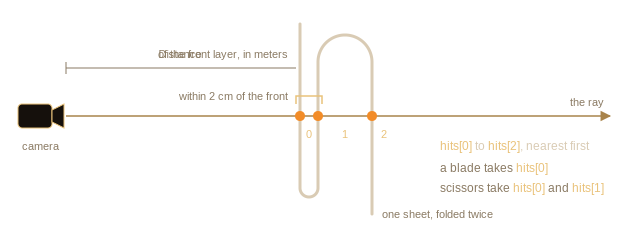
A crumpled sheet stacks several layers under one point, and a hard press stacks eight or more. Raycast returns
every layer a ray passes through, nearest first, and how many it wrote:
var surface = _fabric.CaptureSurface();      // one readback, held for the whole gesture

Span<FabricSurfaceHit> hits = stackalloc FabricSurfaceHit[16];

var count = surface.Raycast(ray, hits);      // nearest first, Distance in meters
Each layer counts once, even where the ray threads a shared edge or corner, or the closed lips of a cut. Hits past
the span’s end are dropped, the furthest first. A ray with no direction, of length 0 or not finite, meets nothing.
TryRaycast takes the nearest alone, which is what a stroke’s Add does. A hit is a
FabricSurfaceHit: where on the flat sheet, where in the world, and how far along the ray, in meters whatever the
ray’s length.
FabricSurface members
| Member | Description |
|---|---|
TriangleCount |
Read-only. The triangles of the pose, as the cut mesh had them when it was captured. |
Raycast(Ray ray, Span<FabricSurfaceHit> hits) |
Returns int: every layer the ray passes through, nearest first, as many as the span holds, and how many it wrote. |
TryRaycast(Ray ray, out FabricSurfaceHit hit) |
Returns bool: the nearest layer alone, and whether there was one. |
FabricSurfaceHit properties
| Property | Description |
|---|---|
Cloth |
Vector2. The point on the flat sheet, in meters, the coordinates Cut takes. |
World |
Vector3. Where that point was in the world, in the captured pose. |
Distance |
float. How far along the ray, in meters. |
Scissors
Cut(rays) and a stroke take the nearest layer, a blade’s. For anything else, walk the layers yourself and cut along
the points you choose. Scissors closing on a pile cut every layer within a few centimeters of the front one, each
layer a polyline of its own:
// every frame of the drag: layer k of this ray continues layer k of the last
var count = surface.Raycast(ray, hits);

for (var k = 0; k < count && hits[k].Distance - hits[0].Distance < 0.02f; k++)
{
    if (_layers.Count <= k) _layers.Add([]);

    _layers[k].Add(hits[k].Cloth);
}

// on the release, one cut per layer
foreach (var layer in _layers)
    _fabric.Cut(CollectionsMarshal.AsSpan(layer));
One list for all the layers would zigzag from layer to layer, cutting straight through the cloth between. Matching
layers by their order in depth is the simplest rule, and holds while the stack under the knife keeps its count; a rule
of your own can follow Distance instead.
Surfaces and rebuilds
A surface knows which sheet it was captured from, and which build of it. Cut(stroke) and Cut(rays, surface) throw
ArgumentException for a surface from another sheet, or from before the last Rebuild, rather than cut a weave it
never described. Raycast itself doesn’t check, so hits you gather yourself, as the scissors above do, are yours to
drop when the sheet is built again: Rebuilt says when.
A surface captured before a cut still picks the cloth as it was, cut lips and all of the cuts before it. Cutting along it still cuts the live weave, since the flat sheet hasn’t moved, but the lips it shows are the old ones: capture a new one for the next gesture.