
Color legend plain property method
A GpuAccelerationStructure is the scene on the GPU: the Tlas and every MeshBlas it uses, in four
structured buffers. A shader walks them with RtTraceAny, from RayTraversal.fxh, the same any-hit walk as
Tlas.IntersectAny on the CPU, line for line: “is anything in the way”, the question shadows and ambient
occlusion ask, for every pixel at once. Names are colored by what they are: a property
or a method; values and fields keep the plain color.
The GPU copy
Create one for the scene, and upload the scene to it every frame, once the scene is declared:
var acceleration = new GpuAccelerationStructure(GraphicsDevice);

// every frame, after tlas.EndUpdate(), on the thread that owns the device
acceleration.Upload(tlas);
Upload sends only what changed since the last one, and nothing at all in a frame where nothing did, so
calling it every frame costs a few comparisons when the scene stands still. Keep one copy per Tlas.
GpuAccelerationStructure upload
| Method | Description |
|---|---|
GpuAccelerationStructure(GraphicsDevice graphicsDevice) |
An empty copy on the device. Its buffers are made by the first upload. |
Upload(Tlas tlas) |
Brings the buffers in line with the scene, sending only what changed. Call it after the scene’s EndUpdate, on the device’s thread. |
What an upload sends
The four buffers come in two halves that change at very different rates:
- The geometry, every BLAS’s nodes and triangles, one after the other in two buffers,
BlasNodesandTriangles. A mesh’s triangles don’t move relative to the mesh, so a BLAS is sent when an instance first uses it, sent again in place when it is refitted, and otherwise left alone. - The scene, the
Tlas’s nodes and oneGpuInstancerecord per instance, its inverse matrix, flags and where its BLAS is, inTlasNodesandInstances. It is sent whenever the tree’sVersionorFlagsVersionhas moved, or the geometry has: whenever an object moved, came, went or changed its flags.
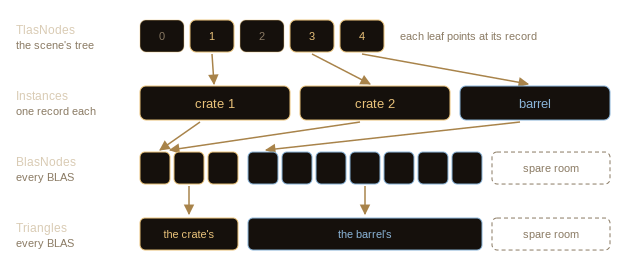
A structured buffer can’t grow, so each is made with half as much room again as it needs, and at least 64 elements.
A mesh first used goes after the ones already there, while it fits; when it doesn’t, the geometry is laid out afresh,
into bigger buffers, and that is when the meshes no instance uses any more are dropped. Every place in the buffers is
an absolute index, worked out at upload: a leaf points straight into Triangles, and an instance straight into
BlasNodes.
| In the frame | What the upload sends |
|---|---|
| Nothing changed | Nothing |
| Objects moved, came or went, or changed their flags | The scene: the tree and the instance records |
| A BLAS was refitted | That BLAS’s nodes and triangles, in place, and the scene if the tree moved |
| A mesh was used for the first time | Its nodes and triangles after the others, and the scene; everything when it doesn’t fit |
| A mesh is used no more | The scene, as for any object gone; the mesh stays in the buffers until they are next laid out afresh |
| The scene emptied | Nothing; IsReady turns false, and Version moves |
Ready and versions
IsReady is false until the first upload of a scene with something in it, and while the scene is empty.
Run no traced pass without it: with nothing to trace against, every ray would come back clear.
Version moves whenever what the buffers describe changes: either half sent, or the scene emptied. A pass that
keeps last frame’s result while nothing it reads has moved, a shadow mask for a still camera say, compares it with
the version it last traced against, along with the G-buffer’s
ContentVersion.
The buffers themselves are there to read too, for a binding of your own: Bind is all most effects need.
GpuAccelerationStructure properties
| Property | Type | Description |
|---|---|---|
IsReady |
bool |
Read-only. There is a scene on the GPU to trace against. |
Version |
int |
Read-only. Moves whenever the buffers change: an upload that sent anything, or the scene emptying. |
TlasNodes |
StructuredBuffer? |
Read-only. The scene’s tree. null until the first upload. |
Instances |
StructuredBuffer? |
Read-only. One GpuInstance per instance, in the tree’s order. |
BlasNodes |
StructuredBuffer? |
Read-only. Every BLAS’s nodes, one after the other. |
Triangles |
StructuredBuffer? |
Read-only. Every BLAS’s triangles, as GpuTriangles, one after the other. |
TlasNodeCount |
int |
Read-only. How many nodes the scene’s tree has, which is where its walk stops. 0 for an empty scene. |
The HLSL headers
The package copies RayTraversal.fxh and GBuffer.fxh to your build output, at
Content/Effects/Lib/. How an effect finds them depends on how it is built:
- Compiled at run time from
Content/Effects:#include "Lib/RayTraversal.fxh"finds them where they are. - Built by the content pipeline: copy the two headers beside your effects, into a
Libfolder to keep the same includes. They are plain HLSL, with no includes of their own.
Compile for DirectX_11, kernels as cs_5_0 and pixel shaders that trace as ps_5_0. RayTraversal.fxh declares
the four buffers and the node count itself, under the names Bind sets, so an effect that includes it
declares none of them. Both headers guard against being included twice.
A shadow kernel
A compute kernel that marks each pixel lit or in shadow from one directional light. It reads the point to trace from
out of the G-buffer: the nearest surface’s depth and normal at the pixel, which
GBuffer.fxh turns back into a position and a normal in the world.
#include "Lib/RayTraversal.fxh"
#include "Lib/GBuffer.fxh"

Texture2D<float>    DepthMap;     // GBuffer.Depth
Texture2D<float4>   NormalMap;    // GBuffer.Normal
RWTexture2D<float4> ShadowMask;   // 1 = lit, 0 = in shadow

float4x4 InverseView;             // view to the space the instances were declared in
float4x4 InverseProjection;
float4   ScreenSize;              // (width, height, 1 / width, 1 / height)
float3   ToLight;                 // world space, towards the light
float    NormalBias = 0.02;

[numthreads(8, 8, 1)]
void CS(uint3 id : SV_DispatchThreadID)
{
    if (id.x >= (uint) ScreenSize.x || id.y >= (uint) ScreenSize.y) return;

    float depth = DepthMap[id.xy];

    if (depth <= 0.0)               // nothing drawn here
    {
        ShadowMask[id.xy] = float4(1.0, 1.0, 1.0, 1.0);
        return;
    }

    float3 position = GBufferWorldPosition(int2(id.xy), ScreenSize, depth, InverseProjection, InverseView);
    float3 normal   = GBufferWorldNormal(NormalMap[id.xy], InverseView);

    // a directional light is far away, not infinitely far: a long, finite ray
    bool blocked = RtTraceAny(position + normal * NormalBias, ToLight, 1e8, RT_FLAG_CASTS_SHADOW);

    float lit = blocked ? 0.0 : 1.0;
    ShadowMask[id.xy] = float4(lit, lit, lit, 1.0);
}

technique Shadow
{
    pass P0
    {
        ComputeShader = compile cs_5_0 CS();
    }
}
The ray starts a little off the surface along its normal, or it would find the surface it starts on, see
starting off a surface. Only instances with
CastsShadow block it.
Dispatching it
Set the kernel’s own parameters, hand it the scene with Bind, and dispatch a thread per pixel:
// once: a texture the kernel can write to
var shadowMask = new Texture2D(GraphicsDevice, width, height, false, SurfaceFormat.Color, ShaderAccess.ReadWrite);

// every frame, after the upload and the G-buffer's prepass
if (acceleration.IsReady && gBuffer.IsCurrent)
{
    shadowEffect.Parameters["DepthMap"].SetValue(gBuffer.Depth);
    shadowEffect.Parameters["NormalMap"].SetValue(gBuffer.Normal);
    shadowEffect.Parameters["ShadowMask"].SetValue(shadowMask);
    shadowEffect.Parameters["InverseView"].SetValue(Matrix.Invert(view));
    shadowEffect.Parameters["InverseProjection"].SetValue(Matrix.Invert(projection));
    shadowEffect.Parameters["ScreenSize"].SetValue(new Vector4(width, height, 1f / width, 1f / height));
    shadowEffect.Parameters["ToLight"].SetValue(Vector3.Normalize(-sunDirection));

    acceleration.Bind(shadowEffect);

    foreach (var pass in shadowEffect.CurrentTechnique.Passes)
    {
        pass.ApplyCompute();
        GraphicsDevice.DispatchCompute((width + 7) / 8, (height + 7) / 8, 1); // groups of 8 × 8 pixels
    }
}
The compute fork binds and unbinds compute resources itself, so the forward pass can sample shadowMask straight
after, as it would any texture. Bind before every dispatch: the node count changes with the scene, an upload that ran
out of room replaces a buffer, and an effect keeps what it was last given. Bind sets only the parameters the effect has, so a kernel the compiler has
stripped of one is fine.
The mask is as sharp as the rays: one ray a pixel to a light with no size gives hard edges. Several rays toward points spread over the light give soft ones, and filtering, temporal accumulation or a reduced resolution are the pass’s to choose, see reduced resolution.
GpuAccelerationStructure bind method
| Method | Description |
|---|---|
Bind(Effect effect) |
Sets TlasNodes, Instances, BlasNodes, Triangles and TlasNodeCount on an effect that includes RayTraversal.fxh. A parameter the effect doesn’t have is skipped. |
Tracing from a pixel shader
RayTraversal.fxh needs nothing that only compute shaders have, so a pixel shader can trace too: shadows straight in
the forward pass, from the position the vertex shader hands it, with no G-buffer at all.
#include "Lib/RayTraversal.fxh"

float4x4 World;
float4x4 ViewProjection;
float3   ToLight;                 // world space, towards the light
float3   Albedo;
float    NormalBias = 0.02;

struct VSInput  { float4 Position : POSITION0; float3 Normal : NORMAL0; };
struct VSOutput { float4 Position : SV_Position; float3 PositionWS : TEXCOORD0; float3 NormalWS : TEXCOORD1; };

VSOutput VS(VSInput input)
{
    VSOutput output;
    float4 positionWS = mul(input.Position, World);
    output.Position   = mul(positionWS, ViewProjection);
    output.PositionWS = positionWS.xyz;
    output.NormalWS   = mul(input.Normal, (float3x3) World);
    return output;
}

float4 PS(VSOutput input) : SV_Target
{
    float3 normal = normalize(input.NormalWS);
    float  facing = dot(normal, ToLight);
    float  light  = 0.0;

    // no ray for a surface facing away from the light: it is in its own shadow already
    [branch]
    if (facing > 0.0)
    {
        bool blocked = RtTraceAny(input.PositionWS + normal * NormalBias, ToLight, 1e8, RT_FLAG_CASTS_SHADOW);
        light = blocked ? 0.0 : facing;
    }

    return float4(Albedo * (0.2 + 0.8 * light), 1.0);
}

technique Lit
{
    pass P0
    {
        VertexShader = compile vs_5_0 VS();
        PixelShader  = compile ps_5_0 PS();
    }
}
Set its parameters and draw with it as with any effect, calling acceleration.Bind(effect) before the draw. A pixel
shader traces once for every fragment it shades, the ones later drawn over included, where a kernel over a G-buffer
traces once a pixel, and can trace at a reduced resolution. For a few objects, or a pass that draws each pixel once, the
pixel shader is the simpler of the two.
The position has to be in the space the instances were declared in. If you draw relative to a floating origin, as the camera does, declare the instances with the same relative matrices you draw with.
Counting steps
RtTraceAnyCounted is the same walk, adding one to a counter for every box and every triangle it tests: how far a
ray had to walk, which is what varies from pixel to pixel. A kernel of its own can draw it as a heat map:
RWTexture2D<float4> HeatMap;

// in the kernel, in place of the RtTraceAny call
uint steps = 0;
RtTraceAnyCounted(position + normal * NormalBias, ToLight, 1e8, RT_FLAG_CASTS_SHADOW, steps);

float heat = saturate(steps / 256.0);
HeatMap[id.xy] = float4(heat, heat * heat, 0.0, 1.0);    // dark, red, then yellow where rays walk furthest
RtTraceAny is this walk with a counter nothing reads, which the compiler folds away: it costs nothing. A kernel that
reads the count pays a register and an add per step, which is why it belongs in a kernel of its own rather than behind
a branch in the real one.
Lifetime
The copy owns its buffers on the GPU: Dispose it with the device’s other resources, when the game
unloads. A copy made for one Tlas follows it from upload to upload; uploading two scenes into one copy would lay the
geometry out afresh at every switch.
GpuAccelerationStructure lifetime
| Member | Description |
|---|---|
Dispose() |
Frees the four buffers. A second call does nothing. |
IsDisposed |
Read-only bool. Dispose has been called. |
RayTraversal.fxh reference
What a shader that includes RayTraversal.fxh can use. The glossary page
has the helpers the walk is built from, and the structs.
RayTraversal.fxh functions
| Function | Description |
|---|---|
bool RtTraceAny(float3 origin, float3 direction, float maxDistance, int requiredFlags) |
Whether any instance with every flag in requiredFlags blocks the ray closer than maxDistance. The direction need not be of length 1. |
bool RtTraceAnyCounted(float3 origin, float3 direction, float maxDistance, int requiredFlags, inout uint steps) |
The same walk, adding every box and triangle it tests to steps. |
RayTraversal.fxh names
| Name | Description |
|---|---|
RT_FLAG_CASTS_SHADOW, RT_FLAG_VISIBLE_TO_GI |
1 and 2: RayTracingFlags’ CastsShadow and VisibleToGI, for requiredFlags. |
RT_MIN_DISTANCE |
10−4: hits closer than this are ignored, as on the CPU. Still start rays off the surface. |
RT_MAX_DISTANCE |
float’s largest finite value, the longest a ray is. A longer maxDistance is taken as it. |
TlasNodes, Instances, BlasNodes, Triangles, TlasNodeCount |
The four buffers and the node count, which Bind sets. |