
Color legend plain property method
The counter gives three readings. FrameTime is the last frame’s time, new every frame.
FrameRate and WorstFrameTimePerRefresh come from a window of frames, half a
second by default, and change only when it closes. Names are colored by what they are: a
property or a method; values and fields keep the
plain color.
The averaging window
Each frame goes into the window: its time is added to the window’s, and the longest frame so far is kept. The frame
that brings the window to RefreshRateInSeconds, or past it, closes it, and its
Update:
- sets
FrameRateto the window’s frames divided by its time, rounded to a whole number, - sets
WorstFrameTimePerRefreshto the longest frame of the window, - starts a new, empty window, and returns
true.
Every other frame returns false, and the two readings keep their values. No frame is lost between two windows or
counted in both: the next window starts with the next frame.
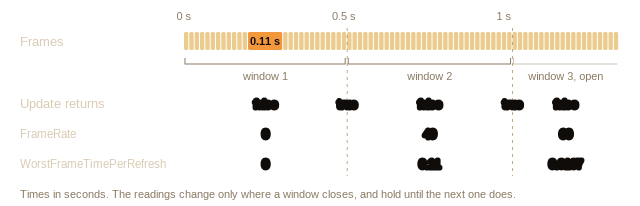
The first window holds 24 frames of 16.7 ms and the hitch of 0.11 s: 25 frames in 0.51 seconds, 49 frames a second. The second holds frames of 16.7 ms only, and reads 60. A window closes at the frame that reaches its length, so it lasts that length and up to a frame more: the readings come about twice a second, a little less often when frames are long.
Before the first window
Until the first window closes, FrameRate and WorstFrameTimePerRefresh read
FrameTimehas the last frame’s time from the first recorded frame on. Show a placeholder until the firsttrue, as the stats overlay does.
The frame rate
FrameRate is the window’s frames divided by the window’s time: the rate the frames really came at, where
a long frame counts for all of its time. Ten frames, nine of 10 ms and one of 100 ms, take 190 ms: 53 frames a second.
An average of each frame’s own rate, 100 nine times and 10 once, would say 91.
The worst frame
An average hides a hitch. In the picture above, one frame of 0.11 s, the time of six or seven ordinary frames at once,
takes the window from 60 frames a second down to 49. That reads like a game running a little slow, not like the stall
the player saw. WorstFrameTimePerRefresh shows it whole: the longest frame of the window,
0.11 seconds.
The frame budget
A frame is a hitch when it overruns the time the game has for a frame, its frame budget: one second divided by the frame rate the game is made for.
| Made for | Frame budget |
|---|---|
| 30 frames a second | 33.3 ms |
| 60 frames a second | 16.7 ms |
| 120 frames a second | 8.3 ms |
| 144 frames a second | 6.9 ms |
With VSync on, a frame that misses its refresh waits for the next one, so a hitch shows as a whole refresh or more: 33.3 ms in a game drawn at 60. Comparing the worst frame with the budget, with some slack for the clock’s jitter, finds the windows with a hitch:
const float Budget = 1f / 60;

var hitch = fps.WorstFrameTimePerRefresh > Budget * 1.5f;
Showing the readings
Frame times are in seconds: multiply by 1000 for milliseconds. Build the text when Update returns true,
not every frame: the readings it shows change only then, and an interpolated string allocates.
if (_fps.Update())
{
    _statsText =
        $"{_fps.FrameRate} FPS\n" +
        $"Frame: {_fps.FrameTime * 1000:F1} ms\n" +
        $"Worst: {_fps.WorstFrameTimePerRefresh * 1000:F1} ms";
}

_spriteBatch.DrawString(_font, _statsText, new Vector2(10, 10), Color.White);
The Frame line is the time of the frame that closed the window, one frame of the half second. For a graph of frame
times, read FrameTime every frame instead, after Update: it is new every frame in either mode.
_fps.Update();

// the last 240 frame times, in milliseconds, for a graph
_frameTimes[_next] = _fps.FrameTime * 1000;
_next = (_next + 1) % _frameTimes.Length;
Per-frame mode
Set UpdateEveryFrame to recalculate the readings from every frame alone, with no window:
var fps = new FrameRateCounter { UpdateEveryFrame = true };
FrameRateis 1 divided by the frame’s time, rounded, and 0 for a frame of no time.WorstFrameTimePerRefreshis the frame’s time, the same asFrameTime.Updatereturnstruefor every frame it records: withUpdate(), every call but the one that starts the clock.
It follows each frame at once, and jumps with it: frames of 15 and 18 ms, an everyday jitter, read 67 and 56 by turns. The averaged mode gives the numbers to read; per-frame mode, a number that follows the frames, and a text built every frame if it is shown.
Switching modes
Changing UpdateEveryFrame discards the frames collected for the window in progress, so the first
averaged reading after a switch covers only frames recorded after it. The readings keep their values until the next
recalculation: switched back to the averaged mode, FrameRate shows the last frame’s rate until the first
window closes. Setting the value it already has changes nothing.
The window’s length
RefreshRateInSeconds sets the window: 0.5 seconds by default. A longer window gives steadier
numbers that come less often, and looks further back for the worst frame; a shorter one follows the game faster:
var fps = new FrameRateCounter { RefreshRateInSeconds = 1f };
| Window | Readings | The worst frame of |
|---|---|---|
| 0.25 s | About four a second, jumpy | The last quarter second |
| 0.5 s, the default | About two a second | The last half second |
| 1 s | About one a second, steady | The last second |
Zero, a negative value, NaN and the infinities are ignored: the window keeps its length. A new length applies to the window in progress, which isn’t discarded, so the next frame closes it if it already holds that much time. In per-frame mode the length isn’t used, and is kept for when the averaged mode comes back.
FrameRateCounter reading properties
| Property | Type | Description |
|---|---|---|
FrameRate |
int |
Read-only. Frames per second, rounded to a whole number: the last window’s frames divided by its time, or 1 divided by the last frame’s time in per-frame mode. 0 until the first window closes, and after Reset. |
FrameTime |
float |
Read-only. The time of the last recorded frame, in seconds, new every frame. 0 until a frame is recorded, and after Reset. |
WorstFrameTimePerRefresh |
float |
Read-only. The longest frame of the last window, in seconds, or the last frame’s time in per-frame mode. 0 until the first window closes, and after Reset. |
FrameRateCounter setting properties
| Property | Type | Description |
|---|---|---|
UpdateEveryFrame |
bool |
false, the default: the readings come from a window of frames. true: from every frame alone. A change discards the frames of the window in progress. |
RefreshRateInSeconds |
float |
The window’s length, in seconds: 0.5 by default. Zero, negative, NaN and infinite values are ignored. Not used in per-frame mode. |