
Color legend plain property method
An input is one physical control: a key, a mouse or pad button, a MIDI note, a trigger, a stick. The same classes do
two jobs. Bound to an action, an input says which control drives it. Passed to
Update, it says what that control is doing this frame. Names are colored by what they are: a plain property or a method.
What an input is
An input holds two kinds of data:
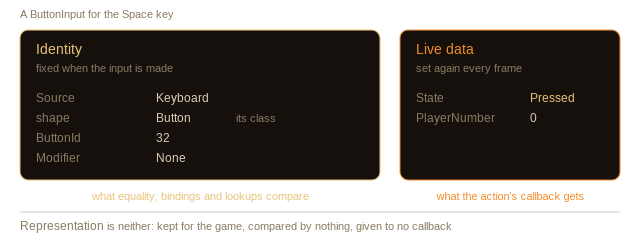
- Its identity: the source, the shape, the id and, for a key, the modifier. They are fixed when the input is made, and they are all the binder compares: a polled input matches the binding with the same identity.
- Its live data: a button’s
Stateor an axis’sValue, and thePlayerNumber. They can be set at any time, so the game makes each polled input once and refills it every frame, and they never change which binding an input matches.
Sources and ids
Source says which kind of device an input is on:
InputSource
| Value | Meaning |
|---|---|
Keyboard |
A key. The only source whose buttons can carry a modifier. |
Mouse |
A mouse button, wheel or movement. |
GamePad |
A pad button, trigger or stick. |
Midi |
A MIDI note, knob or slider. |
The id tells the inputs of one source and shape apart, and its meaning is the game’s: the binder only compares ids. Pick one numbering per source and keep it, since saved bindings store the ids. With MonoGame and MonoInput, these fit:
| Inputs | Ids |
|---|---|
| Keys | MonoGame’s Keys values: (int)Keys.Space is 32 |
| Mouse buttons | MonoInput’s MouseButtonTypes, as int |
| Pad buttons | MonoInput’s GamePadButtonTypes, as int |
| MIDI notes | The note number, 0 to 127 |
| Axes | Numbers of your own, per source: say 0 for the left trigger and 1 for the right, 0 for the left stick and 1 for the right |
The source and the shape are part of the identity, so ids only need to be unique within them: mouse button 0 and pad button 0 are two inputs, and so are pad axis 0, a trigger, and pad axes 0, a stick.
Making inputs
InputFactory makes each kind of input in a few characters, both to bind and to poll:
binder.GetAction("Jump").Bind(0, InputFactory.GamePadButton((int)GamePadButtonTypes.A));
binder.GetAction("Save").Bind(0, InputFactory.Key((int)Keys.S, modifier: ButtonModifier.Ctrl)); // Ctrl+S

var rightTrigger = InputFactory.GamePadAxis(1);         // polled every frame
var leftStick = InputFactory.GamePadAxes(0);
A key’s second parameter is its state, so pass the modifier by name. The state or value matters only to a polled
input: a binding matches on identity alone. The factories are short for the constructors, which do the same:
InputFactory.Key(32) is new ButtonInput(InputSource.Keyboard, 32).
InputFactory methods
Buttons
A ButtonInput is a key, a mouse or pad button, or a MIDI note. Its State is where the button is this
frame, one of four:
ButtonState
| Value | Meaning |
|---|---|
None |
Not touched. The state a new input starts with. |
Pressed |
Just went down: the first frame the button is held. |
Down |
Still held, from the second frame on. |
Up |
Just let go: the frame after the last one it was held. |
They are the four states of MonoInput, with None for its Idle. The binder
doesn’t work them out: the game polls them, and the binder passes them on. A key’s
Modifier is covered on the modifier keys page.
ButtonInput members
| Member | Description |
|---|---|
ButtonId |
Read-only int. Which button of its source. Part of the identity. |
Modifier |
Read-only ButtonModifier. Shift, Ctrl or Alt with the key, or None; always None off the keyboard. Part of the identity. |
State |
ButtonState. Where the button is this frame. Live data: what a button action’s callback gets. |
ButtonInput(InputSource source, int buttonId, ButtonModifier modifier = None) |
A button input, None. A modifier off the keyboard is dropped. |
Axes
A OneAxisInput is a single value, such as a trigger, a wheel or a knob, and a TwoAxesInput a pair, such as a
stick or the mouse’s movement. Their Value goes to the action as it is: the binder sets no range and no dead
zone. Scale values the way the actions expect them, a stick from −1 to 1 and a trigger from 0 to 1, say, before the
update; MonoInput already reports the pad’s that way, with the dead zone applied.
var leftStick = InputFactory.GamePadAxes(0);

// each frame, from MonoInput's first player slot
var stick = GamePadManager.GamePadsStatus[0].LeftStickShift; // MonoGame's Vector2
leftStick.Value = new System.Numerics.Vector2(stick.X, stick.Y);
OneAxisInput members
| Member | Description |
|---|---|
AxisId |
Read-only int. Which axis of its source. Part of the identity. |
Value |
float. The axis this frame. Live data: what a one-axis action’s callback gets. |
OneAxisInput(InputSource source, int axisId, float? value = null) |
A one-axis input, at the value, or 0. |
TwoAxesInput members
| Member | Description |
|---|---|
AxesId |
Read-only int. Which pair of axes of its source. Part of the identity. |
Value |
Vector2, of System.Numerics. The axes this frame. Live data: what a two-axes action’s callback gets. |
TwoAxesInput(InputSource source, int axesId, Vector2? value = null) |
A two-axes input, at the value, or zero. |
Equality
Two inputs are equal when their identities are: the same source, shape, id and modifier. Their live data and representation don’t count, so the input polled this frame equals the one bound last week:
var bound = InputFactory.Key(32);
var polled = InputFactory.Key(32, ButtonState.Pressed);
polled.PlayerNumber = 1;

Console.WriteLine(bound == polled);                                               // True: the same key
Console.WriteLine(bound == InputFactory.Key(32, modifier: ButtonModifier.Shift)); // False: Shift+Space is another input
Console.WriteLine(bound == InputFactory.GamePadButton(32));                       // False: another source
==, !=, Equals and GetHashCode all compare that way, and the identity never changes, so an input can
be a dictionary key, such as for a table of input names. The shapes are told apart too: a button never equals an
axis.
BaseInput members
| Member | Description |
|---|---|
Source |
Read-only InputSource. Which kind of device. Part of the identity. |
PlayerNumber |
int. Which player the input is from this frame. Live data: every callback gets it. 0 at first. |
Representation |
Init-only object. Anything the game shows the input with. Not part of the identity. |
Equals(BaseInput other) |
True for an input with the same identity. Equals(object) is the same. |
operator ==(BaseInput left, BaseInput right) |
True when both have the same identity, or both are null. != is its opposite. |
GetHashCode() |
A hash of the identity, the same for equal inputs. |
Showing an input to the player
A settings menu shows each binding as something the player recognises: “Space”, “Left mouse button”, a picture of the A button. Two ways to get there:
-
A table of the game’s own, from identity to name. Since inputs are equal by identity, a dictionary keyed by input works, and it also names the inputs of bindings loaded from a save:
private static readonly Dictionary<BaseInput, string> InputNames = new() { [InputFactory.Key((int)Keys.Space)] = "Space", [InputFactory.MouseButton((int)MouseButtonTypes.Left)] = "Left mouse button", [InputFactory.GamePadButton((int)GamePadButtonTypes.A)] = "A", }; -
The input’s
Representation, any object set when it is made. The factories don’t take one, so make the input with its constructor:var space = new ButtonInput(InputSource.Keyboard, (int)Keys.Space) { Representation = _icons.SpaceBar };The binding keeps the object it was given, so the representation is there when the menu reads
Inputsback.
BaseInput can’t be derived from outside the library: the three input classes are the only ones.