
Color legend plain property method
Every emitter runs its clip through a chain of effects before it reaches the mix. You add effects to the emitter, then connect them in a line from its send to its return. Names are colored by what they are: a plain property, a method or an event.
The send and the return
An emitter has two fixed ends. EffectLoopSend gives the samples of the current clip, already in the mix format.
EffectLoopReturn takes what the chain made of them and hands it to the mix. A new emitter has its send connected
straight to its return, so it plays its clips as they are.
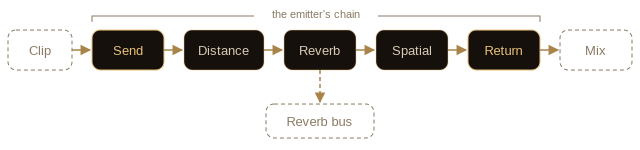
Each effect has one Input and one Output, so a chain is always a single line: an effect can’t feed two others, and
two effects can’t feed one. The reverb effect is the one exception that reaches outside the line: it also sends part
of its sound to the shared reverb bus.
Wiring a chain
TryAddAudioEffect creates an effect of a type and gives it back as a BaseAudioEffect; cast it to its own class to
reach its settings. A new effect is not connected to anything. Connect it by setting Input, the effect it takes its
sound from:
emitter.TryAddAudioEffect(AudioEffectTypes.Equalizer, out var eq);
emitter.TryAddAudioEffect(AudioEffectTypes.Volume, out var volume);

var equalizer = (ThreeBandEqualizerAudioEffect)eq;
equalizer.LowGainDb = 6;

// send -> eq -> volume -> return
eq.Input = emitter.EffectLoopSend;
volume.Input = eq;
emitter.EffectLoopReturn.Input = volume;
Output is the same link seen from the other side: a.Output = b does what b.Input = a does. Connecting takes an
effect away from where it was: when b had another input, that input loses its output, and when a had another
output, that output loses its input.
The order of the three lines above doesn’t matter for an emitter that isn’t playing. For one that is, see below.
A broken chain
While the line from the send doesn’t reach the return, the emitter can’t play. It stops, its State becomes
EffectLoopDisconnected, and Play, Pause and Stop do nothing until the line is whole again. Then the state goes
back to Idle.
Every step that leaves the line open counts, even for a moment. Rewiring a playing emitter one link at a time breaks the
line on the first link and stops the emitter, so wire the chain before playing, or call Play again once it is whole:
// insert a pitch effect between the send and the first effect, while playing
emitter.TryAddAudioEffect(AudioEffectTypes.Pitch, out var pitch);

var first = emitter.EffectLoopSend.Output;
pitch.Input = emitter.EffectLoopSend; // the line is open here: the emitter stops
first.Input = pitch;                  // whole again: Idle
emitter.Play();                       // a clip from the start
Rewiring is safe while the mix runs: the audio thread never sees a half-connected chain.
Bypassing effects
IsBypass lets the sound through an effect unchanged, keeping the effect and its settings in the chain. Use it to
switch an effect off and on without rewiring:
volume.IsBypass = true;  // as if the volume effect weren't there
volume.IsBypass = false; // back
Several effects also skip their work by themselves when their settings leave the sound unchanged: an equalizer band at 0 dB, a pitch of 1, a delay of 0 ms, and Doppler while nothing moves. Don’t bypass the send or the return: a bypassed send gives silence, and a bypassed return keeps playing through a pause.
Removing effects
TryRemoveAudioEffect takes an effect out of the emitter and disposes it, found by itself or by its Id. An effect in
the chain leaves a gap, so connect its neighbors again:
var before = volume.Input;
var after = volume.Output;

emitter.TryRemoveAudioEffect(volume); // the chain is broken here
after.Input = before;                 // whole again
ClearAudioEffects disposes every effect and connects the send straight to the return again. Each effect has an Id,
new for every effect and every run, which TryGetAudioEffect finds; it also finds the send and the return.
Kinds of effects
Most effect types can be added any number of times, such as two equalizers in a row. The positional effects and the
time position effect read or steer the emitter as a whole, so an emitter has at most one of each, and
TryAddAudioEffect returns false for a second one.
The order of effects
The chain runs in the order you wire it, and the order changes the sound. A good default for a sound in the world:
send -> fade -> equalizer -> pitch -> Doppler -> distance -> delay
     -> reverb -> spatial -> volume -> return
- Spatial near the end. The spatial effect turns the sound into what each ear hears. Effects after it treat both ears alike, which suits a volume, but an equalizer or a delay belongs before it.
- Reverb before spatial. The reverb bus then gets the sound before it is placed, and its tail comes from all around, as a room’s does.
- Distance before or after reverb. After the distance effect, the reverb fades with the sound and keeps the same share of it at every distance. Before it, a far sound keeps its full reverb while the dry sound fades, which reads as further away, but a sound past its audible distance still sounds in the reverb.
- Pitch and Doppler together. Both shift the pitch with the same kind of processing; keep them next to each other.
- Time position anywhere. It reads and moves the clip itself, wherever it sits, as long as it is connected.
BaseAudioEffect properties
BaseAudioEffect is the base of every effect, the send and the return included.
| Property | Type | Description |
|---|---|---|
Id |
Guid |
Read-only. Identifies the effect within its emitter. New for every effect and every run, and empty once the effect is disposed. |
Type |
AudioEffectTypes |
Read-only. What kind of effect it is. |
Input |
BaseAudioEffect |
The effect this one takes its sound from, null when none. Setting it connects the two and takes both away from their old links. |
Output |
BaseAudioEffect |
The effect this one gives its sound to, null when none. a.Output = b does what b.Input = a does. |
IsBypass |
bool |
Lets the sound through unchanged, keeping the effect in the chain. Off by default. |
BaseAudioEffect methods
| Method | Description |
|---|---|
Dispose() |
Disconnects the effect and frees it. Remove effects through their emitter instead, which disposes them. |
EmitterSendEffect and EmitterReturnEffect
The two ends of every chain: EffectLoopSend is an EmitterSendEffect and EffectLoopReturn an EmitterReturnEffect.
They have no members of their own beyond those of BaseAudioEffect, and you can’t create or remove them: they live and
die with their emitter. Leave the send’s Input and the return’s Output empty: an effect after the return would be
the end of the line instead of the return, and break the chain.
IAudioEmitter effect methods
| Method | Description |
|---|---|
TryAddAudioEffect(AudioEffectTypes type, out BaseAudioEffect effect) |
Creates an effect of a type, not connected to anything. false for EffectLoopSend and EffectLoopReturn, and for a second Distance, Doppler, Spatial or TimePosition. |
TryRemoveAudioEffect(BaseAudioEffect effect) |
Disconnects and disposes an effect of this emitter. An effect in the chain leaves it broken until you connect its neighbors. |
TryRemoveAudioEffect(Guid effectId) |
The same, for the effect with that Id. |
ClearAudioEffects() |
Disposes every effect and connects the send straight to the return. |
TryGetAudioEffect(Guid effectId, out BaseAudioEffect effect) |
Finds an effect of this emitter by its Id, the send and the return included. |
AudioManager effect methods
| Method | Description |
|---|---|
TryAddEffectToEmitter(string emitterName, AudioEffectTypes type, out BaseAudioEffect effect) |
TryAddAudioEffect on the emitter of that name. |
TryRemoveEffectFromEmitter(string emitterName, BaseAudioEffect effect) |
TryRemoveAudioEffect on the emitter of that name. |
TryRemoveEffectFromEmitter(string emitterName, Guid effectId) |
The same, by the effect’s Id. |
TryClearEmitterEffects(string emitterName) |
ClearAudioEffects on the emitter of that name. |
TryGetEffectById(string emitterName, Guid effectId, out BaseAudioEffect effect) |
TryGetAudioEffect on the emitter of that name. |
AudioEffectTypes
| Value | Meaning |
|---|---|
EffectLoopSend |
The start of a chain. Every emitter has one; it can’t be added. |
EffectLoopReturn |
The end of a chain. Every emitter has one; it can’t be added. |
Distance |
Attenuation and low-pass by distance, see distance. |
Doppler |
Pitch shift by the speeds of the listener and the emitter, see Doppler. |
Equalizer |
A three-band equalizer, see equalizer. |
FadeInOut |
Fades at the start and the end of each clip, see fades. |
Pitch |
A pitch shift by a factor, see pitch. |
Reverb |
A send to the reverb bus, see the reverb bus. |
Delay |
An echo with feedback, see delay. |
Spatial |
HRTF spatialization, see spatialization. |
TimePosition |
Reading and setting the position in the clip, see time position. |
Volume |
A gain, see volume. |