
Color legend plain property method
The solver leaves the sheet on the GPU, in a structured buffer of FabricParticle records. To draw it,
your vertex shader reads that buffer, indexed by SV_VertexID: no vertex stream, no readback, no copy. The library
draws nothing itself, so lighting, materials and the draw call are all yours. Names are colored by what they are: a
property or a method; values and fields keep the
plain color.
The vertex shader
The headers are in your content tree at Content/Effects/Fabric, next to the solver the package copied there, see
the shaders in your content. Include
FabricParticleBuffer.fxh: it brings the particle record, the grid sizes, the texture coordinates and the buffer to
read, so you declare none of them. The path is relative to your own .fx, which is how the content builder resolves an
#include; this one sits in Content/Effects:
#include "Fabric/FabricParticleBuffer.fxh"

float4x4 WorldViewProjection;

struct VSOutput
{
    float4 Position : SV_POSITION;
    float3 Normal   : NORMAL0;
    float2 TexCoord : TEXCOORD0;
};

VSOutput VS(float unused : POSITION0, uint vertexId : SV_VertexID)
{
    FabricParticle p = FabricParticles[vertexId];

    VSOutput output;
    output.Position = mul(float4(p.Position, 1.0), WorldViewProjection);
    output.Normal = p.Normal;
    output.TexCoord = FabricTextureCoordinates(vertexId);

    return output;
}
The float unused : POSITION0 input matches the placeholder vertex buffer a draw call needs bound: the shader reads
nothing from it, so one float per vertex is enough, with no IVertexType behind it. A cut sheet draws vertices that
aren’t particles, and FabricEvaluateVertex fetches any vertex, a particle or not, so a shader that uses it
draws whole and cut sheets alike, see drawing a cut mesh.
FabricParticleBuffer.fxh includes FabricParticle.fxh, which the solver includes too and which declares no
buffer. Include that one alone only for the record without the buffer to read it from.
FabricParticleBuffer.fxh names
| Name | Description |
|---|---|
FabricParticles |
StructuredBuffer<FabricParticle>: the sheet as of the latest step. Bind ParticleBuffer to it every frame. |
FabricSeamVertex |
The struct of a cut mesh’s lip vertex, 32 bytes, mirroring FabricSeamVertex. |
FabricSeamVertices |
StructuredBuffer<FabricSeamVertex>: a cut mesh’s lip vertices. Bind it when drawing from CreateCutMesh. |
FabricEvaluateVertex(uint vertexId, [float fraction,] out float3 position, out float3 normal, out float2 texCoord) |
Any vertex of the plain list or a cut mesh: its position, normal and texture coordinate, at the latest step or a fraction of the way from the one before. |
FabricInterpolatedPosition(FabricParticle p, float fraction) |
A particle’s position a fraction of the way from the previous step’s pose to the latest. A pin draws where it is. |
FabricInterpolatedNormal(FabricParticle p, float fraction) |
Its normal, the same fraction of the way. |
FabricParticle.fxh names
| Name | Description |
|---|---|
FabricParticle |
The particle record, 64 bytes, field for field the C# FabricParticle. |
FabricWidthInParticles, FabricHeightInParticles |
uint: the grid, as built. Set them every frame. |
FabricTextureCoordinates(uint vertexId) |
A particle’s texture coordinate, from its place in the grid, see texture coordinates. |
FabricPackNormal(float3 normal), FabricUnpackNormal(uint packed) |
A unit vector in four bytes and back, as PreviousNormal holds it. |
FabricShaderContractVersion |
The define the solver checks against the assembly, see the headers’ version. |
What to bind every frame
Bind the buffer and the grid sizes on your effect, the one that included the header, every frame:
// Effect _cloth = Content.Load<Effect>("Effects/Cloth");   your shader
_cloth.Parameters["FabricParticles"].SetValue(_fabric.Effect.ParticleBuffer);
_cloth.Parameters["FabricWidthInParticles"].SetValue(_fabric.WidthInParticles);
_cloth.Parameters["FabricHeightInParticles"].SetValue(_fabric.HeightInParticles);
Every frame, because the solver keeps two record buffers and swaps them as it steps, and a build replaces both:
which buffer holds the latest step is the solver’s business, and ParticleBuffer always names it. The grid comes
from the Fabric, as built, never from the settings, which may have run ahead of the next build.
Set them on your effect, never on the solver’s. Its shader declares no FabricParticles, since it binds the records
under two names of its own to read one and write the other, so that parameter is null there; and its grid sizes are
its own, set at the build, so overwriting them breaks the solve. FabricEffect.Shader is for the uniforms of
an effect that wraps the solver, such as a wind function’s, see wind that varies across the sheet.
The buffer you draw is the one the step’s last pass wrote, and that is safe: the compute fork lets go of a pass’s writable buffers right after each dispatch, so by the time your vertex shader binds the buffer to read it, nothing holds it for writing. The header declares it read-only on purpose: a vertex shader can’t bind a writable buffer.
FabricEffect drawing properties
| Property | Description |
|---|---|
ParticleBuffer |
Read-only. The StructuredBuffer holding the latest step, for FabricParticles; null before the first build. Bind it every frame. |
InterpolationFraction |
Read-only. Where to draw between the last two steps, from 0, the previous step’s pose, to 1, the latest. See between steps. |
The triangles
CreateTriangleIndices returns the sheet’s triangle list, two per grid square, indexing the particles directly.
Upload it to a 32-bit index buffer: 16-bit indices overflow silently past 65,536 particles. Do it after every build,
in a handler of Rebuilt, and after every cut or mend, which take triangles away or put them back:
_indices.SetData(_fabric.CreateTriangleIndices());

// and draw _fabric.TriangleCount triangles from here on
GraphicsDevice.DrawIndexedPrimitives(PrimitiveType.TriangleList, 0, 0, _fabric.TriangleCount);
A tear only ever removes triangles, so a buffer sized at the build always fits. The list is built once per change of
damage and the same array comes back until the next, so treat it as read-only. Its lips are jagged at the scale of
the grid; a sheet cut along strokes draws clean lips from CreateCutMesh instead, see
clean lips.
Fabric triangle members
| Member | Description |
|---|---|
CreateTriangleIndices() |
Returns int[]: three particle indices per triangle, two triangles per grid square, less those torn away. |
TriangleCount |
Read-only. The triangles in that list. Read it again after a cut. |
Three rules
A cloth shader keeps three rules:
- No world matrix. The particles are simulated in world space: gravity, the wind and the colliders are world
vectors, so a world matrix that moved the mesh would draw the cloth somewhere the solver doesn’t think it is. Draw
with the view and projection alone. To move a sheet, change its
Originand rebuild, or move its pins. -
No back-face culling. Both sides of the sheet show as soon as it folds. Draw with
RasterizerState.CullNone, and turn the normal towards the camera in the pixel shader before lighting, or the far side of every fold is lit as if from behind:float3 normal = normalize(input.Normal); if (dot(normal, CameraPosition - input.WorldPosition) < 0.0) normal = -normal; - The solver’s normal.
Normalis worked out on the GPU every step, for the pose the step ends in, from the threads that are still whole, so a cut parts the shading too. A normal of your own, from each triangle, shades every crease differently from how the physics bends it. Before the first step it holds the flat sheet’s facing.
Between steps
The solver steps at its own fixed rate. At MonoGame’s fixed 60 updates a second that is exactly two steps a frame, but
other rhythms don’t line up: at 144 frames a second with IsFixedTimeStep = false, or 90 in VR, some frames get no
step and redraw the pose they drew, and others get two. The cloth then moves in uneven jumps. To draw between steps,
bind InterpolationFraction every frame to a uniform of yours and pass it to FabricEvaluateVertex:
_cloth.Parameters["ClothInterpolation"].SetValue(_solver.InterpolationFraction);
float ClothInterpolation;   // your own uniform, any name

VSOutput VS(float unused : POSITION0, uint vertexId : SV_VertexID)
{
    float3 position;
    float3 normal;
    float2 texCoord;

    FabricEvaluateVertex(vertexId, ClothInterpolation, position, normal, texCoord);
    ...
}
Each point is drawn that fraction of the way from the previous step’s pose to the latest, and the fraction is chosen so the cloth moves evenly. The price is a little latency. Drawn at the latest step, the cloth trails the clock by whatever time the last step left over, which changes from frame to frame: that is the stutter. Even motion trails by the same time every frame, so it has to trail by the longest of those, and the fraction keeps it to that, the least the rhythm allows. Against drawing the latest step, that costs nothing when the frames line up with the steps, so binding it at a fixed 60 updates a second changes nothing; 3.5 ms on average at 144 frames a second; and never more than one step. When the rhythm changes the lag rises at once and sheds slowly, so the cloth never jumps.
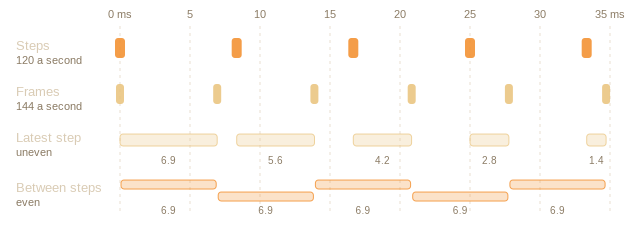
Pins are drawn where they are, so a pin a host moves between steps moves at once. Normals blend by the same fraction,
from the pose a step began in, PreviousNormal, to the one it ended in, so the shading turns as smoothly as
the cloth moves. FabricInterpolatedPosition and FabricInterpolatedNormal do the same for a particle you
fetch yourself. The fraction follows Update; a Step called on its own leaves it where it was.
Texture coordinates
FabricTextureCoordinates works a particle’s texture coordinate out from its place in the grid: u from 0 at the
first column to 1 at the last, and v from 1 at row 0 to 0 at the top row. So the bottom edge of an upright sheet,
the free edge of a hanging one, is the bottom of the texture. They follow the weave, not the world: neither the
sheet’s orientation nor its rotation changes them, and a texture stays on the cloth however it folds. A cut mesh’s lip
vertices carry their own, worked out the same way at the point of the lip.
The particle
A FabricParticle is one point of the grid, 64 bytes, the same field for field in C# and in HLSL. It is lean
because every pass streams the whole grid: nothing that can be worked out is stored. A point’s velocity is the gap
between its two positions, and its texture coordinate follows from its index. A renderer reads its positions and
normals; the pins and the folds are the solver’s, and come to you only in a readback, or go to the solver in an
upload of your own, see driving the solver yourself.
FabricParticle fields
| Field | Type | Description |
|---|---|---|
PrevPosition |
Vector3 |
Where the point was a step before, in world space: its velocity is the gap from here to Position. |
Position |
Vector3 |
Where it is, in world space. |
Normal |
Vector3 |
The facing of the pose the latest step ended in. |
AnchorIndex |
uint |
The pin it hangs from, as a grid index, so a pin that moves is followed. |
MaxAnchorDistance |
float |
The furthest it may get from that pin, measured along the weave; 0 for a pin, negative when no pin reaches it. |
RestAngles |
Vector3 |
The rest angles of the three folds it owns, in radians, π flat. Creases rewrite them. |
IsPinned |
uint |
Not 0 when the point is pinned. A uint, as an HLSL bool is four bytes. |
PreviousNormal |
uint |
The facing of the pose the latest step began in, packed into four bytes. |
FabricParticle constants and methods
| Member | Description |
|---|---|
ShaderContractVersion |
Constant, 3: what FabricShaderContractVersion in the headers must be. |
SizeInBytes |
Constant, 64: the record’s size, and the buffer’s stride. |
PackNormal(Vector3 normal) |
Static. A unit vector in four bytes, as PreviousNormal holds it: folded onto an octahedron, 16 bits a side. |
UnpackNormal(uint packed) |
Static. The unit vector PackNormal packed. |
The headers’ version
The headers in your content are a copy, and a copy outlives the upgrade that changes what it describes. So
FabricParticle.fxh carries #define FabricShaderContractVersion, and the FabricEffect constructor compares
it with FabricParticle.ShaderContractVersion. It throws InvalidOperationException when they differ, and when the
define is missing, since a header older than the check is older than the assembly. It checks GroupSize and
ContactCandidateCapacity in FabricSimulation.fxh the same way, and that the loaded effect has the solver’s
technique and its eight passes.
The version moves with any change of shape: a field added, removed, reordered or resized, a grid parameter renamed, the texture coordinates laid out differently, or a new input from the assembly to the solver. A byte count can’t catch that: swap two fields of the record and both sides still measure 64 bytes, and the cloth reads one field as another, which looks like a broken solver rather than a stale header.
The check does its best. It looks for Content/Effects/Fabric up from the executable’s folder, and a game shipped with
only the compiled solver has nothing to compare with, and isn’t failed for it. The package refreshes the copy on every
build, so a mismatch means headers from another release reached your content some other way: build again from the
package, or copy its headers again.