
Color legend plain property method event
A Fabric is one sheet of cloth. It builds the grid from its settings and its layout, uploads it to its
FabricEffect, and from then on drives it: every frame it hands the solver the settings and the frame’s time,
and the solver runs as many fixed steps as that time affords. Names are colored by what they are: a
property, a method or an
event; values and fields keep the plain color.
Building the sheet
A sheet takes a solver and the settings, and is built by Rebuild:
var settings = new FabricSettings { WidthInParticles = 96, HeightInParticles = 64, RestLength = 0.06f };
var fabric = new Fabric(new FabricEffect(GraphicsDevice, Content), settings)
{
    Origin = new Vector3(0.0f, 3.0f, 0.0f),
    PinMode = FabricPinMode.TopCorners
};

fabric.Rebuild();
The constructor builds nothing, so the layout can be set first at no cost. Rebuild is optional the first time: the
first Update or Step builds the sheet if nothing has, and so does any member that needs the
sheet: a cut, a pin change, the triangles, a captured surface. Call it yourself when you want to size your buffers
right away, as the first sheet does.
A build lays the points out flat in the plane and at the angle the layout asks for, pins the ones it names, measures
how far each point may hang from its pin, seeds the folds with their rest angles, and uploads the lot. It replaces
the live sheet whole: every tear is mended, every SetPinned change dropped, and the solver’s clock and
its diagnostics start again. To open a scene with a sheet already torn, cut it right after the build.
Everything is checked before the live sheet is touched, so a bad setting throws and leaves the old sheet running. A
Rebuild throws InvalidOperationException for a grid smaller than 2 × 2 points, which the settings’ default of 0
is; for a RestLength that isn’t a finite, positive number, another default of 0; for a grid of more than
MaxParticles points; for a Origin, Rotation or SeedRipple that isn’t finite, or a rotation of
no length; and for aerodynamic pressure on a sheet too long for it. It throws ArgumentOutOfRangeException for a pin
index outside the grid, and ArgumentException for a setting that isn’t a finite number.
Rebuilt is raised after every build, whoever asked for it: the grid, the triangles and the pins may all
have changed, so it is the one place to size your buffers to the sheet. It is raised even when the settings fail to
upload after the sheet was replaced, since your buffers must follow the new sheet either way.
Fabric build members
| Member | Description |
|---|---|
Settings |
The FabricSettings the sheet runs with. Another instance can be assigned at any time; its sheet fields wait for a build. Never null. |
Effect |
Read-only. The FabricEffect driving the sheet: a renderer needs its particle buffer. |
IsBuilt |
Read-only. Whether the sheet has been built, by Rebuild or by first use. |
Rebuild() |
Builds the sheet afresh from the settings and the layout, uploads it and mends every tear. Throws, before touching the live sheet, for anything it can’t build. |
Rebuilt |
An EventHandler raised after every build, called, done by first use or by AutoRebuild. |
Live settings and built ones
The settings live two lives. Most of them, the solver’s, the air’s, the colliders’, are read every frame: change one
while the cloth runs and the next step takes it up. A few describe the sheet itself, and are read only when it is
built: the grid and its spacing, SeedRipple, and the sheet’s layout on the Fabric, where it hangs and what
holds it. Change one of those and the live sheet keeps what it was built with until the next Rebuild, so it never
stretches or shears out of step with its own pins, folds and cuts. The settings page
lists which is which.
Rebuilding by itself
Turn on AutoRebuild, and every Update and Step compares what a build reads with what the live sheet was
built from, and rebuilds when anything differs. The handler of Rebuilt sizes the buffers to the new sheet:
_fabric.Rebuilt += (_, _) =>
{
    var indices = _fabric.CreateTriangleIndices();

    _indices?.Dispose();
    _indices = new IndexBuffer(GraphicsDevice, IndexElementSize.ThirtyTwoBits, indices.Length, BufferUsage.WriteOnly);
    _indices.SetData(indices);

    _vertices?.Dispose();
    _vertices = new VertexBuffer(GraphicsDevice,
        new VertexDeclaration(new VertexElement(0, VertexElementFormat.Single, VertexElementUsage.Position, 0)),
        _fabric.ParticleCount, BufferUsage.WriteOnly);
};

_settings.AutoRebuild = true;
_settings.WidthInParticles = 128;   // the next Update rebuilds, and the handler resizes
A rebuild starts over, with a fresh sheet, every tear mended and the pins as the layout names them, so this suits a
setup being edited, from a tuning panel say. It doesn’t suit an Origin moved every frame: that rebuilds every frame.
The comparison is exact, and a SeedRipple past its range counts as the value it is held to, so a change that builds
the same sheet rebuilds nothing.
The sheet as built
The sizes on the Fabric report the sheet as built, which the settings may have run ahead of. Bind these to your
shader, never the settings’ figures. Until the first build they report the settings’.
The flat sheet is (points − 1) × RestLength along each side, Width and Height: a 96 × 64 sheet at
6 cm is 5.7 m by 3.78 m. Cuts are measured on it. The starting ripple narrows the sheet as built by a few percent at
most, and BuiltWidth and BuiltHeight give that figure, see the starting ripple.
Fabric size properties
| Property | Description |
|---|---|
WidthInParticles |
Read-only. Points across, as built. |
HeightInParticles |
Read-only. Points from the bottom edge to the top, as built. |
RestLength |
Read-only. The spacing between neighbors, in meters, as built. |
ParticleCount |
Read-only. Points in the sheet, WidthInParticles × HeightInParticles. |
Width |
Read-only. The flat sheet’s width, (WidthInParticles − 1) × RestLength. |
Height |
Read-only. The flat sheet’s height, or its depth lying down. |
BuiltWidth |
Read-only. The width the sheet was laid out at, narrowed by the starting ripple. 0 until built. |
BuiltHeight |
Read-only. The height it was laid out at. 0 until built. |
The fixed step
The solver steps at SolverFrequencyHz, 120 times a second by default, whatever the frame rate: a step
always covers the same time, so the cloth moves the same at any frame rate. Update adds the frame’s time
to what is owed, runs a step for every whole step’s worth, and keeps the remainder for the next frame. Under MonoGame’s
fixed 60 updates a second, that is exactly two steps a frame. At other rhythms some frames get one step and some three,
and a frame between two steps redraws the same pose; the drawing page
has how to draw between them instead.
protected override void Update(GameTime gameTime)
{
    _fabric.Update((float)gameTime.ElapsedGameTime.TotalSeconds);   // takes the settings up, then steps

    base.Update(gameTime);
}
A frame runs at most MaxStepsPerFrame steps, 4 by default. A slow frame owes more, and if it owes
more than that, the rest is dropped rather than carried over: catching up would make the next frame slower still.
IsSaturated says the last frame did that, and the cloth fell behind the clock for it. A frame’s time is
held to between 0 and 0.25 s, a NaN or a negative time counts as none, and the frame right after an upload, which a
build is, gets exactly one step, whatever its time: the upload’s stall isn’t time the cloth owes, and one step gives
the sheet its normals before it is first drawn.
Step runs exactly one step, whatever the clock says: for a tool that steps the cloth by hand, or a test.
Both take the settings up first, and both build or rebuild the sheet first when it needs it, as Update does.
Fabric stepping methods
| Method | Description |
|---|---|
Update(float elapsedSeconds) |
Takes the settings up, then runs as many whole steps as the time affords, up to MaxStepsPerFrame. Builds the sheet first if nothing has, or rebuilds it when AutoRebuild finds something changed. |
Step() |
Takes the settings up, then runs exactly one step. Builds or rebuilds first, as Update does. |
FabricEffect stepping members
The Fabric calls these for you. They are the solver’s half of the step, and what you call when you drive a
FabricEffect without a Fabric, see driving the solver yourself.
| Member | Description |
|---|---|
Apply(FabricSettings settings) |
Uploads every setting, cheap enough for every frame. Throws, before uploading anything, for a setting that isn’t a finite number or a step rate or spacing that isn’t positive. |
Update(float elapsedSeconds) |
Runs the whole steps the time affords, up to MaxStepsPerFrame, and drops the backlog past that. |
Step() |
Runs exactly one step. |
LastStepCount |
Read-only. The steps the last Update ran. |
IsSaturated |
Read-only. The last Update hit MaxStepsPerFrame and dropped its backlog. |
Time |
Read-only. Simulated seconds since the sheet was uploaded, the clock the cloth keeps. |
TotalStepCount |
Read-only. Steps since the sheet was uploaded. |
DispatchesPerStep |
Read-only. Compute dispatches a step takes with the settings as last applied. |
What a step does
A step is a few compute passes over the whole sheet, one thread per point, in this order:
- Integrate. Gravity, the drag of the air against the wind, damping and the motion each point carries from the last step move every point that isn’t pinned. Folds that bent past their yield set a little further as creases, and points that barely move are let rest, see rest.
- Pressure, with
UseAerodynamicPressureon: a few passes that couple the sheet through the air it pushes, see aerodynamic pressure. - The neighbor search, with self-collision on: three passes that file every point in a spatial hash and gather each one’s partners for the step, see the spatial hash.
- The rounds,
RelaxationIterationsof them. Each pulls every thread back towards its length, keeps every point within reach of its pin, pushes touching layers apart and keeps the cloth off the colliders, each point gathering what its neighbors ask of it and moving by the average. A round that solves bending runs a fold pass before it. The last round writes the finished records, with the normals of the pose the step ends in.
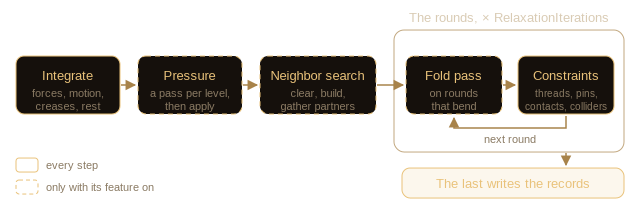
DispatchesPerStep counts them: one for the integration, one per round, one more per round that solves
bending, three for the neighbor search, and the pressure’s. At the defaults, ten rounds all solving bending, with
self-collision on, that is 24 a step and 48 a frame at 60 frames a second. Which of them cost the most on a large
sheet, and the knobs that cut them down, are on the settings page.
Several sheets
Each sheet needs its own FabricEffect and Fabric. A FabricEffect takes its own copy of the solver from the
ContentManager, which shares the compiled shaders and costs little, so any number of sheets can load it from one
ContentManager:
var flag = new Fabric(new FabricEffect(GraphicsDevice, Content), flagSettings) { PinMode = FabricPinMode.LeftEdge };
var banner = new Fabric(new FabricEffect(GraphicsDevice, Content), bannerSettings) { PinMode = FabricPinMode.TopEdge };
Each runs its own clock and its own buffers, and each is drawn with its own ParticleBuffer and grid sizes. Sheets
don’t collide with each other: each knows only itself, the sphere and the ground.
Driving the solver yourself
A Fabric builds the sheet and keeps the pins and the damage; the FabricEffect under it runs whatever particles
it is given. A sheet of your own, laid out by hand, runs on a FabricEffect alone:
var solver = new FabricEffect(GraphicsDevice, Content);

solver.SetParticles(particles, width, height);   // a FabricParticle per point, row by row
solver.Apply(settings);                          // every frame, before Update
solver.Update(elapsed);
SetParticles allocates the buffers and uploads the sheet, restarting the clock and the diagnostics; call it
again to change the grid. The pins come from each record’s IsPinned, AnchorIndex and
MaxAnchorDistance, see the particle. UpdateParticles overwrites a
sheet of the same size and keeps the clock running, for changes made while it simulates, and ReadBack copies it
back to the CPU at the cost of a stall. Without a Fabric, there are no cuts, no pin changes and no measuring of the
pins’ reach: those are the Fabric’s.
Under a Fabric, these are still yours to call, with care. ReadBack is free to use; an UpdateParticles that
changes which points are pinned is followed by the Fabric on its own, see moving pins.
A SetParticles with a sheet of another size takes the solver from the Fabric, whose next pin or picking call
throws InvalidOperationException until a Rebuild takes it back.
FabricEffect particle methods
| Member | Description |
|---|---|
SetParticles(FabricParticle[] particles, int widthInParticles, int heightInParticles) |
Allocates the buffers for a sheet and uploads it, restarting the clock and the diagnostics. Everything is checked and the new buffers made before the old ones go, so a failure leaves the previous sheet running. |
UpdateParticles(FabricParticle[] particles) |
Overwrites the particles of a sheet of the same size, keeping the clock: positions, pins, anchors, rest angles. Throws before uploading anything for a value that isn’t finite or an anchor outside the sheet. |
UpdateTearState(uint[] tearState, bool anyTorn) |
Uploads the damage, FabricTearFlags per point. The Fabric’s cuts call it for you. |
ReadBack() |
Copies the particles back to the CPU, stalling until the GPU catches up: for events and diagnostics, not every frame. |
ParticleCount |
Read-only. The particles the buffers hold; 0 before the first SetParticles. |
Dispose() |
Releases every buffer and the sheet’s copy of the solver. The instance is unusable afterwards. |
FabricEffect limits
| Constant | Description |
|---|---|
ComputeGroupSize |
256: the threads of one compute group, the points one group covers. Must match the solver’s GroupSize, which the constructor checks. |
MaxParticles |
65,535 × 256 = 16,776,960: the largest sheet, as many points as one dispatch can cover. |