
Color legend plain property method
A key can be bound on its own or with Shift, Ctrl or Alt: S walks back, Ctrl+S saves. The game polls the S key as it is, says which modifiers are held, and the binder picks the binding. Names are colored by what they are: a plain property or a method.
Bindings with a modifier
A key’s Modifier is part of its identity, so S, Shift+S, Ctrl+S and Alt+S are four inputs, bound to four
actions or fewer:
binder.RegisterButtonAction("Walk back", OnWalkBack)
      .WithDefaultBinding(0, InputFactory.Key((int)Keys.S));

binder.RegisterButtonAction("Save", (state, player) => { if (state == ButtonState.Pressed) SaveGame(); })
      .WithDefaultBinding(0, InputFactory.Key((int)Keys.S, modifier: ButtonModifier.Ctrl));
The modifier is the third parameter of InputFactory.Key, after the state, so pass it by name. A binding has one
modifier at most: there is no Ctrl+Shift+S. Only keys have modifiers; a mouse, pad or MIDI button made with one drops
it.
ButtonModifier
| Value | Meaning |
|---|---|
None |
The key on its own. Every button off the keyboard has it. |
Shift |
The key with Shift held. |
Ctrl |
The key with Ctrl held. |
Alt |
The key with Alt held. |
Telling the binder what is held
The game polls keys without a modifier, and passes the modifiers held to
Update. With MonoInput, its keyboard manager knows them, left or right:
binder.Update(buttons, oneAxis, twoAxes,
              withShift: KeyboardManager.IsShiftDown,
              withCtrl: KeyboardManager.IsCtrlDown,
              withAlt: KeyboardManager.IsAltDown);
The flags only matter to keys polled without a modifier. Mouse, pad and MIDI buttons, and axes, reach their bindings whatever is held.
The most specific binding wins
For a key polled without a modifier, the binder first tries the binding of the key with each modifier held, in the order Shift, Ctrl, Alt, and calls every one it finds. Only when none of them is bound does it call the key’s own binding. So Ctrl+S saves without also walking back:
| Held | Bound | Called |
|---|---|---|
| Nothing | S, Ctrl+S | S |
| Ctrl | S, Ctrl+S | Ctrl+S, not S |
| Ctrl | S only | S: with no Ctrl+S binding, the key’s own binding is called |
| Ctrl and Shift | S, Ctrl+S, Shift+S | Shift+S and Ctrl+S, not S |
| Ctrl and Shift | S, Ctrl+S | Ctrl+S, not S |
A held modifier with nothing bound for the key changes nothing: a player who sprints with Shift still walks back with S, as long as Shift+S isn’t bound. Binding Shift+S to something takes S away from a sprinting player, so keep modifier bindings to keys that aren’t held during play.
A press keeps its binding
The binding is chosen when the key is Pressed, and the press keeps it through its Down and Up, whatever happens
to the modifiers meanwhile:
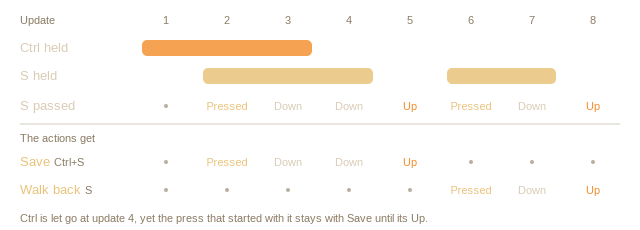
So an action that got Pressed gets the Up that ends it, and no action gets a Down or an Up without the
Pressed before it: letting go of Ctrl before S doesn’t leave Walk back with a release it never saw start. A press
that went to several bindings, Ctrl+S and Shift+S, keeps all of them.
Two cases are decided by the modifiers held at the moment instead:
- A key first seen held. A key whose
Pressedthe binder never saw, because it was held before the game started passing keys or a frame was skipped, is routed by the modifiers held at each update until itsUp. - A key never seen let go. A press whose
Upnever came, such as while the window lost focus, is forgotten at the key’s nextPressed.
The binder keeps the binding of each held key per player number: the same key on two players’ keyboards is two presses.
Polling a key with its modifier
A key polled with a modifier skips all of this: it reaches the binding with that modifier, whatever the flags say. That suits a game that works out its own combinations, or an input that comes from somewhere other than a keyboard, such as a shortcut button on screen:
var saveShortcut = InputFactory.Key((int)Keys.S, ButtonState.Pressed, ButtonModifier.Ctrl);
binder.Update([saveShortcut], null, null, false, false, false); // calls Save, as Ctrl+S would
Modifier keys as bindings
Shift, Ctrl and Alt are keys too, and can be bound on their own, Shift to sprint or Ctrl to crouch. Poll them like any
key: Left Shift polled while the Shift flag is set looks for a Shift+Left Shift binding first, finds none, and calls
its own. Bound keys are Keys.LeftShift and Keys.RightShift, two inputs, so a game that wants either Shift binds both,
one per slot.
binder.RegisterButtonAction("Sprint", (state, player) => _heroes[player].Sprinting = state is ButtonState.Pressed or ButtonState.Down)
      .WithDefaultBinding(0, InputFactory.Key((int)Keys.LeftShift))
      .WithDefaultBinding(1, InputFactory.Key((int)Keys.RightShift));
A rebinding screen that listens for the next key pressed sees Ctrl on its own before Ctrl+S. One that offers modifier
bindings waits for a key that isn’t a modifier, and takes the modifier held with it, through
InputFactory.Key with modifier:.