
Color legend plain property method
The weave can be cut while the cloth runs, without starting over: a stroke severs every thread it crosses, the cut opens under its own weight, and a piece cut free of every pin falls. Cuts are drawn on the flat sheet, where the damage belongs; turning a drag across the screen into such a stroke is the picking page’s. Names are colored by what they are: a property or a method; values and fields keep the plain color.
Cutting the flat sheet
Cut takes a stroke in meters on the unfolded sheet: (0, 0) is the point of index 0, u runs along
Width and v along Height, see conventions. So a stroke lands on the
same threads whatever the cloth is doing, and in the same place at any resolution. It returns how many threads it
severed:
// a rip climbing from the free edge, 45% of the way across
var u = _fabric.Width * 0.45f;
var severed = _fabric.Cut(new Vector2(u, 0.0f), new Vector2(u + 0.4f, _fabric.Height * 0.6f));

// triangles that spanned the cut are gone: upload the list again, and draw TriangleCount of them
if (severed > 0) _indices.SetData(_fabric.CreateTriangleIndices());
A rip that wanders is a polyline: Cut(ReadOnlySpan<Vector2>) cuts a stroke between each pair of points in one call,
and measures the pins’ reach again once for the lot rather than once a stroke. Every point is checked before anything
is cut, so one that isn’t finite throws ArgumentException and leaves the sheet as it was. Fewer than two points cut
nothing. A stroke may start and end off the sheet: it is clipped to two cells past the sheet’s edge, so one drawn from
far away costs only its part near the cloth.
// short strokes, each turning a little from the last
Span<Vector2> rip = stackalloc Vector2[6];

rip[0] = new Vector2(_fabric.Width * 0.5f, _fabric.Height * 0.1f);
var heading = MathHelper.PiOver2;

for (var i = 1; i < rip.Length; i++)
{
    rip[i] = rip[i - 1] + new Vector2(MathF.Cos(heading), MathF.Sin(heading)) * _fabric.Height * 0.12f;
    heading += MathHelper.ToRadians(Random.Shared.NextSingle() * 80.0f - 40.0f);
}

_fabric.Cut(rip);
What a cut does
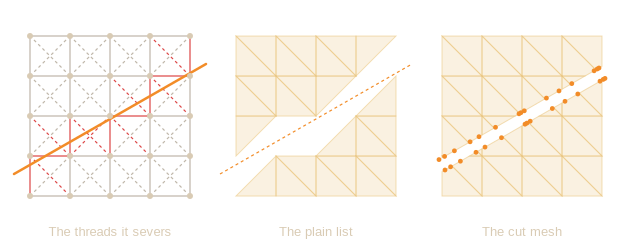
A stroke severs every thread it crosses: those along the grid, the diagonals, and with them the folds built over them. It takes effect at once, at the next step:
- The severed threads stop pulling, and the cut opens as the cloth on either side hangs its own way.
- The lips part in the shading too: each side’s normals come from its own threads, so they no longer share one.
- The lips collide. Points on either side of a cut are no longer neighbors in the weave, so self-collision pushes them apart like any other cloth, rather than skipping them.
- The pins’ reach is measured again, through the weave that is left: a path that ran through the cut now goes round it, and a piece cut free of every pin isn’t held by any, and falls.
- The triangles across it are gone from
CreateTriangleIndices, andTriangleCountis lower. A tear only removes triangles, so the index buffer sized at the build always fits.
The simulation tears whole threads, so the hole the plain list draws has jagged lips, at the scale of the grid. The cut mesh draws clean ones along the stroke itself, see clean lips.
Fabric cut members
| Member | Description |
|---|---|
Cut(Vector2 start, Vector2 end) |
Returns int: severs every thread a straight stroke on the flat sheet crosses, and returns how many. |
Cut(ReadOnlySpan<Vector2> stroke) |
Returns int: cuts along a polyline, measuring the pins again once. Throws ArgumentException for a point that isn’t finite. |
Tear(int indexA, int indexB) |
Tears the one thread between two neighbors. |
ClearTears() |
Mends every tear, keeping the drape. |
HasTears |
Read-only. Whether the sheet has any damage. Free to ask. |
CopyTearState() |
Returns uint[]: a copy of the damage, FabricTearFlags per point, all 0 when whole. |
CreateCutMesh() |
Returns FabricCutMesh: the sheet’s triangles with clean lips along the strokes. |
The other overloads of Cut, along rays from the camera, are on the picking page.
Single threads and mending
Tear severs one thread, between two points of the same square of the weave, sideways, up and down or across a
diagonal, with everything a cut does but the clean lips: it has no stroke to clip along. A thread already torn is left
as it is. It throws ArgumentOutOfRangeException for an index outside the sheet, and ArgumentException for two
points that share no thread.
ClearTears mends every tear in place, keeping the drape. The folds a cut killed come back at the angles they had
when it did, and lips that drifted apart pull together, with a visible twitch. Rebuild always starts from
whole cloth; to open a scene with a sheet already torn, cut it right after the build.
Clean lips
CreateCutMesh returns the same sheet with the damaged triangles clipped along the strokes that cut them, at
whatever angle those ran, so a straight cut draws as a straight cut, not a staircase:
var mesh = _fabric.CreateCutMesh();

// indices below ParticleCount are particles, as before; the rest name lip vertices,
// mesh.SeamVertices[index - ParticleCount]. The mesh can hold more triangles than the whole
// sheet, so size the buffers from it, and draw its TriangleCount
_indices.SetData(mesh.Indices);
_seams.SetData(mesh.SeamVertices);
A lip vertex isn’t a particle. It is a point of the flat sheet that the shader blends from three particles on its own side of the cut, usually, so the lips part as the rip opens, and follow the cloth on either side. The clipping is flat geometry, worked out once per cut, never per frame, and the simulation under it is the one the plain list draws, still torn thread by thread: the drawn lip and the simulated one differ by about a cell at most.
The mesh is built once per change of damage, and the same instance comes back until the next cut, tear, mend or build,
so treat it as read-only. CaptureSurface picks against it too, lips and all, so what the player can pick is what
they see. On a sheet never cut, it is the plain list, with no lip vertices.
FabricCutMesh properties
| Property | Description |
|---|---|
Indices |
Read-only int[]. Three indices per triangle, wound as the plain list winds them: a particle below ParticleCount, a lip vertex from there up. |
SeamVertices |
Read-only FabricSeamVertex[]. The lip vertices; empty on a sheet never cut. |
TriangleCount |
Read-only. The triangles in Indices. It can be more than the whole sheet’s, since a clipped square yields more, smaller triangles. |
FabricSeamVertex fields
A lip vertex blends three carriers, with barycentric weights on the flat sheet that sum to 1 but often reach past 0 to
1: exact while the cloth moves rigidly, close while it bends smoothly. Where the cloth that reaches it lies along one
line, a single row left between two cuts close together, it blends two, marked by IndexC equal to IndexA: a point
t of the way from A to B, and s across, along the cloth’s normal.
| Field | Type | Description |
|---|---|---|
IndexA |
uint |
The first carrier particle. |
IndexB |
uint |
The second. |
IndexC |
uint |
The third, or IndexA for a blend of two. |
WeightA |
float |
A’s weight, or 1 − t of two. |
WeightB |
float |
B’s weight, or t. |
WeightC |
float |
C’s weight, or s, the offset across the line. |
TexCoord |
Vector2 |
Its texture coordinate, stored, as a lip vertex has no place in the grid to work it out from. |
SizeInBytes |
int |
Constant, 32: the stride of the buffer the shader reads. |
Drawing a cut mesh
On the shader’s side, fetch every vertex through FabricEvaluateVertex, which draws a particle and a lip vertex
alike, and so a whole sheet as well as a cut one:
#include "Fabric/FabricParticleBuffer.fxh"

VSOutput VS(float unused : POSITION0, uint vertexId : SV_VertexID)
{
    float3 position;
    float3 normal;
    float2 texCoord;

    FabricEvaluateVertex(vertexId, position, normal, texCoord);
    ...
}
On the host’s side, bind the lip vertices to FabricSeamVertices every frame, beside the particles, and keep two
sizes in mind. The lip buffer is never empty, even on whole cloth: the shader declares it, and a real resource has to
sit behind the binding. And the placeholder vertex buffer covers every index the list names,
ParticleCount + SeamVertices.Length. Buffers that grow when a cut outgrows them, and are refreshed after every change
of damage:
private void RefreshTopology()
{
    var mesh = _fabric.CreateCutMesh();

    _drawTriangleCount = mesh.TriangleCount;

    if (mesh.Indices.Length > _indexCapacity)
    {
        _indices?.Dispose();
        _indices = new IndexBuffer(GraphicsDevice, IndexElementSize.ThirtyTwoBits, mesh.Indices.Length, BufferUsage.WriteOnly);
        _indexCapacity = mesh.Indices.Length;
    }

    if (mesh.Indices.Length > 0) _indices.SetData(mesh.Indices);

    // the shader reads nothing from it, but it must cover every index the list names
    var vertexCount = _fabric.ParticleCount + mesh.SeamVertices.Length;

    if (vertexCount > _vertexCapacity)
    {
        _vertices?.Dispose();
        _vertices = new VertexBuffer(GraphicsDevice,
            new VertexDeclaration(new VertexElement(0, VertexElementFormat.Single, VertexElementUsage.Position, 0)),
            vertexCount, BufferUsage.WriteOnly);
        _vertexCapacity = vertexCount;
    }

    // never empty, even on whole cloth
    var seamCount = Math.Max(mesh.SeamVertices.Length, 1);

    if (seamCount > _seamCapacity)
    {
        _seams?.Dispose();
        _seams = new StructuredBuffer(GraphicsDevice, typeof(FabricSeamVertex), seamCount, BufferUsage.None, ShaderAccess.ReadWrite);
        _seamCapacity = seamCount;
    }

    if (mesh.SeamVertices.Length > 0) _seams.SetData(mesh.SeamVertices);
}
Call it from a handler of Rebuilt and after every cut that severed something, tear and mend, then draw
_drawTriangleCount triangles, with FabricSeamVertices set to _seams beside FabricParticles.
The awkward cases
What the cut mesh does where cuts get complicated:
- Only strokes can be clipped along. Damage done by
Tearhas no stroke, and keeps its jagged hole. - A stroke ending inside a cell draws closed there, as cloth about to give rather than a hole, unless it ends on, or just short of, another stroke that crosses it, which already severed the cloth there. The rip then opens all the way to that stroke, so a T-shaped rip parts cleanly.
- Crossing strokes free all four flaps. Where two cuts cross, the point where they meet is drawn four times, once for each flap, told apart by which side of each stroke the flap is on. Crosses, T-junctions and X-shaped cuts open without the flaps staying stitched together.
- A drag sampled finely draws one lip. Every segment of a cut is kept, joints and all, so a stroke sampled far finer than the grid parts as cleanly as a straight one.
- A cut through a line of points leaves no crack. The points belong to the side their remaining threads hold them to, and that side’s lip shares them with the cloth beyond.
- A strip one point wide keeps its width. Between two cuts about a cell apart there is a single row of points to blend from; its lips are drawn along the row and offset across it, along the cloth’s normal.
- Cloth cut to shreds falls back to the jagged hole. A piece whose carrier particles no longer hang together through the weave that is left isn’t drawn, rather than being stretched across cloth that has come apart; nor is a scrap of fewer than two points.
The damage
The damage is a word of bits per point, FabricTearFlags. Each thread has one owner, so its two ends agree on it: a
point owns the thread to its right, the thread up, the diagonal to its upper right and the square’s other diagonal, see
the weave. Three more bits say which of the point’s folds a tear has
killed, so the folds check one bit rather than five threads.
CopyTearState returns a copy, all 0 on whole cloth. It is what the diagnostics take on a torn sheet, see
diagnostics, and enough to save the damage and replay it later
through Tear, a thread at a time. Damage replayed that way has no strokes, so the cut mesh draws its lips jagged.
FabricTearFlags values
| Value | Bit | Description |
|---|---|---|
None |
0 | Every thread the point owns is whole. |
TornRight |
1 | The thread to (column + 1, row). |
TornUp |
2 | The thread to (column, row + 1). |
TornUpRightDiagonal |
4 | The diagonal to (column + 1, row + 1). |
TornUpLeftDiagonal |
8 | The square’s other diagonal, (column + 1, row) to (column, row + 1): owned, though the point isn’t on it. |
DeadFoldAcross |
16 | The point’s across fold has lost a thread. |
DeadFoldDown |
32 | Its down fold has lost a thread. |
DeadFoldDiagonal |
64 | Its diagonal fold has lost a thread. |
Costs and edge cases
A cut is an event, not work for every frame. Measuring the pins’ reach again runs on the CPU, a shortest path through the weave, with nothing read back from the GPU; with nothing pinned it is skipped. The cut mesh is clipped once per change of damage. A sheet never cut pays nothing for any of it.
- A stroke exactly along a line of points severs the threads crossing it on one side only: always the same side, but not one you chose. Move the stroke off the line a little to choose.
- A stroke exactly along a thread never severs that thread, as scissors sliding along a thread don’t cut it.
- The air doesn’t see holes. With aerodynamic pressure on, the air treats the sheet as whole, so a badly torn parachute still catches more air than it should.