
Color legend plain property method
A camera path can hand you what it takes to draw it: a line along the curve, the positions of its waypoints and small frames that show which way the camera faces. It is plain data, with no drawing code and no graphics device, so you draw it with your own line renderer, in an editor’s overlay or a debug view. Names are colored by what they are: a property or a method; values and fields keep the plain color.
Turning it on
Set IsVisualized once, then read VisualGeometryBuffers each frame you draw:
path.IsVisualized = true;

// in Draw
var geometry = path.VisualGeometryBuffers;
Reading the property is what keeps the geometry current: it builds it again then if the path or its
VisualOptions changed since the last read, and otherwise costs nothing. So read it through the property every
frame rather than keeping the instance: the instance stays the same, but its lists are only brought up to date when
the path is read. Turning
IsVisualized off empties the buffers and stops building them.
CameraPath drawing properties
| Property | Type | Description |
|---|---|---|
IsVisualized |
bool |
Whether the path keeps its drawing geometry current. Turning it off empties the buffers. Off by default. |
VisualGeometryBuffers |
CameraPathGeometryBuffers |
Read-only. The geometry to draw, built again on this read when the path or the options changed. Empty while IsVisualized is off. |
VisualOptions |
CameraPathVisualOptions |
How the geometry is built. CameraPathVisualOptions.Default to start with. A struct: assign a changed copy. |
The geometry
A CameraPathGeometryBuffers holds four lists, all in world coordinates:
| List | What it holds | How to draw it |
|---|---|---|
Polyline |
Points along the curve, in order, from the start to the end. On a closed path the last point is the first one again. | A line through the points, each to the next. |
Waypoints |
The position of each waypoint. | A marker at each. |
Gizmos |
Orientation frames at even steps of distance: GizmoCount of them. On an open path the first is at the start and the last at the end; on a closed one they go evenly round. |
Three short lines from each, along its axes. |
WaypointGizmos |
One orientation frame at each waypoint, with the orientation it resolves to. | The same, to show and edit each waypoint’s facing. |
A frame is a CameraPathGizmo: a Position and the camera’s Right, Up and Forward there, as
unit vectors in world space.
A path with one waypoint has no line, but its waypoint, one frame and one waypoint frame, so the facing shows while you place the first waypoint. An empty path has nothing.
CameraPathGizmo fields
| Field | Type | Description |
|---|---|---|
Position |
Vector3 |
Read-only. Where the frame is, in world coordinates. |
Right |
Vector3 |
Read-only. The camera’s right there, its local +X. |
Up |
Vector3 |
Read-only. The camera’s up there, its local +Y. |
Forward |
Vector3 |
Read-only. The way the camera faces there, its local −Z. |
Options
CameraPathVisualOptions is a struct. Change it by assigning a changed copy, which also marks the geometry for
building again:
path.VisualOptions = path.VisualOptions with { GizmoCount = 24 };
The line along the curve is built one of two ways:
- Fixed, the default:
PolylineSamplessegments of equal length along the curve, 128 by default, so 129 points whatever the path’s shape. The count is known in advance, which suits a vertex buffer of a fixed size. - Adaptive, with
IsAdaptive: the line is split wherever the curve strays from it by more thanChordTolerance, 0.05 units by default. Straight runs get a few points and tight bends many, so a path looks as smooth up close as from afar.MaxSubdivisionDepth, 12 by default, caps how many times a piece is halved.
path.VisualOptions = path.VisualOptions with { IsAdaptive = true, ChordTolerance = 0.02f };
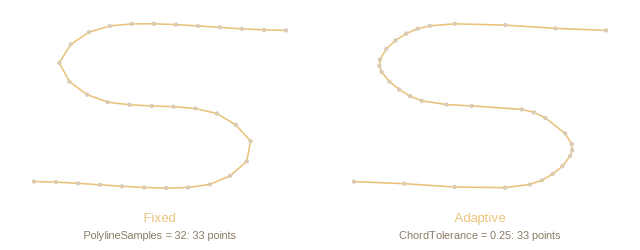
Start from CameraPathVisualOptions.Default, or from the path’s current options as above: a
new CameraPathVisualOptions() is all zeros, which gives no frames and a line of two points.
CameraPathVisualOptions fields
| Field | Type | Description |
|---|---|---|
IsAdaptive |
bool |
Whether the line is split where the curve bends, rather than into equal segments. Off in Default. |
PolylineSamples |
int |
The number of equal segments of a fixed line; less than 1 counts as 1. 128 in Default. |
ChordTolerance |
float |
How far, in world units, the curve may stray from an adaptive line before it is split, at least 10−5. 0.05 in Default. |
MaxSubdivisionDepth |
int |
How many times a piece of an adaptive line may be halved. 12 in Default. |
GizmoCount |
int |
The number of orientation frames along the path; 0 or less gives none. 12 in Default. |
CameraPathVisualOptions property
| Property | Type | Description |
|---|---|---|
Default |
CameraPathVisualOptions |
Static, read-only. The default options: a fixed line of 128 segments and 12 frames. |
A line renderer
A small renderer for the geometry, with MonoGame’s BasicEffect. It draws the curve, a cross on each waypoint and
the frames, with the camera’s right in red, its up in green and its forward in blue.
using BorrowedTorch.Cameras;
using BorrowedTorch.Cameras.Animation;
using Microsoft.Xna.Framework;
using Microsoft.Xna.Framework.Graphics;

public class PathRenderer
{
    private readonly BasicEffect _effect;
    private readonly List<VertexPositionColor> _lines = [];
    private VertexPositionColor[] _vertices = [];
    private Vector3 _offset;

    public PathRenderer(GraphicsDevice device)
    {
        _effect = new BasicEffect(device) { VertexColorEnabled = true };
    }

    public void Draw(CameraPath path, Camera camera)
    {
        var geometry = path.VisualGeometryBuffers; // built again here if the path changed

        // the vertices relative to the camera's offset, like every other object
        _offset = camera.Offset;
        _lines.Clear();

        for (var i = 1; i < geometry.Polyline.Count; i++)
            AddLine(geometry.Polyline[i - 1], geometry.Polyline[i], Color.Gold);

        foreach (var p in geometry.Waypoints)
        {
            AddLine(p - Vector3.UnitX * 0.3f, p + Vector3.UnitX * 0.3f, Color.White);
            AddLine(p - Vector3.UnitY * 0.3f, p + Vector3.UnitY * 0.3f, Color.White);
            AddLine(p - Vector3.UnitZ * 0.3f, p + Vector3.UnitZ * 0.3f, Color.White);
        }

        foreach (var g in geometry.Gizmos)
        {
            AddLine(g.Position, g.Position + g.Right * 0.5f, Color.Red);
            AddLine(g.Position, g.Position + g.Up * 0.5f, Color.Lime);
            AddLine(g.Position, g.Position + g.Forward, Color.Blue);
        }

        if (_lines.Count == 0) return;

        if (_vertices.Length < _lines.Count) _vertices = new VertexPositionColor[_lines.Count * 2];
        _lines.CopyTo(_vertices);

        _effect.World = Matrix.Identity;
        _effect.View = camera.View;
        _effect.Projection = camera.Projection;

        foreach (var pass in _effect.CurrentTechnique.Passes)
        {
            pass.Apply();
            _effect.GraphicsDevice.DrawUserPrimitives(PrimitiveType.LineList, _vertices, 0, _lines.Count / 2);
        }
    }

    private void AddLine(Vector3 from, Vector3 to, Color color)
    {
        _lines.Add(new VertexPositionColor(from - _offset, color));
        _lines.Add(new VertexPositionColor(to - _offset, color));
    }
}
Call its Draw from the game’s Draw, after the camera’s update. It subtracts the
offset from each vertex on the CPU, rather than putting it in
the world matrix, so lines far from the origin stay as steady as the rest of the scene.
Buffers of your own
CameraPathVisualizer.Build fills buffers of your own with a path’s geometry, with any options, whether the path
has IsVisualized on or not. A path that is visualized calls it itself; call it directly to draw one path two
ways, say a fine line in the editor’s main view and a coarse one in a minimap:
var minimap = new CameraPathGeometryBuffers();

CameraPathVisualizer.Build(path, minimap,
    CameraPathVisualOptions.Default with { PolylineSamples = 24, GizmoCount = 0 });
It empties the buffers before it fills them, and builds them at once, on every call: call it again after the path changes.
CameraPathGeometryBuffers members
| Member | Type | Description |
|---|---|---|
Polyline |
List<Vector3> |
Read-only field. Points along the curve, in order. |
Waypoints |
List<Vector3> |
Read-only field. The position of each waypoint. |
Gizmos |
List<CameraPathGizmo> |
Read-only field. Orientation frames at even steps of distance. |
WaypointGizmos |
List<CameraPathGizmo> |
Read-only field. An orientation frame at each waypoint. |
Clear() |
Empties the four lists. |
CameraPathVisualizer methods
| Method | Description |
|---|---|
Build(CameraPath path, CameraPathGeometryBuffers buffers, in CameraPathVisualOptions options) |
Static. Empties the buffers and fills them with the path’s geometry, built with the options. Throws ArgumentNullException for a null path or buffers. |