
Color legend plain property method
A Tlas is the scene as rays see it: a tree over instances, each a MeshBlas placed by a world matrix, under
an id of yours. A ray walks this tree in world space and, at each instance it reaches, that instance’s BLAS in the
mesh’s own space. You don’t add, move and remove objects one call at a time: you declare the whole scene every frame,
and the Tlas works out what changed. Names are colored by what they are: a property
or a method; values and fields keep the plain color.
Declaring the scene
An update is every instance, between BeginUpdate and EndUpdate:
var tlas = new Tlas();

void UpdateScene()
{
    tlas.BeginUpdate();

    foreach (var obj in sceneObjects)
        tlas.Add(obj.Id, obj.Blas, obj.WorldMatrix);    // in the same order every frame

    TlasUpdateResult result = tlas.EndUpdate();         // Unchanged, Refitted or Rebuilt
}
What is declared is the scene: an object left out of an update is gone from it, and comes back when it is declared
again. Declare it after your objects have moved for the frame and before anything traces: the queries see the scene
as of the last EndUpdate.
Each Add is compared with what the same position held in the last update, which is what lets an update find
out on its own what it has to do, see what an update does. A null BLAS is ignored, as are
the transforms a ray can’t be traced through, see flat and broken transforms.
Tlas update methods
| Method | Description |
|---|---|
BeginUpdate() |
Starts declaring the scene anew: no instances until they are added. The last update’s are kept to compare with. |
Add(ulong instanceId, MeshBlas? blas, in Matrix world, RayTracingFlags flags = Default) |
Declares one instance: an id of yours, its geometry, its world matrix and the queries it takes part in. Ignored for a null BLAS or a transform that can’t be traced. |
EndUpdate() |
Brings the tree in line with the instances declared, doing the least work that does, and returns TlasUpdateResult: what it did. |
Instance ids
An instance’s id is a ulong of yours. The library never reads it beyond comparing it with the last update’s at the
same position, and hands it back in every hit, in RayHit.InstanceId, so a hit leads straight to
your object. Keep each object’s id the same from frame to frame.
An ECS entity, an id and a generation, fits in the 64 bits:
// an entity as an instance id, and back
static ulong ToInstanceId(Entity entity) => (ulong)(uint)entity.Generation << 32 | (uint)entity.Id;
static Entity ToEntity(ulong instanceId) => new((int)(uint)instanceId, (int)(instanceId >> 32));

tlas.Add(ToInstanceId(entity), blas, world);
With the generation in it, an entity that takes a destroyed one’s id is a new object to the Tlas too, see
ids and generations. The library doesn’t check that ids are unique: two
instances under one id are both traced, and a hit can’t tell which it was.
Flags
Each instance carries RayTracingFlags, the queries it takes part in, and each query a mask: only the
instances carrying every flag in the mask are seen. An instance is declared with all three unless you pass fewer:
tlas.Add(groundId, ground, groundWorld, RayTracingFlags.CastsShadow | RayTracingFlags.VisibleToGI); // clicks go through it
tlas.Add(ghostId, ghost, ghostWorld, RayTracingFlags.Pickable);                                      // casts no shadow
tlas.Add(cursorId, cursor, cursorWorld, RayTracingFlags.None);                                     // only a query with no mask sees it

// queries
tlas.Intersect(clickRay, float.MaxValue, out var hit, RayTracingFlags.Pickable);           // the ghost, never the ground
tlas.IntersectAny(shadowRay, distanceToLight, RayTracingFlags.CastsShadow);                // the ground, never the ghost
A mask of two flags sees only the instances that have both, and a mask of None, the default of the CPU queries, sees
every instance. Shaders see CastsShadow and VisibleToGI as RT_FLAG_CASTS_SHADOW and RT_FLAG_VISIBLE_TO_GI;
Pickable is for the CPU, since picking never runs on the GPU.
To change an object’s flags, declare it with the new ones. A change of flags alone doesn’t touch the tree: the update
reports it Unchanged, and moves FlagsVersion instead, see versions.
RayTracingFlags values
| Value | Bit | Description |
|---|---|---|
None |
0 | No flags. As a mask: every instance. |
CastsShadow |
1 | Blocks shadow rays. |
VisibleToGI |
2 | Takes part in indirect light: bounced light, reflections, traced ambient occlusion. |
Pickable |
4 | Can be picked by a ray from the cursor. CPU only. |
Default |
7 | All three, what Add gives an instance unless told otherwise. |
What an update does
Every Add asks whether its position holds the same instance as in the last update: the same id and the same
BLAS object.
- The same, unmoved. Its matrix and its BLAS’s
Versionare what they were, so its box is too. It costs a few comparisons, and nothing is recomputed. - The same, moved. Its box in the scene is recomputed, and if the box changed, the tree has to follow. A BLAS that was refitted moves an instance’s box as much as a new matrix does.
- Another. A different id or BLAS at the position, or a different number of instances than last time: the tree no longer fits the scene.
Then EndUpdate does the least that brings the tree in line:
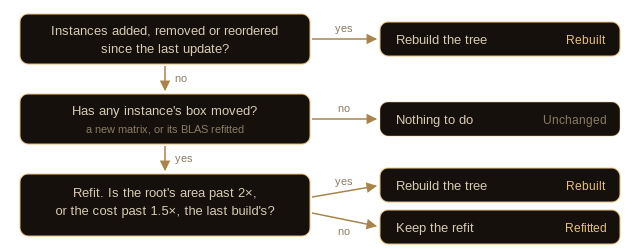
EndUpdate does. A refit keeps the tree's splits; a rebuild chooses them afresh, so it follows when the refit has worn the tree too far.A refit recomputes the boxes over the tree as it is, which is much cheaper than a build, but keeps the splits chosen for where the instances were. As they move, the boxes grow and overlap, and rays open more of them. So after a refit the update measures the tree two ways, and rebuilds it when either has gone too far: the root’s area past twice what it was at the last build, which an object flown far off makes happen, or the tree’s cost, the area of every box over the root’s, past one and a half times. That second one sees what the root can’t: objects moving about inside a root that stays where it is, as anything does on a large ground plane. The BVH page has both measures.
The very first update rebuilds, even with nothing declared. The result is there to watch, a count of rebuilds in a profiler say; nothing else needs it.
TlasUpdateResult values
| Value | Description |
|---|---|
Unchanged |
Nothing that affects the tree changed. Version didn’t move. |
Refitted |
The same instances, some of them moved: the boxes were recomputed over the tree as it is. |
Rebuilt |
Instances were added, removed or reordered, or a refit had worn the tree too far: it was built afresh. |
A stable order
Each Add is compared with the same position in the last update, so declare the instances in the same order every
frame. Another order is still traced right, but reads as different instances at every position that changed, and
rebuilds a tree that a refit, or nothing at all, would have kept.
- Lists and arrays keep their order: walk them the same way every frame.
- An object added or removed rebuilds the tree whatever the order, since the count changed. What a stable order saves is every frame in which nothing came or went.
- Sorting the objects each frame, by distance or by material, makes the order change all the time. Declare them before you sort.
- An ECS query walks its entities in the order of a store, which stays the same from frame to frame. A removal moves the store’s last entity into the gap and reorders the query once, mostly in a frame where an object went anyway.
Flat and broken transforms
A ray is traced through an instance’s inverse matrix, from the scene into the mesh’s space, and some matrices have none:
- Flat. A scale of 0 on one axis, or a parent’s non-uniform scale that shears a turned child into a plane, squashes
the object flat. It still draws, a ground tile at a Y scale of 0 among them, so it is traced too, through a stand-in
that gives it back a sliver of depth along the plane’s normal: a ten-thousandth of the matrix’s longest axis. A tile
is traced exactly where it is drawn, and anything with depth of its own as a slab that thin.
IsFlattells such an instance. - Collapsed or broken. A matrix that squashes the object to a line or a point, has an infinity or a NaN in it, or
puts its box beyond float’s range is left out: the
Adddeclares nothing. Nothing that would draw is lost.
How flat is too flat doesn’t depend on size: it is the volume the matrix’s three axes span, over the volume of a box with the same edges, which is 1 for any rotation and scale and falls only as the axes fold onto each other. Below one millionth, the matrix is flat. A tiny uniform scale isn’t flat, down to about 10−13.
An instance left out isn’t in Instances, so the instances that follow it sit one place earlier than the
Add calls that declared them.
The instances
Instances holds what the last update declared, in the order it was declared, as TlasInstance
records. A hit’s InstanceIndex is a place in it, which leads from the hit to the instance’s mesh and
matrix:
if (tlas.Intersect(ray, float.MaxValue, out var hit))
{
    TlasInstance instance = tlas.Instances[hit.InstanceIndex];

    ITriangleMesh mesh = instance.Blas.Geometry;    // the triangle hit is mesh's hit.TriangleIndex
    Matrix world = instance.World;                  // as declared
}
The span reads the Tlas’s own array, so read it between an EndUpdate and the next BeginUpdate, and don’t keep
it across an update. The CPU queries page has what to do with an
instance’s mesh at a hit.
Tlas instance properties
| Property | Type | Description |
|---|---|---|
Instances |
ReadOnlySpan<TlasInstance> |
Read-only. The instances of the last update, in the order they were declared. |
InstanceCount |
int |
Read-only. How many there are: the Add calls of the update, less the ones ignored. |
TlasInstance fields
| Field | Type | Description |
|---|---|---|
InstanceId |
ulong |
The id it was declared with. |
Blas |
MeshBlas |
Its geometry. |
World |
Matrix |
Its world matrix, as declared. |
WorldInverse |
Matrix |
The inverse a ray is taken into the mesh’s space with: of World, or of the stand-in of a flat instance. |
IsFlat |
bool |
World squashes the mesh flat, and the instance is traced through a stand-in. |
Flags |
RayTracingFlags |
The queries it takes part in. |
Versions
Two counters tell anything that mirrors the scene when to follow it:
Versionmoves whenever the tree does: on every refit and every rebuild.FlagsVersionmoves when an instance’s flags change and nothing else about it does, the one change that leaves the tree alone. Flags that change along with anything else ride onVersion’s move.
So a mirror of the instances watches both. The GPU copy does, and so can anything of yours worked out from the scene, such as lighting baked from it:
// rebake only when the scene has changed since the last bake
if (tlas.Version != _bakedVersion || tlas.FlagsVersion != _bakedFlagsVersion)
{
    BakeLighting(tlas);

    _bakedVersion = tlas.Version;
    _bakedFlagsVersion = tlas.FlagsVersion;
}
The tree itself is Bvh, over the instances’ boxes in the scene, see the
BVH page.
Tlas version properties
| Property | Type | Description |
|---|---|---|
Version |
int |
Read-only. Moves on every refit and every rebuild. |
FlagsVersion |
int |
Read-only. Moves when an update changed an instance’s flags and nothing else about it. |
Bvh |
Bvh |
Read-only. The tree over the instances, one instance a leaf. |
Threads
A Tlas isn’t thread-safe. Update it on one thread, and query it once the update is over: a query during an update
walks a tree that is being rebuilt under it. A refit of a BLAS is an update too, for every Tlas that uses it. The
queries themselves only read, so several threads may query one Tlas at once, while nothing updates it.