
Color legend plain property method
The counter measures one thing, the time from one of its calls to the next, and every reading comes from those times. Where the calls go decides what they measure. Names are colored by what they are: a property or a method; values and fields keep the plain color.
What a frame is
A frame, to the counter, is the time from one Update call to the next. Called once per drawn frame, that is
the whole frame: the game’s update, its drawing, and the wait for the monitor when VSync is on. A game that draws in
3 ms on a 60 Hz monitor with VSync reads 60 frames a second and frames of 16.7 ms, not 333 frames a second.
So the counter tells how often the game shows a new picture, which is what the player sees. To know how long a part
of the frame takes on the CPU, time that part with a Stopwatch timestamp of its own:
var start = Stopwatch.GetTimestamp();

DrawScene();

var drawSeconds = (double)(Stopwatch.GetTimestamp() - start) / Stopwatch.Frequency;
Draw, not Update
Call Update from the game’s Draw. MonoGame’s fixed time step, on by default, runs the game’s Update in
fixed steps of 16.7 ms of game time. When a frame takes longer than a step, the next frame runs Update twice, or more,
to catch up, and draws once. A counter in Update counts updates, and reads 60 however few frames are drawn.
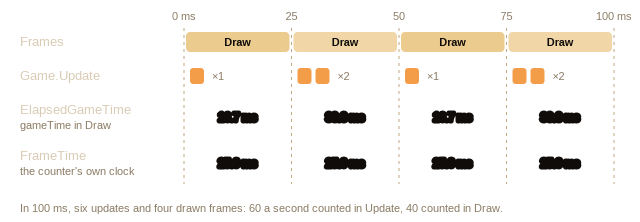
The game in the picture draws 40 frames a second. Its Update runs once before one frame and twice before the next,
60 times a second, as the fixed time step owes it:
| Counter called from | What it counts | Reads, in the picture |
|---|---|---|
The game’s Draw |
Drawn frames, the pictures the player sees | 40 frames a second, frames of 25 ms |
The game’s Update |
Fixed steps: 60 a second while the game catches up | 60 frames a second, a game running smoothly to look at |
With IsFixedTimeStep = false, Update and Draw run once each per frame, and both places count the same. Draw is
right either way.
The counter’s own clock
Update() measures the time between its calls with Stopwatch.GetTimestamp, the system’s high-resolution
clock, and reads nothing from gameTime. Under the fixed time step, the gameTime handed to Draw isn’t the frame’s
real time: its ElapsedGameTime is the steps run before that draw, 16.7 ms times the number of updates, and 500 ms at
most. The frames of 25 ms in the picture come out as 16.7 and 33.3 ms, and a two-second stall as half a second. The
counter’s clock gives 25 ms for every frame, and the stall whole.
The first call has no call before it to measure from: it only starts the clock, records no frame and returns false.
The readings start with the second call.
The uncapped frame rate
MonoGame holds a game to a frame rate twice over. The fixed time step waits until a whole 16.7 ms step is due before
it updates and draws, and VSync, SynchronizeWithVerticalRetrace, waits for the monitor’s refresh to show each frame.
The counter then reads 60, however light the frame is. To see how fast the game can draw, turn both off:
// in the game's constructor, after creating the GraphicsDeviceManager
_graphics.SynchronizeWithVerticalRetrace = false;
IsFixedTimeStep = false;
The game then draws as fast as it can, and the counter reads the frame rate its work allows. The GPU runs flat out to do it and the picture may tear, so keep this for measuring rather than for play.
| Fixed time step | VSync | The frame rate is held to |
|---|---|---|
| On (default) | On (default) | 60, or the refresh rate below that |
| On | Off | 60 |
| Off | On | The monitor’s refresh rate: 144 on a 144 Hz monitor |
| Off | Off | Nothing: as fast as the game can draw |
Other game loops
Update() keeps its own clock, so a loop of your own needs one call a frame, at any point of the frame, as
long as it is the same point every frame:
using BorrowedTorch;

var fps = new FrameRateCounter();

while (running)
{
    if (fps.Update())
        ShowFrameRate(fps.FrameRate);

    UpdateGame();
    RenderFrame();
}
Frame times of your own
An engine that measures its frames already can hand the counter its times instead:
Update(double elapsedSeconds) records one frame of that many seconds, with no clock of its own.
// the engine's own time since the previous frame, in seconds
fps.Update(deltaSeconds);
The argument isn’t checked. A zero is a frame that took no time, and a negative value takes time away from the window, so pass the real time since the previous frame.
Use one of the two on a counter. Update(double) leaves the clock of Update() as it is, so after
a mix, the next Update() measures from its own previous call and counts again the time already passed in.
Starting over
Reset puts the counter back as new, with its settings kept: every reading back to 0, the frames of the
window discarded, the clock stopped. The next Update() only starts the clock again, so the time before it
isn’t a frame.
Call it when a measurement should start clean: when a benchmark scene starts, or once a level has loaded. A loading
screen that doesn’t draw, or a breakpoint in the debugger, stops the calls for a while, and the next
Update() records the whole pause as one frame. Its window then reads a low frame rate, and a worst frame as
long as the pause.
LoadLevel("benchmark");

// the loading isn't a frame: measure from the level's first frame
fps.Reset();
UpdateEveryFrame and RefreshRateInSeconds keep their values.
Update(double) needs no clock, so after a reset it records a frame at once.
FrameRateCounter methods
| Method | Description |
|---|---|
Update() |
Records one frame, measuring the time since the previous call with a Stopwatch. The first call, and the first after Reset, only starts the clock and returns false. Returns true when FrameRate and WorstFrameTimePerRefresh were recalculated by this call: when a window closes, or every frame in per-frame mode. |
Update(double elapsedSeconds) |
Records one frame that took elapsedSeconds seconds, and leaves the clock of Update() as it is. Returns true when the readings were recalculated by this call. |
Reset() |
Every reading back to 0, the frames of the window discarded and the clock of Update() stopped. UpdateEveryFrame and RefreshRateInSeconds keep their values. |
Threads
A FrameRateCounter isn’t thread-safe. Call it from the thread that runs the loop, and read its readings there. A
loop on another thread, a simulation running at a rate of its own, gets a counter of its own.
Cost
Update() reads one timestamp and does a few additions and comparisons; a recalculation adds a division. The
counter allocates nothing after it is created, so it leaves no garbage for the collector. The text is what costs: an
interpolated string allocates, so build it when Update returns true, as in
showing the readings, not every frame.