
Color legend plain property method event
Every input MonoInput reports, a key, a mouse button, a pad button or a MIDI note, is in one of four states, and moves at most one step each time its manager updates. The states are the same for every device, and so are the five checks that read them. Names are colored by what they are: a plain property, a method or an event.
The four states
ButtonStates has four values. Two of them last for exactly one update:
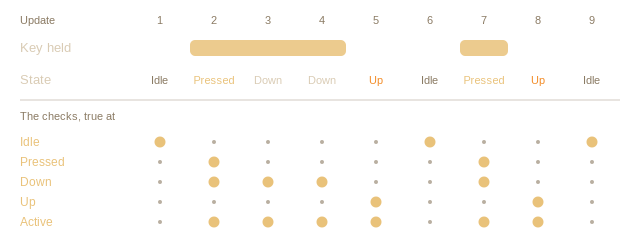
- Idle to Pressed: the input went down.
Pressedis the update a press starts. - Pressed to Down: still held at the next update. It stays
Downfor as long as it is held. - Pressed or Down to Up: let go.
Upis the update a press ends; an input held for one update only goes straight fromPressedtoUp. - Up to Idle: nothing at the next update. Or Up to Pressed, when it is held again by then: a fast
second press skips
Idle.
Since Pressed and Up last one update, code that reacts to them reacts once per press, however long the input is
held.
ButtonStates
| Value | Meaning |
|---|---|
Idle |
Not touched. Every input starts here, and comes back one update after its release. |
Pressed |
Just went down: the first update the input is held. |
Down |
Still held, from the second update on. |
Up |
Just let go: the update after the last one it was held. |
The five checks
Game code rarely compares states. It asks one of five questions, which every device answers the same way:
| Check | True when | Use it for |
|---|---|---|
| Idle | The input isn’t touched. | Waiting for nothing to be held, such as before a key-binding screen listens |
| Pressed | The first update of a press, only. | Things that happen once per press: jumping, firing, opening a menu |
| Down | Every update the input is held, the first one included. | Things that last: walking, aiming, charging a shot |
| Up | The update the input was let go, only. | The end of a press: releasing a charged shot, dropping what was dragged |
| Active | Anything but idle: pressed, held or just let go. | Highlighting a key on screen for as long as anything happens to it |
The Down check covers two states, Pressed and Down, as MonoGame’s own IsKeyDown does: a key held for the first
time is already down. For only the updates after the first, compare the state, State == ButtonStates.Down.
The checks on each device
| Check | Keyboard | Mouse and pad buttons | MIDI notes |
|---|---|---|---|
| Idle | IsKeyIdle(key) |
button.Idle |
not in ActiveNotes |
| Pressed | IsKeyPressed(key) |
button.Pressed |
note.State == ButtonStates.Pressed |
| Down | IsKeyDown(key) |
button.Down |
note.State is ButtonStates.Pressed or ButtonStates.Down |
| Up | IsKeyUp(key) |
button.Up |
note.State == ButtonStates.Up |
| Active | IsKeyActive(key) |
button.Active |
in ActiveNotes |
The keyboard’s checks are methods that take the key. Mouse and pad buttons are objects with the checks as properties. MIDI notes come as a list of the notes that aren’t idle, each with its state.
Buttons that are always there
A mouse has five buttons and a pad fifteen, whatever happens, so each of them is one object for the whole run: a
MouseButtonInfo or a GamePadButtonInfo, both derived from ButtonInfo. Its manager changes its state in
place at each update. A reference to a button stays good, and can stand for an action:
// chosen once, in the settings
ButtonInfo fireButton = useMouse
    ? MouseManager.MouseStatus.LeftButton
    : GamePadManager.GamePadsStatus[(int)PlayerIndex.One].RightShoulder;

// read every frame, after the managers' updates
if (fireButton.Pressed) _player.Fire();
A pad that isn’t connected keeps its buttons too, idle, so the reference works before the pad is plugged in.
ButtonInfo properties
| Property | Type | Description |
|---|---|---|
State |
ButtonStates |
Read-only. Where the button is. Idle at first; it moves one step at each update of its manager. |
Idle |
bool |
Read-only. Idle: not touched. |
Pressed |
bool |
Read-only. Pressed: true for the first update the button is held, only. |
Down |
bool |
Read-only. Held: Pressed or Down, every update the button is held, the first one included. |
Up |
bool |
Read-only. Up: true for the update the button was let go, only. |
Active |
bool |
Read-only. Anything but Idle: pressed, held or just let go. |
Inputs that come and go
A keyboard has over a hundred keys and MIDI 128 notes, but only a few are touched at a time. So the keyboard and MIDI
managers keep a list of the inputs that aren’t idle: a status is added to it, Pressed, when its input goes down, goes
through Down and Up, and leaves the list at the update the input would be Idle. An input not in the list is idle.
Game code reads the lists through ActiveKeys and ActiveNotes, each an
ActiveInputs<TStatus>: a live, read-only view of the list, in the order the inputs were first pressed. Its items are a
KeyStatus for a key and a NoteStatus for a note, both derived from ActiveInputStatus<TId>, and each with its
State.
foreach (var status in KeyboardManager.ActiveKeys)
{
    if (status.State == ButtonStates.Pressed) Log($"{status.Key} went down");
}
A few things follow from the list being live:
foreachdoesn’t allocate. It takes the list’s own struct enumerator, so walking the list every frame is free. LINQ goes throughIEnumerable<T>and allocates.- Finish a loop before the next update.
Updateadds and removes statuses, and like any list enumerator, one that sees the list change throwsInvalidOperationException. - Keep the key, not the status. A status is the same object from press to release, its state changing in place.
Once it leaves the list it stays
Upand is never updated again, and a new press of the same key gets a new status.
ActiveInputs members
| Member | Description |
|---|---|
Count |
Read-only int. How many inputs are active: pressed, held or just let go. |
GetEnumerator() |
Returns LinkedList<TStatus>.Enumerator, a struct, over the statuses in the order their inputs were first pressed. foreach calls it. |
ActiveInputStatus members
| Member | Description |
|---|---|
State |
Read-only ButtonStates. Pressed, Down or Up while the status is in its list, never Idle. |
ActiveInputStatus(TId id) |
For derived classes: a status for the input, Pressed. |
What a frame does
- The game calls
Updateon each manager it uses, at the top of its ownUpdate. - The manager reads the hardware. The keyboard, mouse and gamepad managers ask MonoGame for its snapshot, or the keyboard and mouse managers take the one the game handed them; the MIDI manager takes in what Windows queued since the update before.
- Every input moves one step through the states above.
- Events are raised for what changed, from inside
Update, see events. - The game reads the input: the checks, the statuses, the lists.
The states then hold until the next Update of that manager, so Draw reads what Update read. Three cases follow
from that.
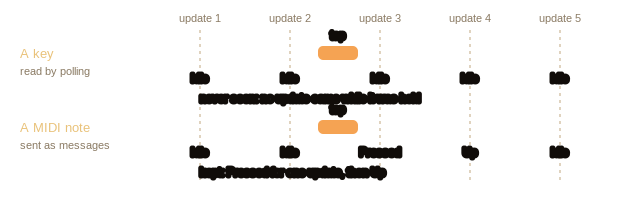
A press between two updates. The keyboard, the mouse and the pads are read by polling: a press that starts and
ends between two updates, shorter than a frame, is never seen. MIDI notes come as messages instead, and a note struck
and let go between two updates still reads Pressed for one update, then Up:
Two updates in a frame. With a fixed time step, MonoGame calls Update twice before one Draw when it falls
behind, and each call is a step for the input. A press seen by the first call is Down by Draw, so check Pressed
and Up in Update.
Updates skipped. A manager that isn’t updated holds every state as it was. A key that was Pressed stays
Pressed for every frame the keyboard isn’t updated, so a screen that ignores the input should still update the
managers, and ignore what they say.
Events
Some managers also raise events, for code that would rather be told than ask. They are raised from inside the
manager’s Update, on the game thread:
The events
| Event | Raised when |
|---|---|
MouseManager.OnButtonsStatesChanged |
A mouse button changed state, at any step. Once per update, after all five buttons moved. |
MouseManager.OnPositionChanged |
The pointer moved. |
MouseManager.OnWheelDeltaChanged |
The wheel turned. |
MouseManager.OnHorizontalWheelDeltaChanged |
The horizontal wheel turned. |
GamePadManager.OnStatusChanged |
Anything about a pad changed: its connection, a button’s state, a stick, a trigger. Once per pad per update. |
MidiManager.OnDevicesChanged |
A MIDI device appeared or was removed. |
MidiManager.OnDeviceSelected |
The MIDI device notes come from was set, or cleared. |
The keyboard has no events: ask it. The button events are raised for every change of state, not only for presses: a
click held for a few frames raises OnButtonsStatesChanged four times, at Pressed, Down, Up and
Idle, so a handler checks the states it gets.
The events are static, so a handler stays subscribed for the whole run, and keeps its object alive. A screen or an object that subscribes unsubscribes when it goes away.
Threads
Every public member is for the game thread. The keyboard, the mouse and the pads are read on the thread that calls
their Update. MIDI messages and device changes arrive from Windows on threads of its own, but they only wait in a
queue there: Update takes them in on the game thread, and raises the MIDI events there.